

You’re paying for one of the most capable AI tools ever built.

And most days, you’re using it like a search bar.
You type a question.
You get an almost-right answer.
You fix it yourself.
Tomorrow you open a new chat and explain everything again from scratch.
That’s not a Claude problem.
That’s a rules problem.
Claude does its best work when you give it a few clear rules.
Which model to use.
What “done” means.
What it should never guess.
When it should stop and ask you.
I’ve been testing these rules on my own work for weeks.
21 of them made the cut.
They build on each other in three steps:
Part 1: Talk to Claude so it gets it right the first time.
Part 2: Build a Claude that already knows you.
Part 3: Let Claude work while you’re away, without losing control.
Start at Law 1.
By Law 21, you’ll be using Claude very differently.
Part 1: Talk to Claude Better
Everything starts here. These seven laws work in any chat, on any plan, today.
Law 1: Match the model to the job
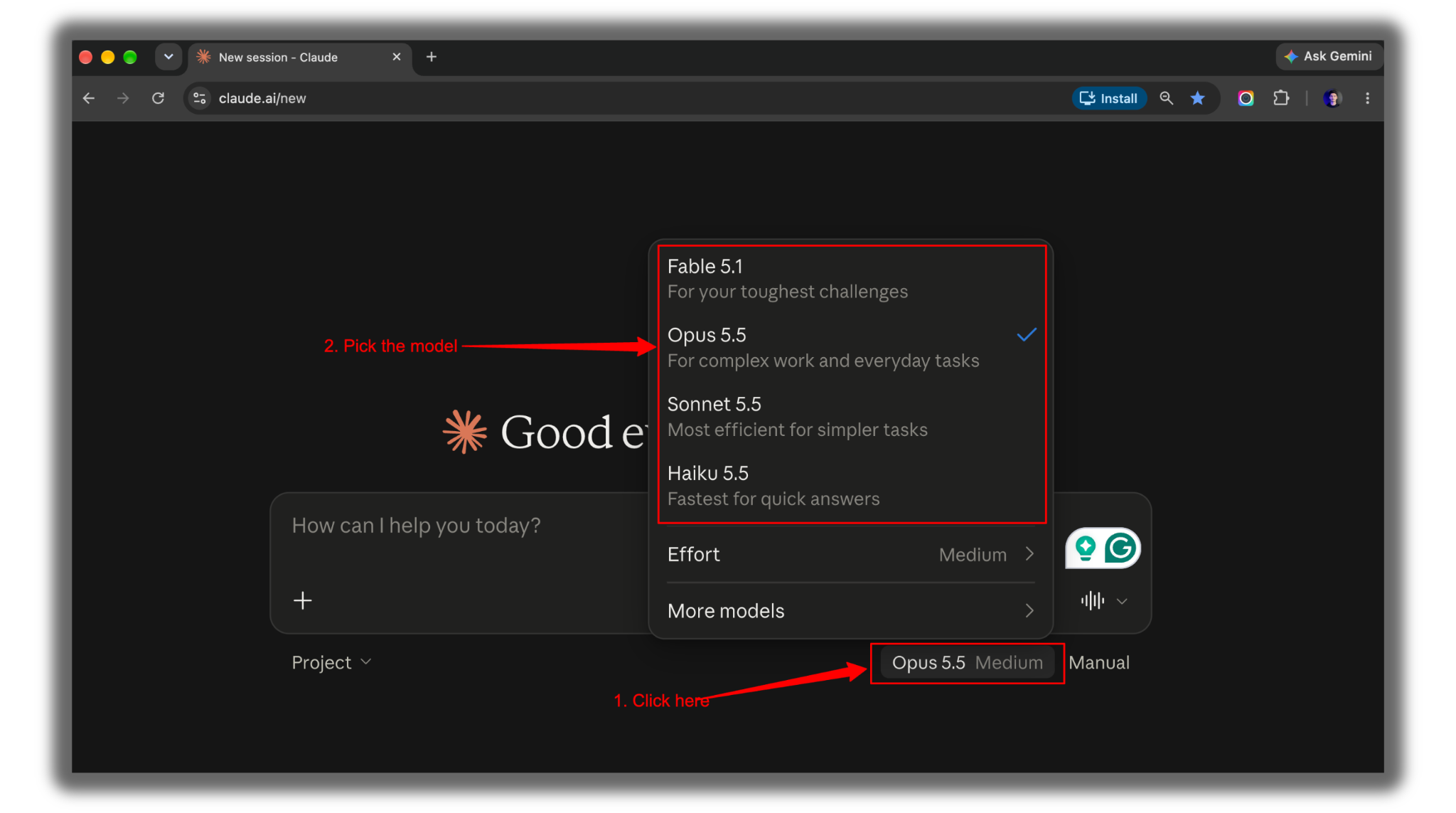
Claude now has three main models:
Opus 5.5
Sonnet 5.5
Haiku 5.5.
Sonnet is your everyday model for writing, analysis, and planning.
Opus is for hard problems with lots of moving parts and big decisions.
Haiku is for fast, repetitive work like sorting, labeling, and pulling out details. It’s also the cheapest.
If you use Claude Code, type /effort to set how hard Claude thinks.
→ Low for small fixes.
→ High for big decisions.
The right model gets you halfway. The right instructions get you the rest.
Law 2: Make Claude ask before it answers
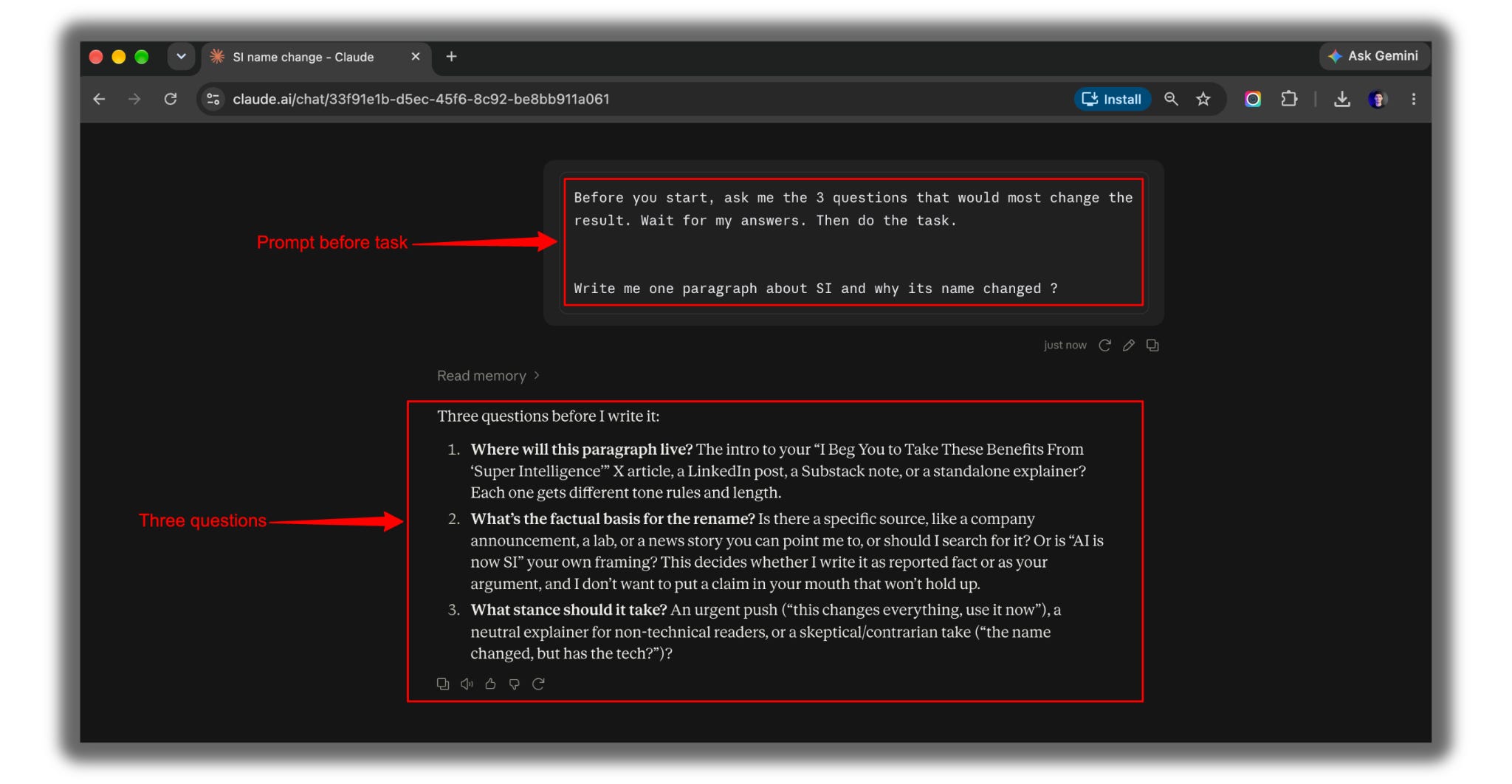
The worst answers come from Claude guessing what you meant.
Paste this before any task that isn’t crystal clear:
Before you start, ask me the 3 questions that would most change the result. Wait for my answers. Then do the task.This one line does all the work: “Wait for my answers.”
Writing a newsletter is easy. Testing everything first takes days, a sore back, and a lot of coffee. Your support covers the coffee, and the coffee covers the rest.
Law 3: Tell Claude what “done” looks like
Questions fix the start of a task. This law fixes the finish.
Claude stops when it thinks the job is complete. So tell it exactly what complete means.
Write a cold email to the owner of a small Shopify store that sells handmade soy candles. I'm offering product photography for $300 a month.

Consider this done only when:
- It's under 120 words
- It has one clear ask
- It mentions something specific about handmade candles
- It doesn't start with "I hope this finds you well"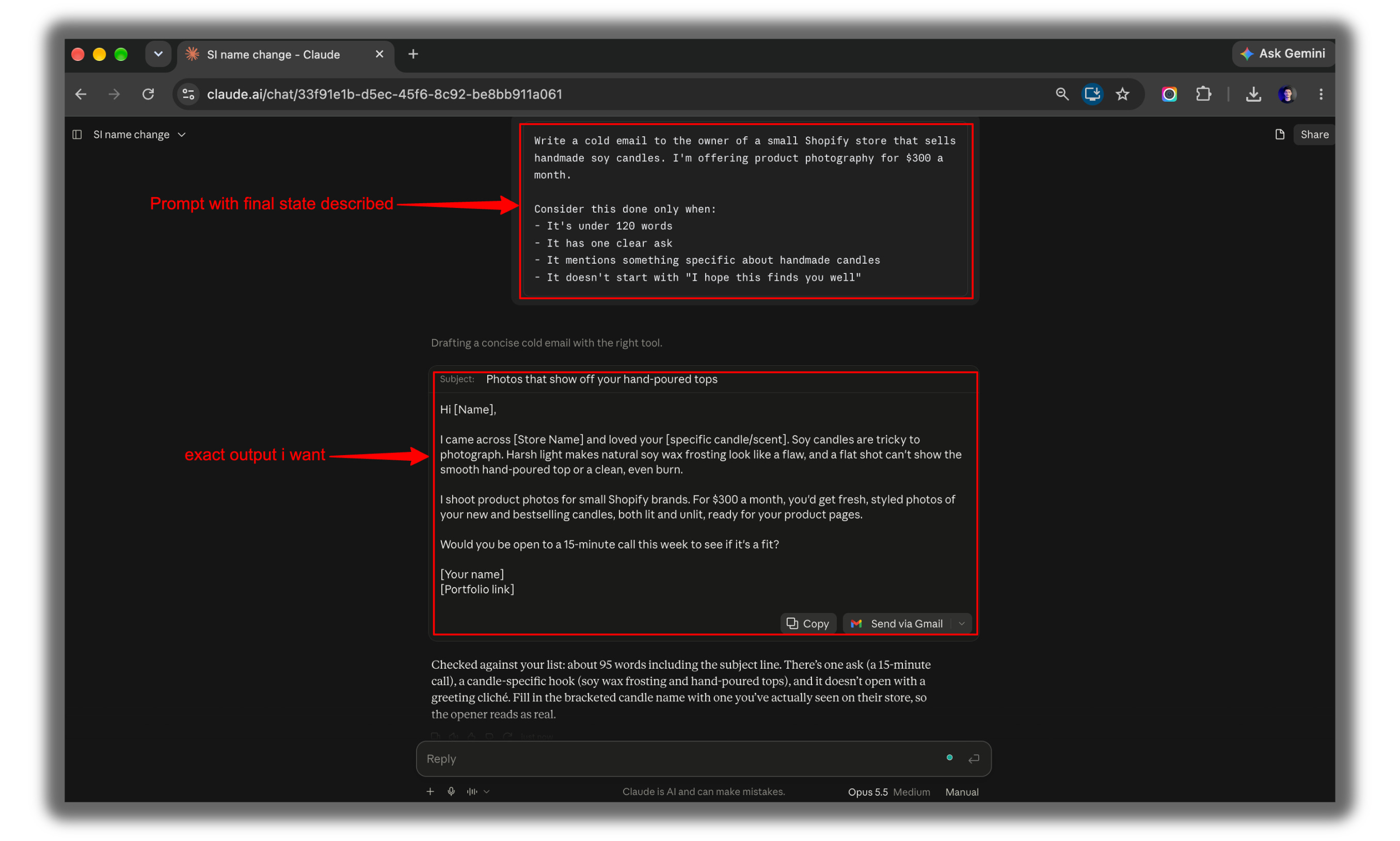
Law 4: Give it the original, not your summary
Now that Claude knows what you want, give it the right material.
When you summarize a file for Claude, it only knows what you remembered to mention.
Upload the actual spreadsheet, contract, or transcript instead.
Base your answer only on the files I uploaded. For every important finding, tell me which file and which section it came from.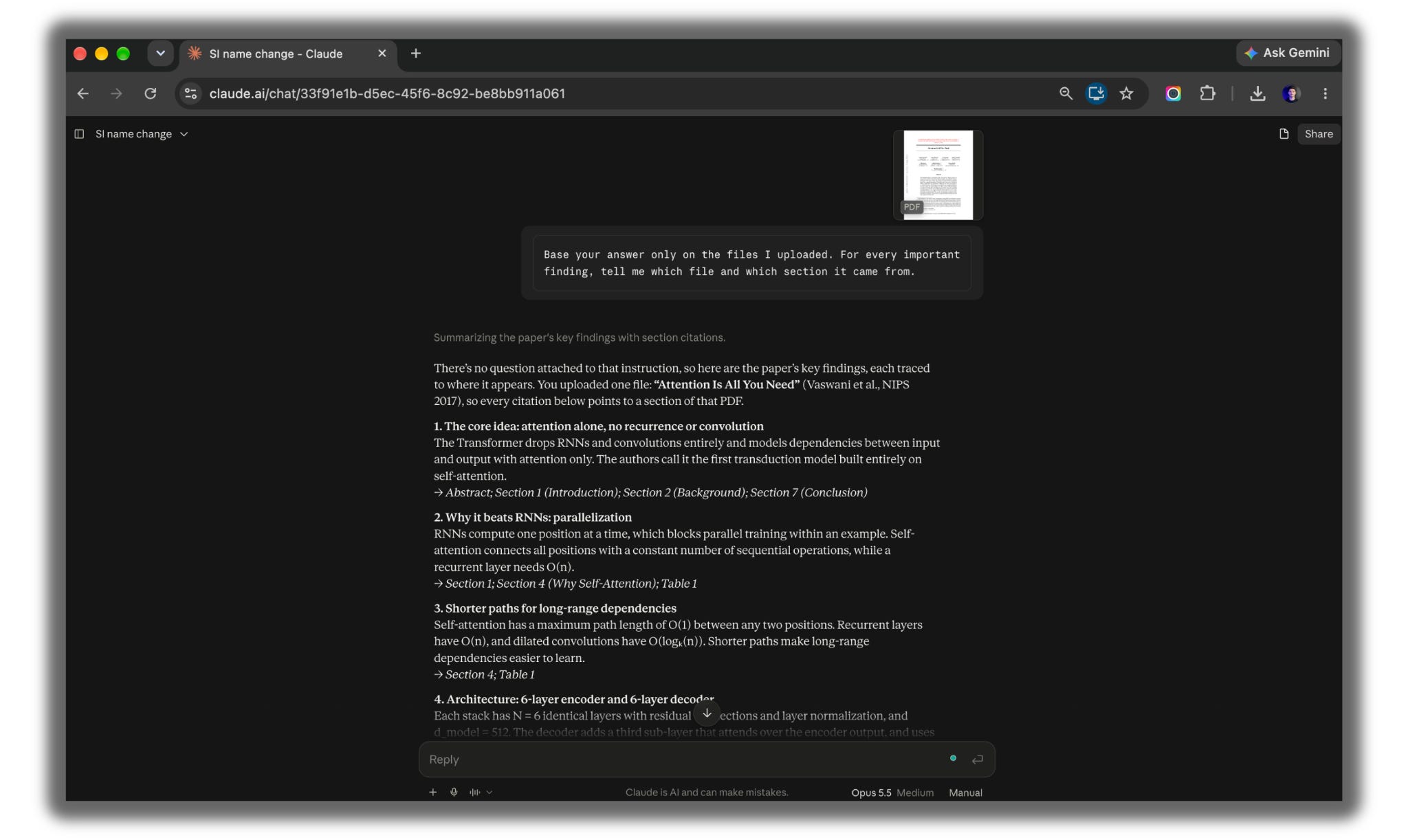
Law 5: Ban made-up numbers
Real files are half the fix.
The other half is stopping Claude from filling gaps on its own.
This is the rule I’d tattoo on my arm.
Add it to any task with prices, dates, or stats:
If you can't find a price, date, source, or number, write "Not found." Never fill a gap with an estimate unless I ask for one.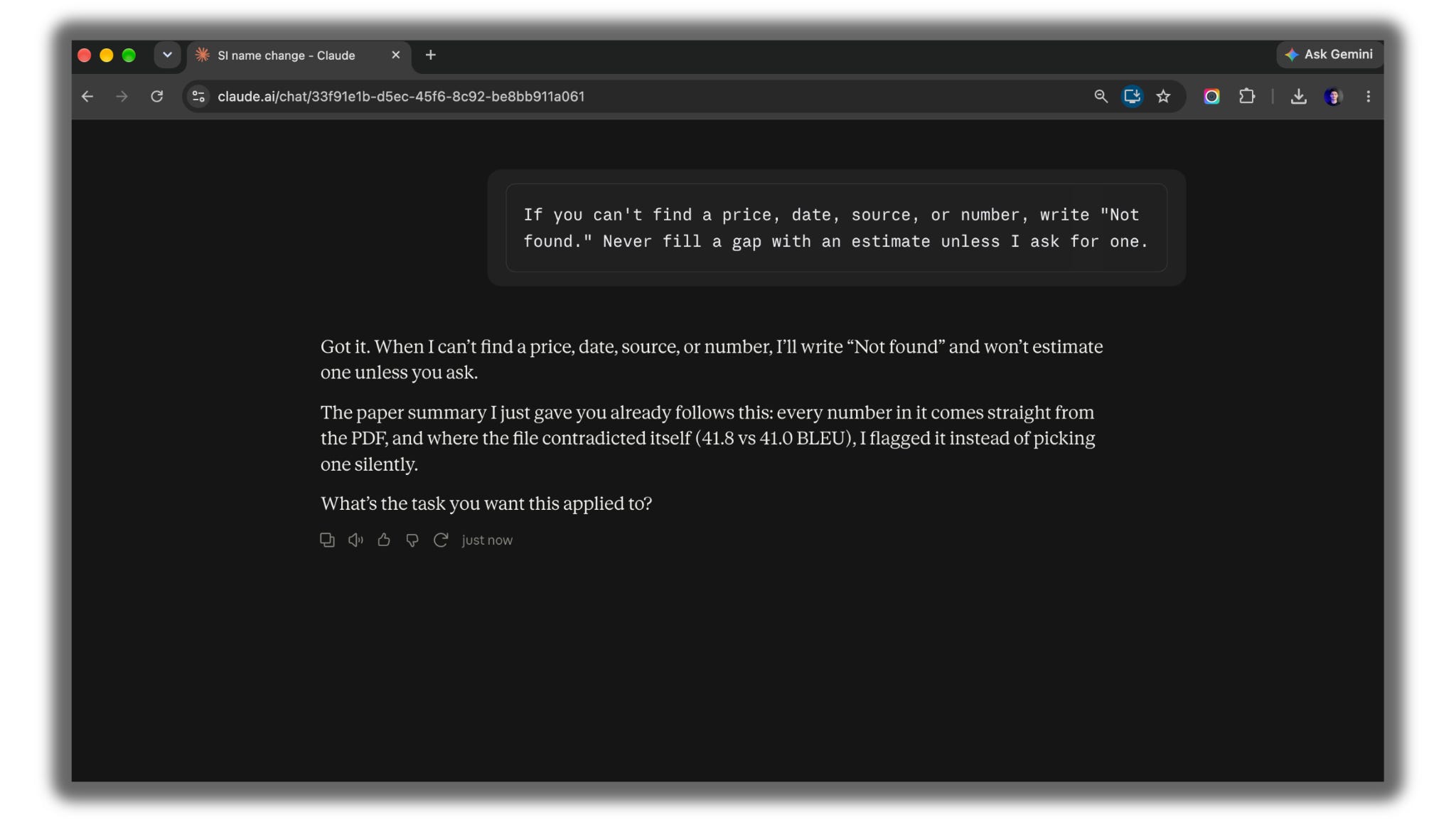
Law 6: Never accept the first draft
You’ve got a solid answer.
Now make it better.
Claude’s first draft is a starting point.
Make it edit itself before you edit it.
Read your last answer like a tough editor. Cut the weakest 20%. Replace every vague example with a specific one. Then give me the new version only.Law 7: Make Claude argue with you
The last step before you act on anything: let Claude try to talk you out of it.
Claude is polite.
Politeness is useless when you’re about to spend money.
I'm planning to launch a $49 Notion template for freelance designers next month. Give me the 3 strongest reasons this could fail. Don't soften it, and don't agree with me just to be helpful.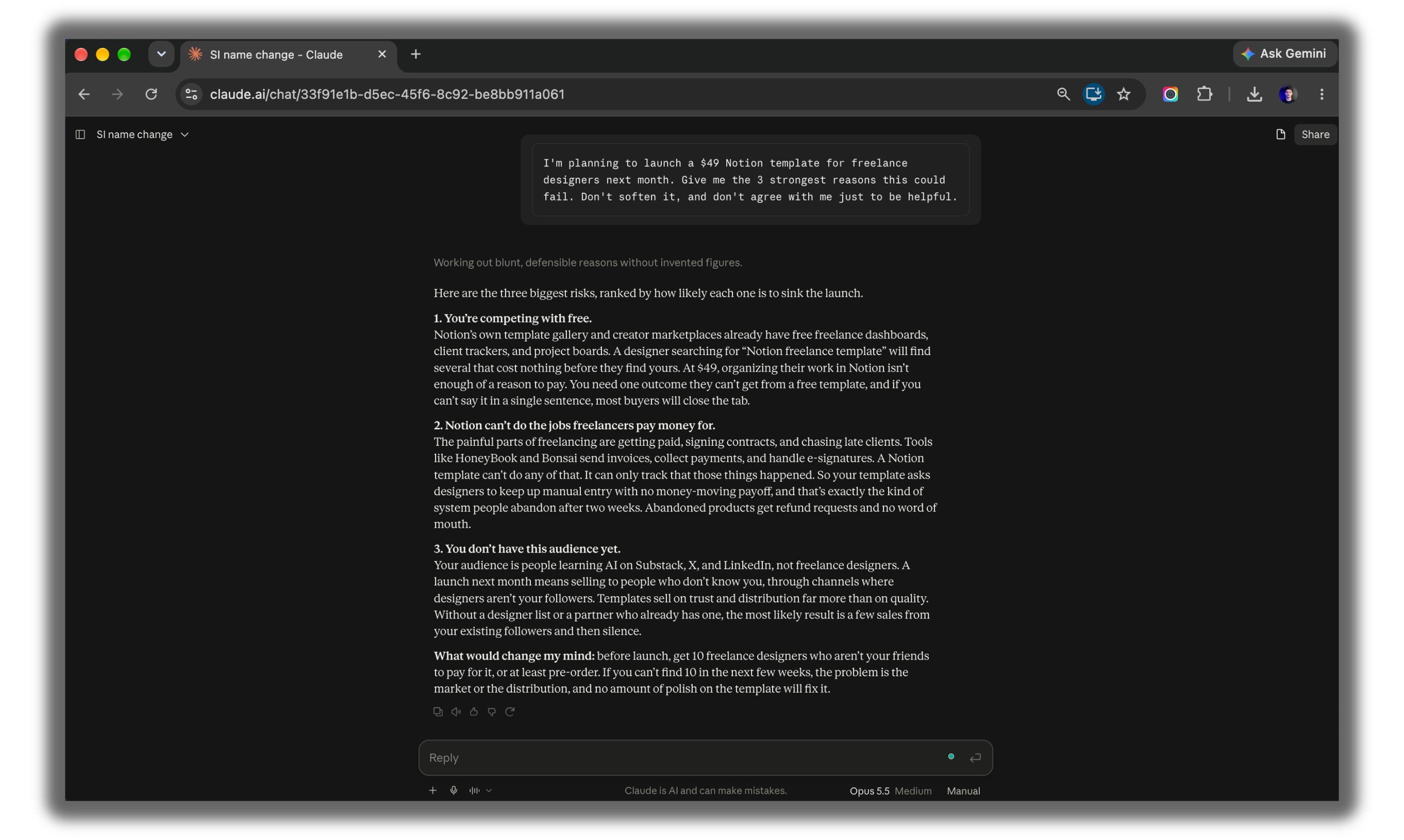
Want to go deeper on picking models? I broke it down here:

Part 1 makes every single chat better.
But you’re still explaining yourself every time you start a new one.
Part 2 fixes that.
Most nights, it’s just me, my laptop, and a cup of coffee going cold while Claude runs another test. One cup from you makes those late nights feel a lot lighter.
Part 2: Build a Claude That Knows You
Set these up once.
They keep working in every chat after.
Law 8: Give every job its own Project
One giant chat for everything is how Claude gets confused.
A Project is a separate workspace with its own files and rules. Claude uses them in every chat inside that Project.
Open Claude.
Click Projects.
Then create a New Project.
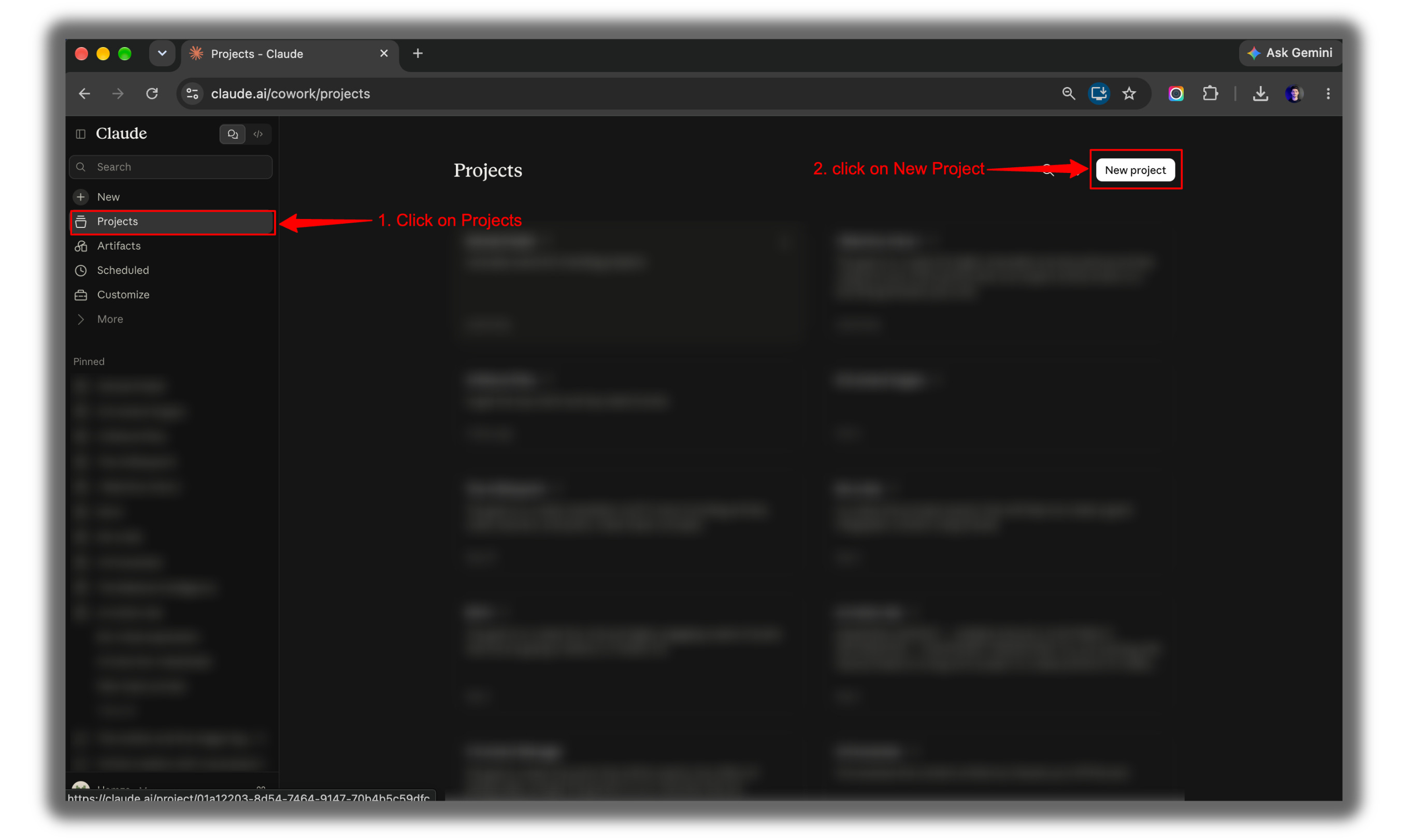
Create one Project per job: newsletter, clients, research, personal.
Upload the files that the job needs.
If you want to learn about projects from scratch, then you must read this guide:

Law 9: Write your rules once
Remember Laws 2 to 5? You don’t have to paste them every time.
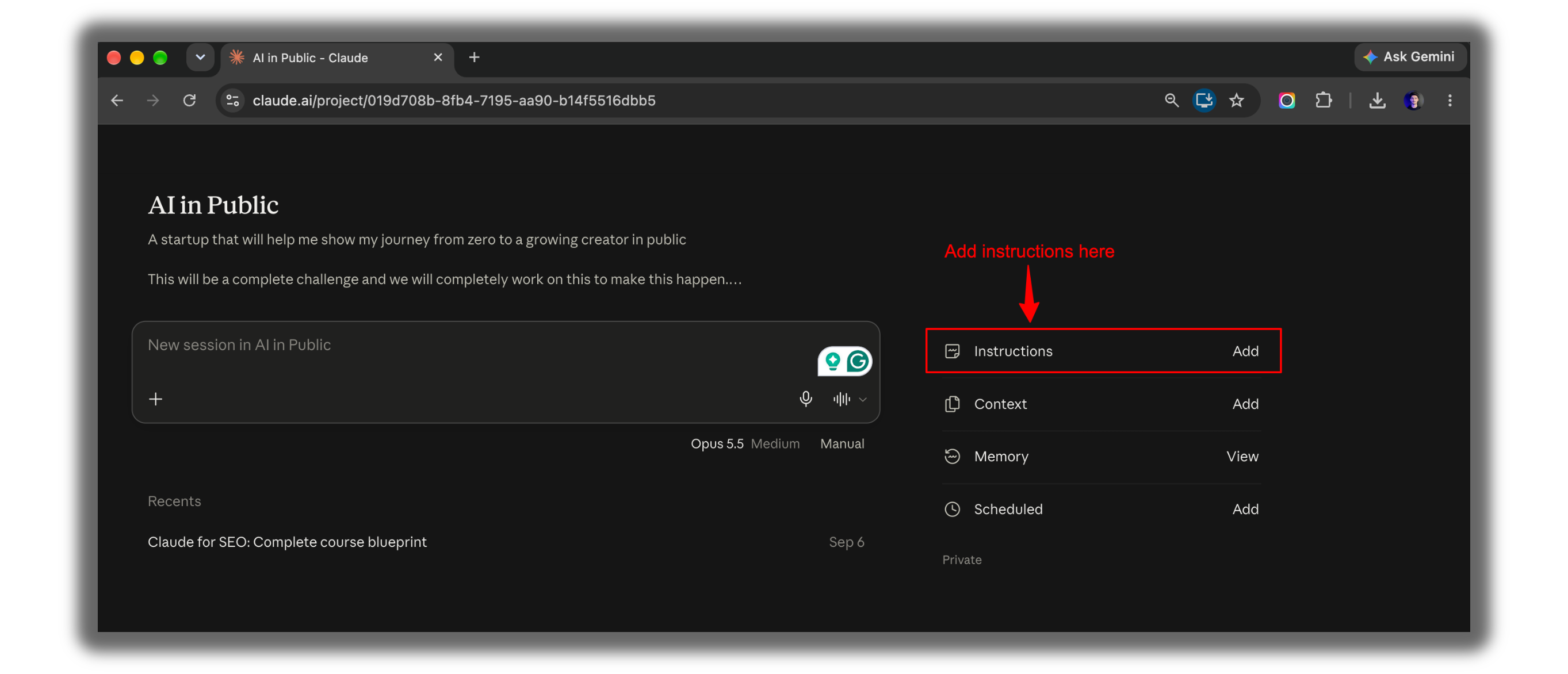
Open your Project.
Find the project instructions.
Paste this, then add your own rules:
Use simple English. Keep answers practical. Check every number twice. If important information is missing, ask me instead of guessing. If you can't find a price, date, or source, write "Not found."Now every chat in that Project follows your rules from the first message.
Law 10: Teach Claude your voice
Your Project knows your rules.
Now teach it how you sound.
Upload three things you wrote and liked: posts, emails, anything.
Study these 3 pieces of my writing. Look at my word choice, sentence length, opinions, and tone. Write a one-page voice guide I can paste into my project instructions. Keep my rough edges. Don't make me sound polished.Paste the guide into your project instructions.
This one line does all the work: “Keep my rough edges.”
Law 11: Show, don’t describe
Voice is how you sound. Structure is how your work looks.
Describing the report you want takes ten minutes.
Uploading one you like takes ten seconds.
I've uploaded a report I like. Match its structure, length, and level of detail. Use the new data in the second file to create a fresh report. Don't copy any wording from the example.Law 12: Keep Claude’s memory clean
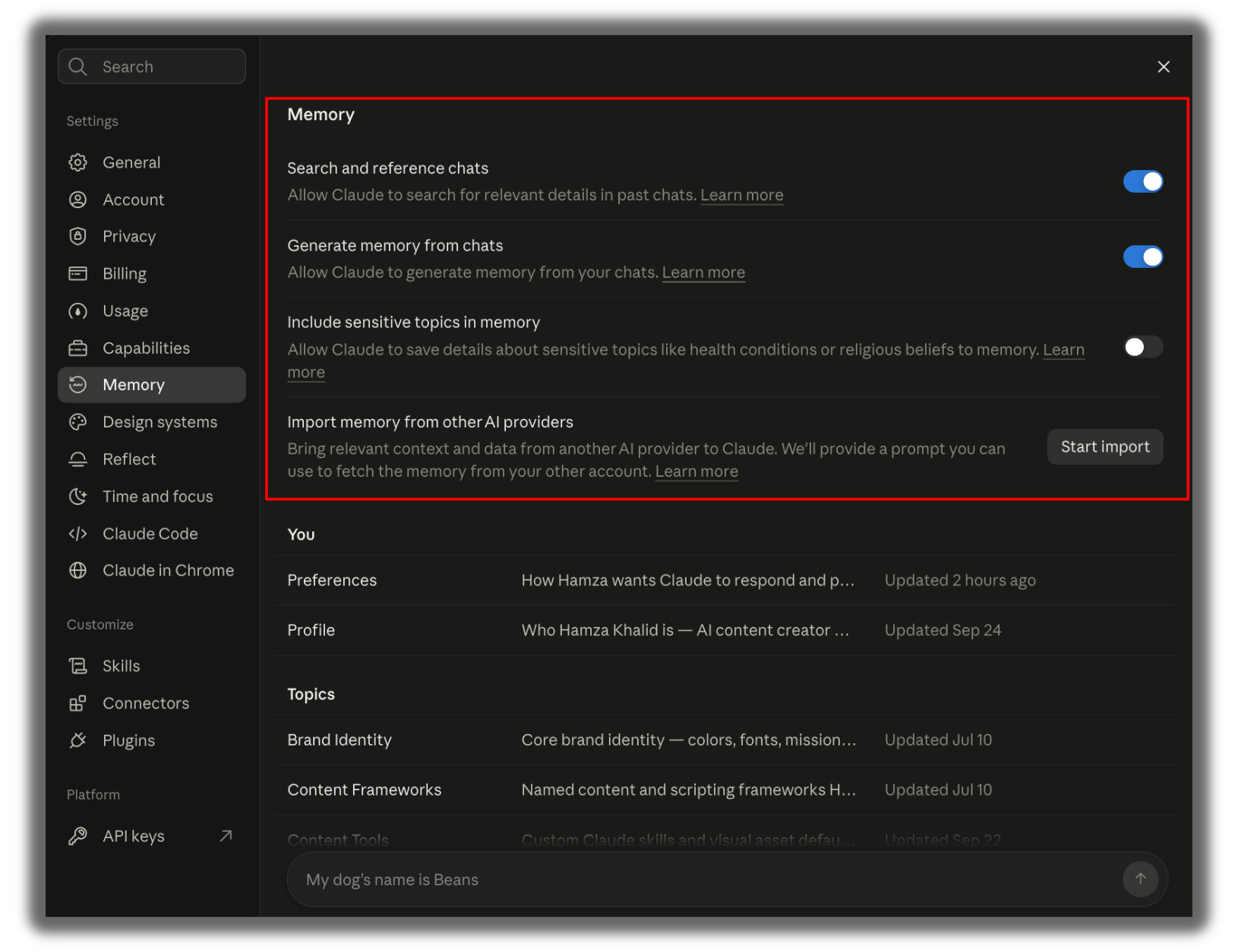
Claude can remember things about you across chats. That’s great until the details go stale.
Open Settings.
Find memory.
Read what Claude remembers about you.
Fix or remove anything outdated.
If your AI memory is broken, then you must read this guide and fix it now:
Your AI Memory Is Broken if you are missing this one hack.

I’ve sent Claude the same instruction 47 times this year.
Law 13: Turn repeat work into a skill
If you’ve explained the same task to Claude three times, it should be a skill.
A skill is a saved set of instructions Claude follows the same way every time.
Help me create a skill for my weekly content report. Every Monday I'll upload a CSV of my LinkedIn and Substack stats. The skill should compare this week to last week, list my top 3 posts and my worst post, explain the likely reason for each in one line, and use the same format every week. Ask me anything you need before writing it.Full guide on building skills:

I don’t have a team. I have a desk, a laptop, and a coffee cup that’s always empty by the time the testing ends. If this issue helped you, fill it.
Law 14: Connect your apps, but keep the send button
Your Claude knows your rules, your voice, and your workflows.
The last piece is your actual work.
Claude can connect to Gmail, Google Calendar, Google Drive, Notion, Slack, and more.
Then it reads your stuff directly instead of you copying it in.
Open a new Claude chat.
Click on the + icon
Click on Connectors.
Add Connectors.
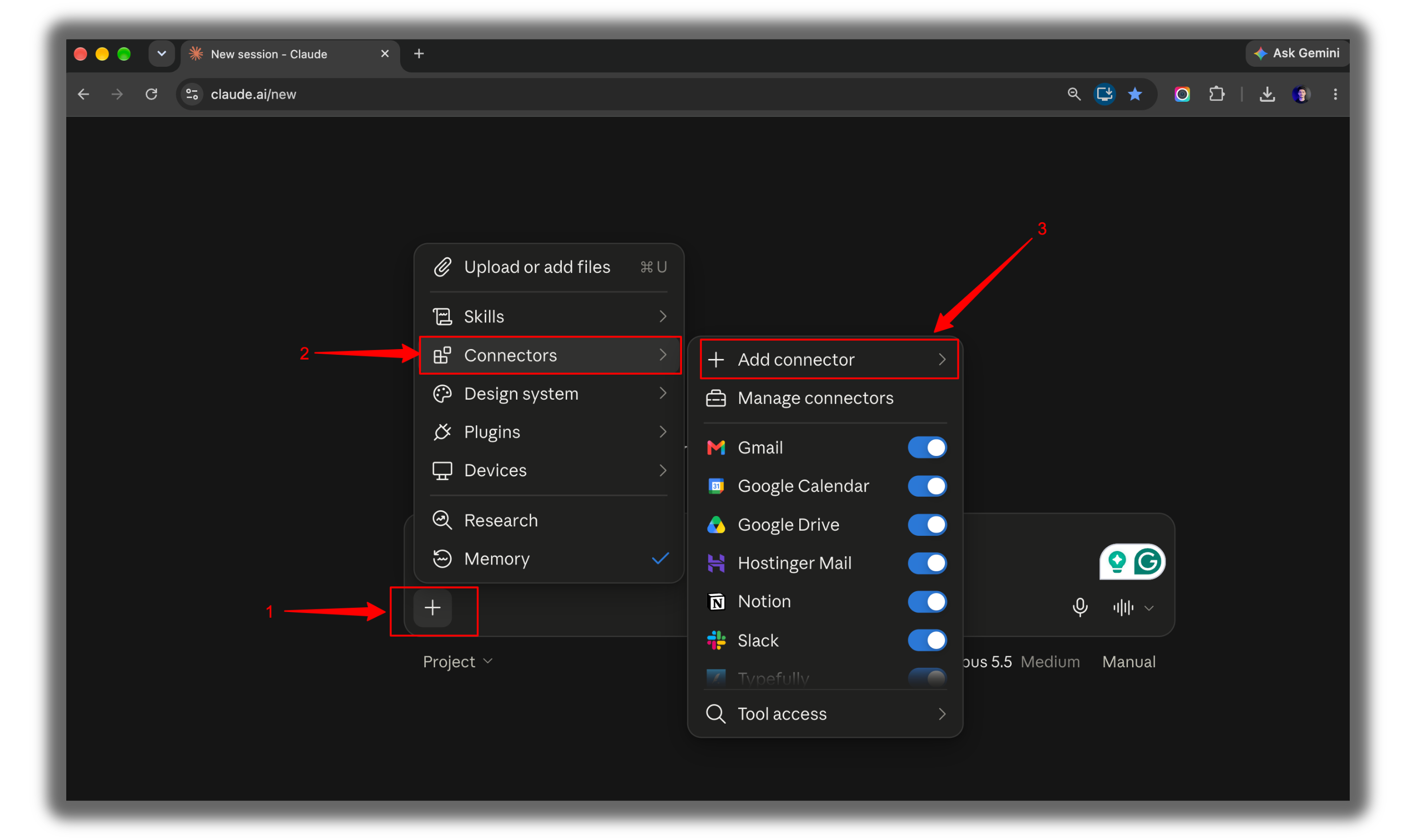
Connect Gmail.
Then try:
Find client emails from the last 3 days that I haven't replied to. Group them by urgency. Write a draft reply for each and save them as drafts. Don't send anything.This one line does all the work: “Don’t send anything.”
Now Claude knows you and can reach your work.
There’s only one thing left.
Letting it do that work when you’re not there.
Here is the full guide to using connectors:

This newsletter grows from your shares. If you got value from this, pass it on.
Part 3: Let Claude Work Without You
This is where Claude stops being a chat and starts being an employee.
Law 15: Give Claude a morning job
Claude can run tasks on a schedule.
Some run in the cloud, so your laptop can be closed.
Anything that touches files on your own computer still needs it switched on.
Ask Claude to set one up:
Create a scheduled task that runs every weekday at 8 AM. Find the 5 most important AI news stories from the last 24 hours that matter to solo creators. For each one, give me one sentence on what happened and one sentence on why I should care. Include the source link.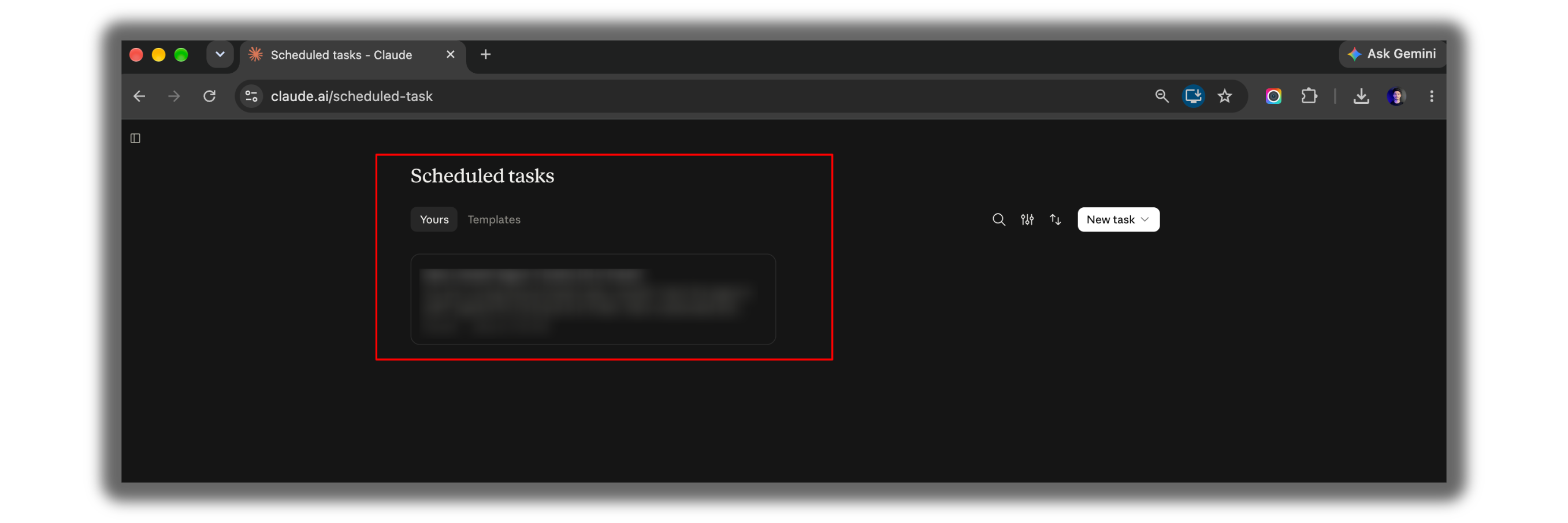
Law 16: Tell your automation when to stay quiet
Your first automation will feel amazing.
Your fifth one will flood you with noise, unless you set this rule.
Every Monday, check the pricing pages of Notion, Canva, and Gamma. Report only confirmed price changes, with the old price, the new price, and the link. If nothing changed, write one line: "Checked. No changes." Keep a log with the date and result of every check.Two jobs in one prompt: stay quiet, and keep a log.
Check the log once a month so silent failures don’t pile up.
Law 17: End long sessions with a handover note
Automations handle the small jobs.
Big projects still happen in long sessions, and long sessions get slow and confused.
Start fresh, but bring your progress with you:
Write a short handover note for my next session. Include what we finished, what we decided and why, what's still open, and the very next step. Keep it under 200 words.Paste it into your next chat.
You’re back where you left off in ten seconds.
Law 18: Try Claude Code, even if you don’t code
Claude Code isn’t only for programmers.
It works with files, folders, spreadsheets, and small websites on your own computer.
On a Mac, open Terminal.
Paste this line and press Enter:
curl -fsSL https://claude.ai/install.sh | bashOpen the folder you want to work in.
Type claude and press Enter.
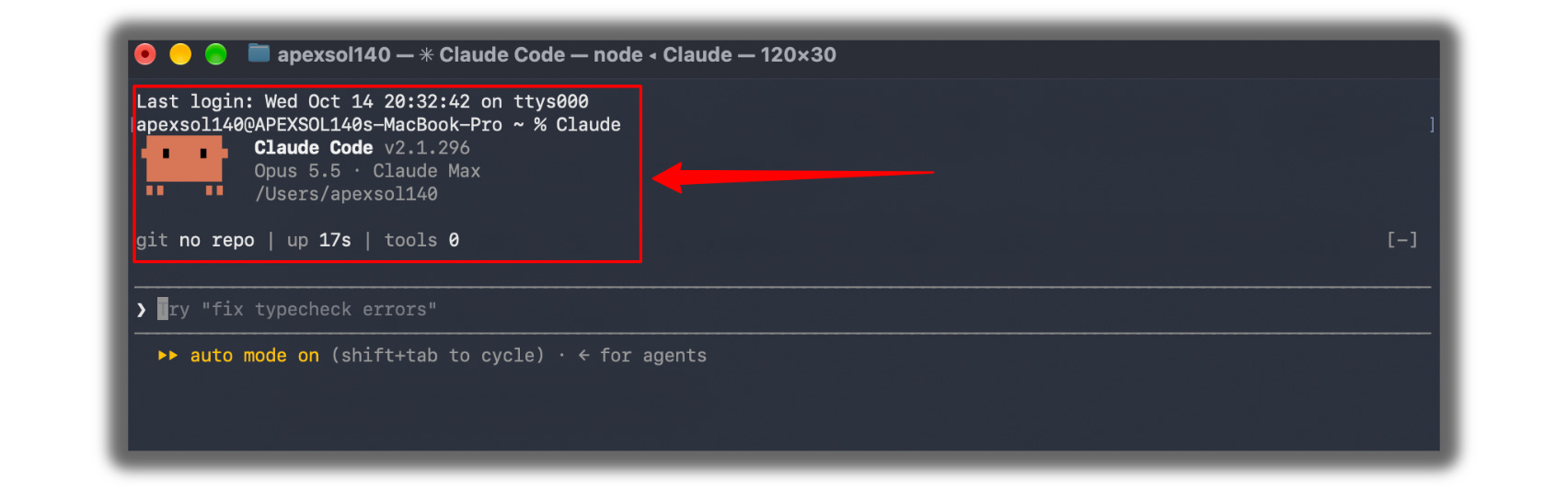
Start with a safe first task:
Look at every file in this folder. Tell me what's here in plain English, what looks messy, and 3 things you could organize for me. Don't change anything yet.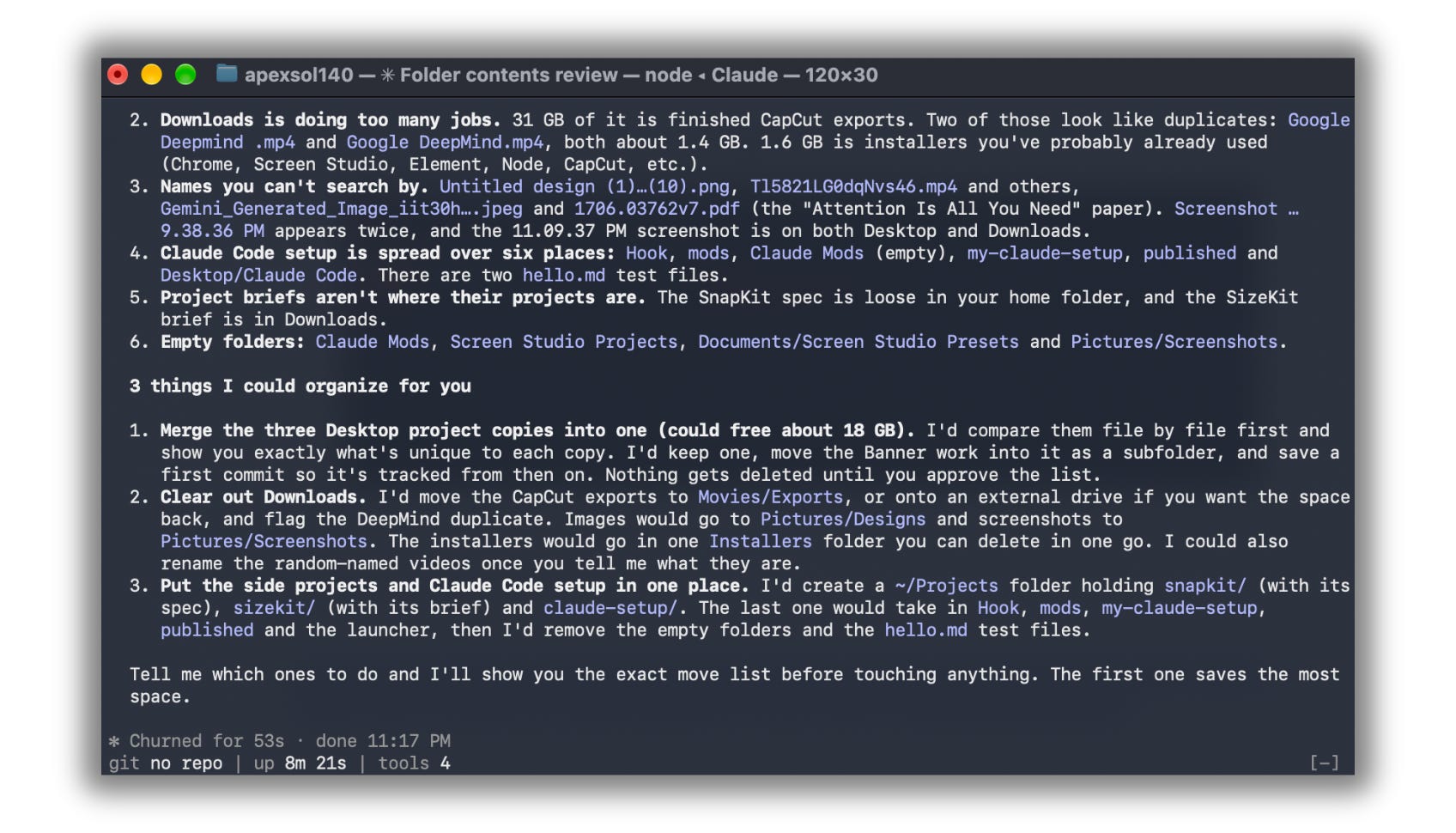
In Claude Code, /compact shortens a long session and keeps what matters.
/clear starts completely fresh.
Law 17 still applies here.
If this issue gave you something real - a tool, a starting point, a moment where something clicked - share it.
Law 19: Give Claude Code a rulebook
This is Law 9 again, but for Claude Code.
Open your project folder in Claude Code.
Type /init and press Enter.
Claude creates a file called CLAUDE.md. It reads that file every time it starts.
Add your rules to it:
Add these rules to CLAUDE.md: Explain changes in plain English. Never delete files without asking me first. Save all finished work in a folder called "output." Before saying you're done, check your work against my original request.Law 20: Make it plan before big changes
Rules tell Claude how to work.
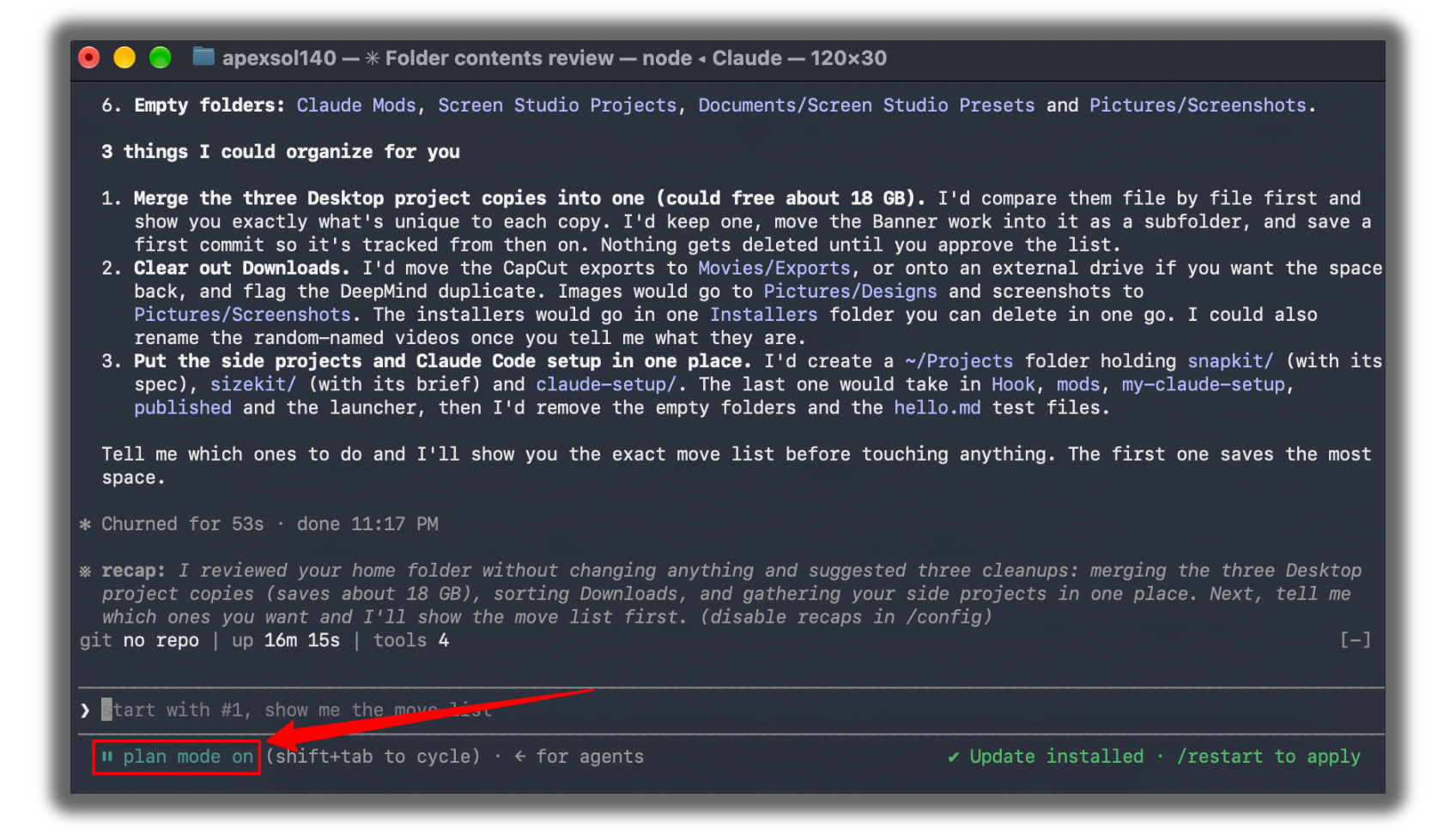
Plan Mode lets you see the work before it happens.
In Claude Code, press Shift+Tab to switch into Plan Mode.
Claude studies the project and shows you a plan before it touches a single file.
I want to turn this folder of blog posts into a simple website. Study everything here, then show me your plan step by step. Don't edit anything until I say go.Use Plan Mode for big jobs. For tiny fixes, skip it.
Law 21: Stay in charge of anything permanent
Look at what Claude can do by now.
→ Read your email.
→ Run tasks while you sleep.
→ Edit files on your computer.
That’s why this is the most important law in the list.
Put this in your project instructions, your CLAUDE.md, and every automation:
You can research, organize, calculate, prepare files, and write drafts. Ask for my approval before you send anything, delete anything, spend money, or make any change I can't undo.The more Claude does for you, the more this one line matters.
Writing a newsletter is easy. Testing everything first takes days, a sore back, and a lot of coffee. Your support covers the coffee, and the coffee covers the rest.
Before you go
You don’t need all 21.
Nobody does.
Pick the three tasks that eat your week.
Find the law that fixes each one.
Use those three until they feel normal.
Then add one more.
That’s how this sticks.
Not by saving a list.
By using three things until you forget you ever worked without them.
Recap checklist
[ ] Picked the right model for my next task (Law 1)
[ ] Added “ask me 3 questions first” to one unclear task (Law 2)
[ ] Wrote a “done when” line on one important task (Law 3)
[ ] Created one Project with my rules in it (Laws 8 and 9)
[ ] Built my voice guide (Law 10)
[ ] Connected one app and asked for drafts only (Law 14)
[ ] Scheduled one recurring task (Law 15)
[ ] Added the approval rule everywhere Claude can act (Law 21)
We tested it in public. Now go use it in private.
If this is useful, send it to one person who’s still using Claude like a chatbot. Takes ten seconds.
PS: Which of these 21 laws do you already use without thinking?
And which one surprised you?
Hit reply and tell me. I read every one.