

Most people who build their first Claude Skill feel the same thing.
It works.
Kind of.
For a day.
Then something starts slipping - wrong output, weird behavior, the skill firing when it shouldn’t, or worse, not firing at all.
You don’t know what broke.
So you rebuild it. Same result.
I’ve been through this.
Seven times.
And after watching dozens of readers try to set up their own Skills after my last issue on building them, I noticed the same 5 failure patterns showing up over and over.
The worst part? Every single one of these mistakes looks like a Claude Problem.
It’s not.
It’s a setup problem.
And setup problems have exact fixes.
If you’ve ever started at a skill file that looks completely fine and produces completely wrong output, this issue is for you.
By the end of this issue, you’ll get a copy-paste Skill Repair Checklist - run it against any broken skill, and it’ll tell you exactly what to fix.
The moment I almost gave up on Skills entirely
It was 11 pm. I had been debugging the same LinkedIn post skill for three days straight.
The output was never right. Sometimes too formal. Sometimes the wrong length. Sometimes Claude ignored the skill completely and wrote like it had never seen my instructions.
I had rewritten the skill four times. I had rebuilt the project twice. I had blamed Claude, blamed the model update, blamed my prompts.
I was one bad output away from deleting the whole skills folder and going back to writing prompts from scratch every time.
Then I found the real problem.
Not in the skill. Not in the model. In five specific things, I had been doing wrong since the very first skill I ever built.
The description was too vague. The file was too long. Claude had no instructions to read it. It referenced files that didn’t exist. And it was doing three jobs inside one file.
Five mistakes. Every broken skill I had ever built had at least two of them.
Once I knew what to look for, fixing them took less time than one of my debugging sessions.
That’s what this issue is. The five things I got wrong, in the order you’re most likely to get them wrong too.
Here’s how I found these mistakes
Three weeks after I published the first Claude Skills issue, I started getting replies.
Not “this is great” replies. Diagnostic ones.
“My skill exists, but Claude never reads it.” “The output is inconsistent - good one day, wrong the next.” “Claude uses my skill for tasks I never intended.”
I recognised every single complaint. Because I’d had all of them myself. I spent about 4 hours total, debugging skills that looked fine on paper and behaved like chaos in practice.
The problems weren’t random. They were the same 5 mistakes, in different combinations.
Here they are - with the exact fix for each.
This issue is the follow-up to How to Build Claude Skills. If you're starting from zero, read that one first. It'll make everything here land harder.
Read it here👇

If this is useful, forward it to one person who’s been building with Claude. Takes 5 seconds.
The old way vs. the new way
Old way: Build a skill. Test it once. Assume it works. Wonder why outputs drift after a week.
New way: Build a skill. Run it through 5 diagnostic checks. Fix what’s broken before it costs you 3 hours.
Old way: Most people build a skill once, assume it works, and don’t touch it again until something breaks. By then, they’ve blamed Claude three times, rewritten the skill twice, and spent 4 hours on a problem that had a 30-second fix. That’s the old way. This issue is the new way.
New way: Write skill → diagnose → fix once → run clean indefinitely.
The skill isn’t the problem. The 5 gaps inside it are.
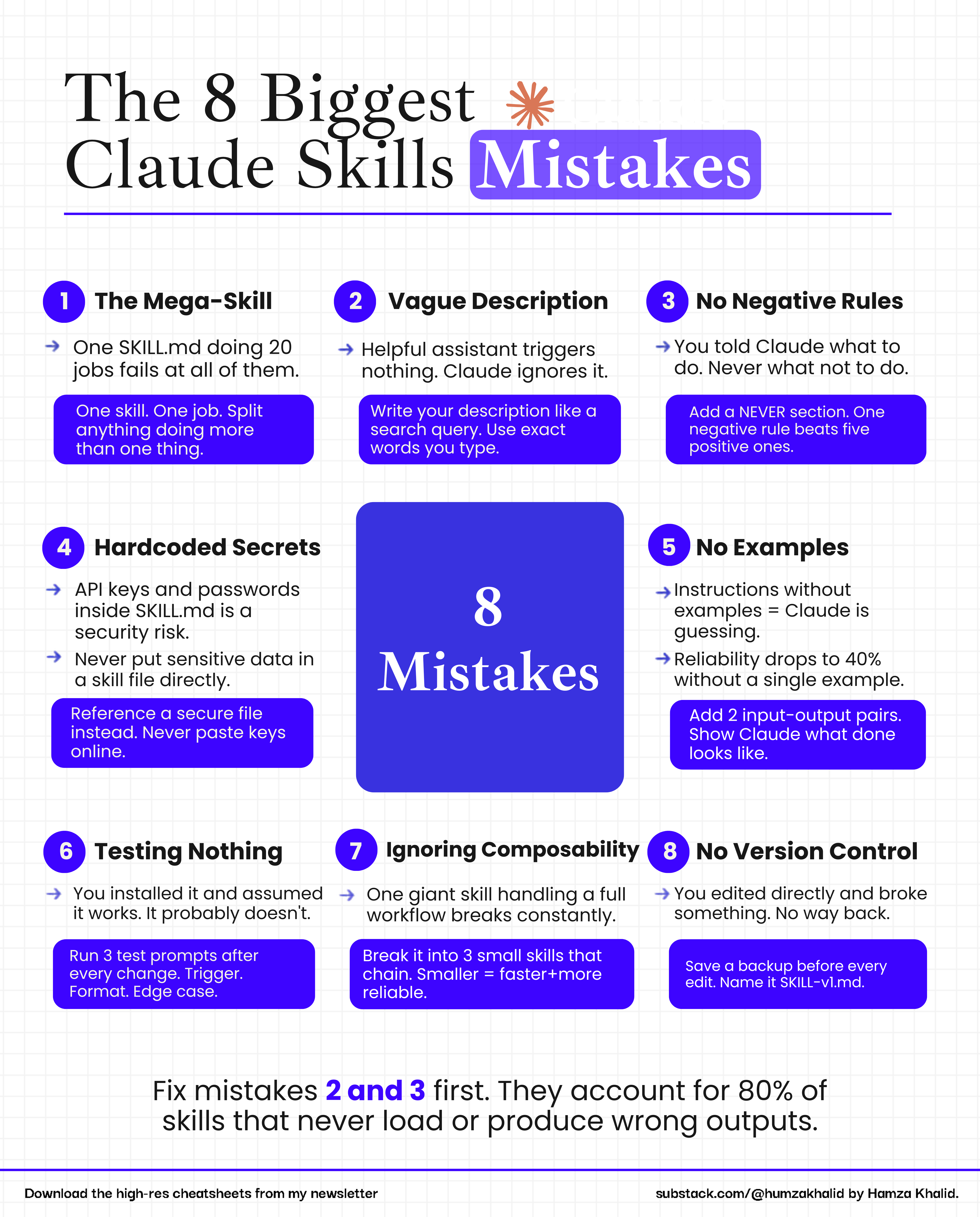
Who you were before this issue:
Someone who built a Claude Skill got inconsistent output and blamed Claude.
Who you are after this issue:
Someone who can look at any broken skill, diagnose the exact failure in under 5 minutes, and fix it in one run.
The difference isn’t technical knowledge. It’s knowing which 5 things to check. That’s what this issue gives you.
Skip the manual work: I’ve written a copy-paste prompt at the end of each step that does all of this for you automatically. Doing it manually takes 20+ minutes, whereas the prompt takes only 30 seconds. The choice is yours.
If this is useful, forward it to one person who’s been building with Claude. Takes 5 seconds.
Mistake 1: Your description is doing too much
The description at the top of your SKILL.md file is the most important line you’ll write. It’s not a label. It’s a trigger. Claude reads it and decides in that moment whether to load your skill at all.
When the description is too broad, two things happen.
Claude fires the skill on tasks you never intended.
Or it fires on everything, and the output becomes a blurred average of all your tasks.
I ran into this exact problem when I built a skill for Chrome research tasks.
I wrote a complete guide on how to automate your daily tasks using Claude in Chrome.
Read it here👇

What a broken description looks like:
Description: Use this skill for writing tasks.
Claude reads that and loads your skill for emails, code comments, chat replies, and everything else with words in it.
Four hours. That’s how long I spent debugging a skill before I realised the description was the problem. Four hours on a one-line fix.
Step-by-step guide to fix this:
Open the SKILL and find the description line at the top.
Identify the ONE specific task this skill is built for. Write it in one sentence.
List 3 exact phrases a user would type to trigger this task.
List 2–3 tasks that sound similar but should NOT trigger this skill.
First, trigger your skill with “/” and then rewrite the description using this copy-paste prompt:
Here is my existing SKILL.md file:

[PASTE YOUR SKILL FILE HERE]

Do the following steps in order:

1. Read the current description line in the YAML frontmatter
2. Identify the ONE specific task this skill is built for — write it in one sentence
3. List 3 exact phrases a user would type to trigger this task
4. List 2–3 tasks that sound similar but should NOT trigger this skill
5. Rewrite the description using this exact structure:

description: Use this skill ONLY when [specific task].
Triggers include: "[phrase 1]", "[phrase 2]", "[phrase 3]".
Do NOT use for: [excluded task 1], [excluded task 2].

Show me the old description and the new description side by side.
Do not change anything else in the file.
Save the file.
Your skill description is updated.
That one change - the exclusion line - is the difference between a skill that fires correctly and one that fires on everything. If you just fixed your description, you’ve already solved the problem most people never find.
