

You open Claude.
Type a big task.
It does one thing. Stops.
You type “continue.”
One more thing. Stops.
“Ok, now do step 3.” Stops.

You’re not using AI.
You’re parenting it.
That’s not a workflow.
That’s a second job you didn’t sign up for.
I spent months doing it.
40 minutes of supervision for tasks that should have run themselves.
Frustrated at AI - when really I just didn’t know this existed.
Anthropic just shipped the way out. It’s called /goal.
One command. You type what “done” looks like.
A separate model - not Claude - checks after every step. A neutral judge.
You come back to finish work. Done.
I’ve been testing it for two weeks. This issue is everything I found.
And by the end, if you’re a paid subscriber, you get the full /goal Condition Kit - 10 copy-paste goal conditions built for 5 different reader types. Paste and go. Under 2 minutes. No setup. No editing.
Keep reading. This one changes how you work.
The moment everything shifted for me
Last Tuesday. Content research pipeline. Seven steps.
I’d done it a dozen times - 40 minutes of “ok now step 3” every single time.
That Tuesday I typed /goal instead.
Set the condition. Made tea. Came back 11 minutes later.
Done. All seven steps.
My first reaction wasn’t excitement.
It was suspicion. “Did it actually finish or just stop and call it done?”
I checked. It finished.
That 40-minute babysitting session had just become 11 minutes of nothing.
Not just faster. A different relationship with the work entirely.
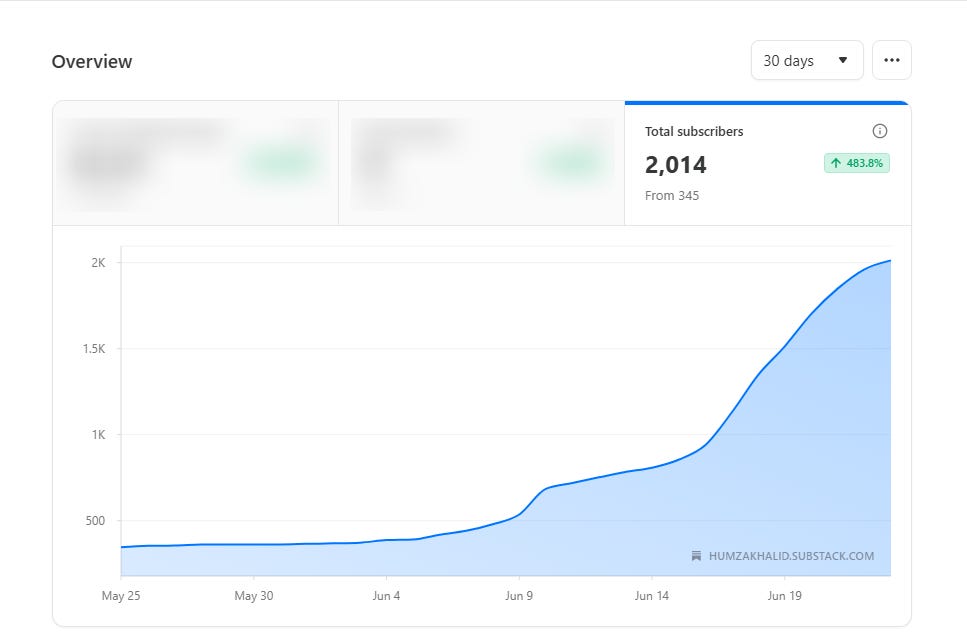
Yesterday, AI In Public crossed 2,000+ subscribers.
2,000+ people who showed up every issue to actually build - not just read about AI.
This issue is for all of you. Let’s get into it.
The proof
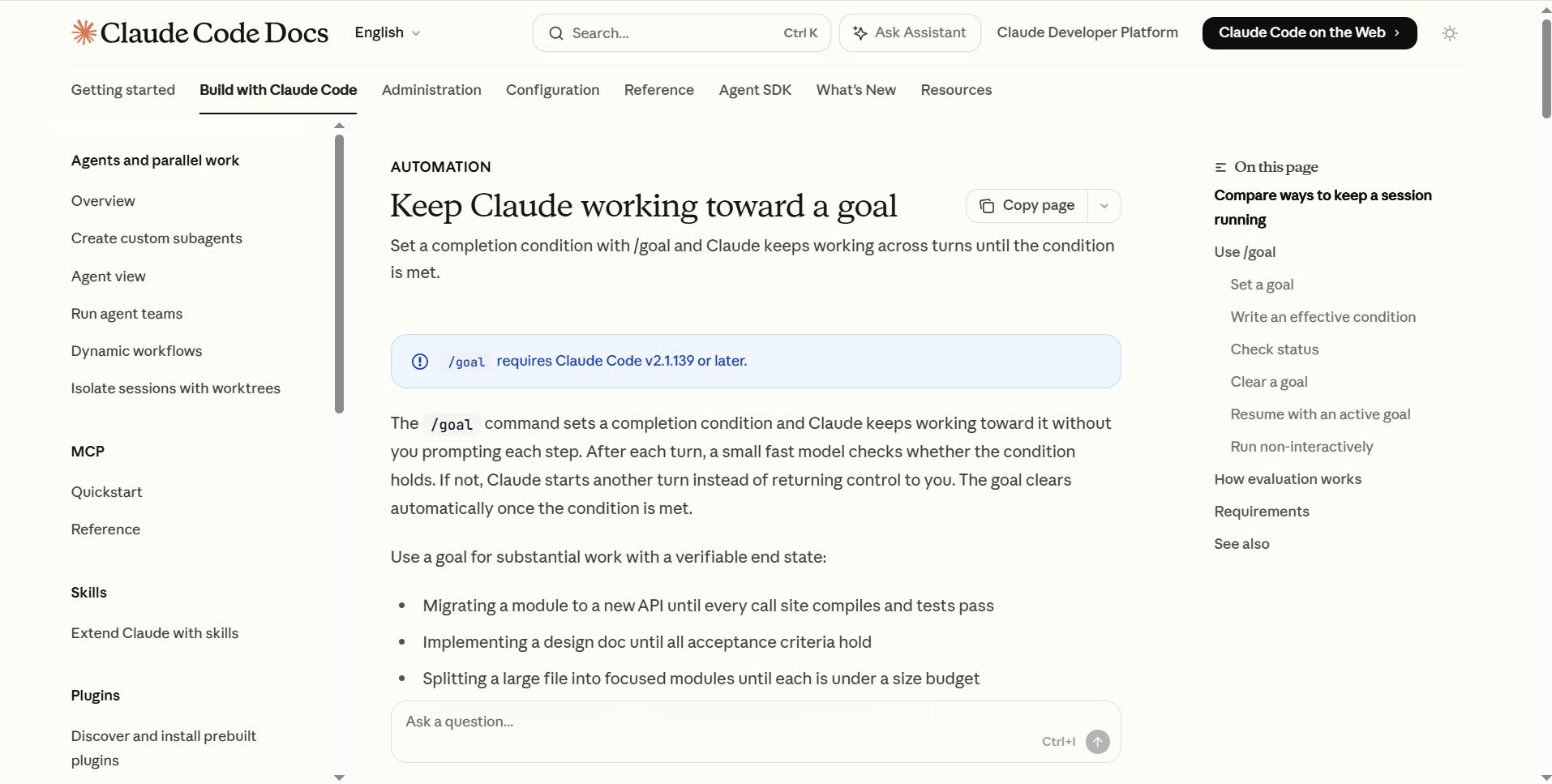
Anthropic released /goal in Claude Code version 2.1.139 on May 12, 2026.
Not experimental. Not a beta. Live right now - across Claude Code CLI, VS Code, JetBrains, the Desktop App, and Claude Code Mobile.
→ Official /goal documentation - code.claude.com/docs/en/goal
I read the full documentation so you don’t have to. This issue skips the technical language and shows you what actually matters - starting with wherever you are right now.
Think of someone on your team who sends you “Are you done yet?” messages every hour. This is the issue for them. Forward it. It takes 5 seconds.
Where are you now? Where you’ll be by the end of this.
Let me be direct about what this issue does.
Right now, your AI workflow looks like this:
You think of task → Prompt Claude → Claude does part of it
→ Claude stops → You check → You push → Claude does part of it
→ Claude stops → You check → You push → Claude does part of it
→ You lose track → You start over → You give up or settle
You are the engine. Claude is a wheel that needs pushing every 30 seconds.
By the time you finish reading this, your workflow will look like this:
You define "done" → Set /goal → Step away
→ Claude works → Judge checks → Not done → Claude works again
→ Judge checks → Done → You come back to finished work
You become the person who sets the destination. Claude is the driver.
That shift - from supervisor to director - is what this command makes possible.
And it’s available to you today, whether you’re a developer, a content creator, a newsletter writer, or someone who has never typed a command in their life.
I’ll show you exactly how to get there. Step by step. Starting now.
Step 1: Where /goal does it actually live - and it is not just the terminal
Most people see “Claude Code” and think: terminal. Black screen. Command line. Not for me.
Stop right there.
/goal Works on every Claude Code surface. Including the ones that look nothing like a terminal.
VS Code Extension      → Open Claude panel → type /goal [condition]
JetBrains Plugin       → Open Claude panel → type /goal [condition]
Claude Code Desktop    → Chat input → type /goal [condition]
CLI (Terminal)         → Run claude → type /goal [condition]
Claude Code Mobile     → Chat input → type /goal [condition]
Regular Claude Chat    → Does NOT work → use Manual Goal Block (Step 6)
If you use VS Code, you do not need to touch a terminal. Open the Claude Code extension panel on the right side of your editor, type /goal followed by your condition, and hit enter. It looks exactly like a chat window.
If you’re on JetBrains - IntelliJ, PyCharm, WebStorm - same panel. Same command. Same behavior.
The only place /goal does not work with the regular Claude chat at claude.ai. For that, I’ll give you the Manual Goal Block workaround in Step 6. It’s not the same thing - but it’s a version you can use today without installing anything.
Step 2: What /goal actually does
When you set a /goal, something different happens under the hood.
The system splits into two completely separate models.
Model 1 - The Worker: The main Claude. Reads files. Writes code. Drafts content. Executes commands. Does the actual work.
Model 2 - The Judge: A smaller, faster model. After every turn the Worker takes, the Judge steps in. It reads the conversation and asks one question: Does the condition hold? Yes or no. If yes, the goal is cleared, and Claude stops. If not, Claude starts another turn automatically.
The Judge is neutral. It doesn’t care how hard Claude worked - only whether the condition is actually met.
This is the key shift that changes everything.
In a normal session, Claude decides when it’s done. Claude is grading its own work. That’s how you get confident-sounding output that’s missing half the deliverables. Claude judged it complete.
In a /goal session, a separate model makes that call. The Worker and the Judge are never the same model at the same time.
The result: Claude stops lying to you about being finished.
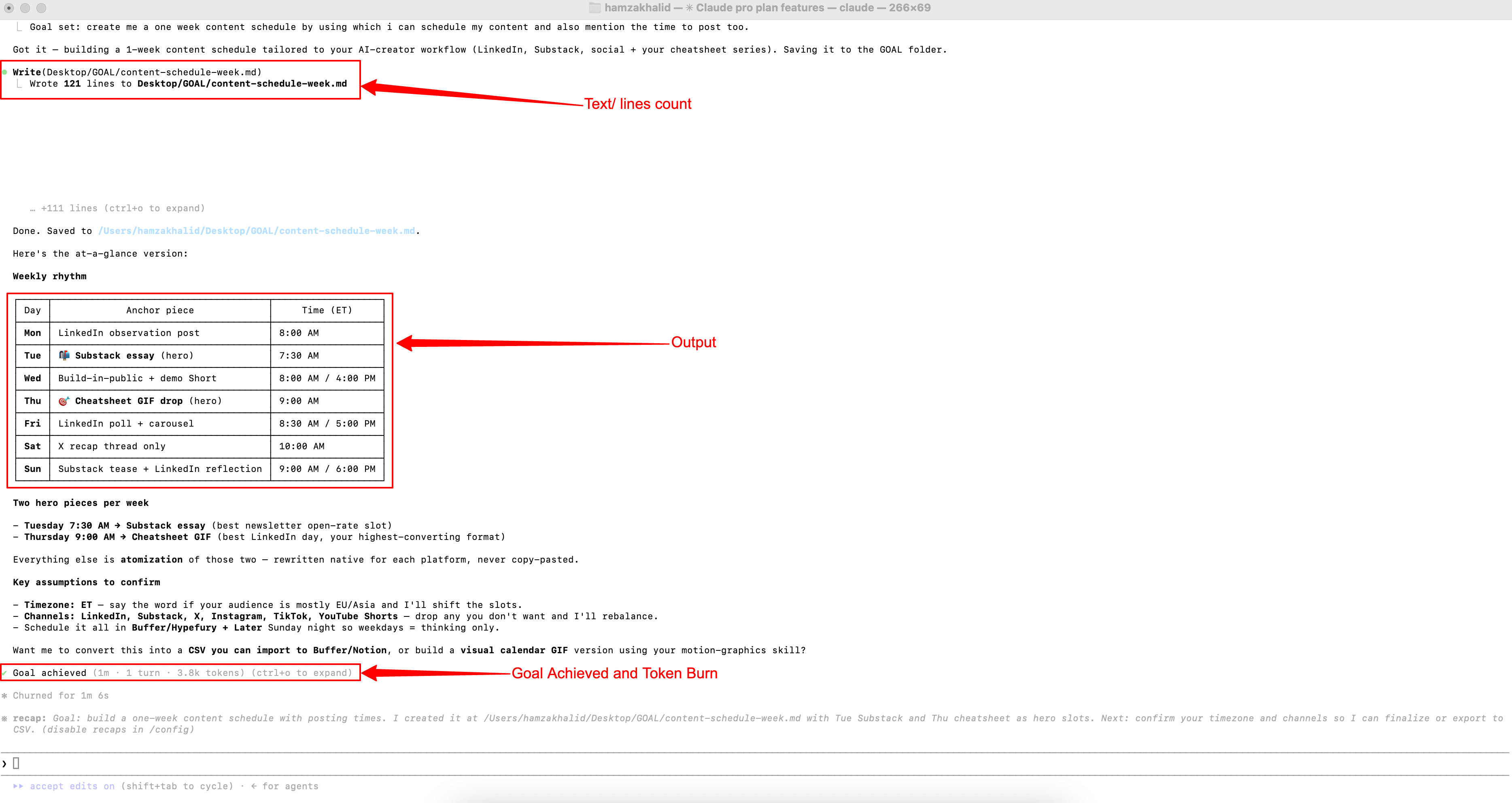
Step 3: How to write a goal condition that actually works
I’ll be honest with you here, because this is where most people fail and blame the feature.
A vague condition gets vague results. If you type “improve my project” as your goal, Claude will wander and eventually tell you it’s done because the Judge has nothing specific to check.
The command is only as powerful as what you write into it.
A goal condition that actually works has three parts:
1. One measurable end state: Not “write the report.” Not “make it better.” Something with a clear pass or fail.
→ All five sections of the report are written, and each is over 200 words.
→ The content calendar has 7 days with a title and hook for each.
→ npm test exits 0 with no errors in the output.
2. How Claude proves it’s done: The Judge can only read what Claude has surfaced in the conversation. It cannot check files independently. So you have to tell Claude how to show proof.
→ Run npm test and paste the full output.
→ List all 7 days with their titles in a numbered format.
→ Count the words in each section and confirm all are over 200.
3. What must not change: This protects you from Claude solving the goal the wrong way - technically meeting the condition while breaking something else.
→ Do not modify the existing test files.
→ Do not change the tone guidelines.
→ Keep all headings in the format I specified.
Here’s what the difference looks like in practice:
Vague - Claude wanders:
/goal improve the dashboardSpecific - Claude drives:
/goal Refactor the dashboard component in /src/dashboard.jsx
so that it loads in under 2 seconds on a slow 3G connection.
Run the Lighthouse test and confirm the performance score
is above 85. Do not change any existing API calls or
remove any current features. Stop after 20 turns.
The turn limit at the end is not optional for any unattended run. It’s the safety net. Without it, a stuck goal can run longer and spend more tokens than you expect.
You now know more about writing a goal condition than 90% of people who’ve tried this feature.
Keep going.
The next step is where the actual shift happens.
/goal is only as powerful as what Claude does inside each turn. A blank session still produces blank output - just faster. ClaudeKit fixes that. 121 commands and 25 skills that make every turn count.
Step 4: Set it. Step away. Here’s exactly what happens.
The moment you hit enter, Claude starts immediately. No confirmation message. No, “I’ll get started on that now.” It just goes.
Turns start ticking in the panel or terminal. Each turn is one complete cycle - the Worker executes, the Judge evaluates, and if the condition isn’t met, the Worker starts again.
To check the status without stopping the goal:
/goalType /goal With no condition. You see:
The active condition
How many turns have you run
Tokens spent so far
The last evaluator's reason - why the Judge said “not done yet”
That last one is the most useful signal you have.
If Claude is stuck, the evaluator's reasoning tells you exactly what it’s looking for and what it's not finding.
Most of the time, it’s because the proof requirement wasn’t specific enough.
This is the part where you feel the shift for the first time. You set the condition. You check the status. You see turns running. And you realize you have nothing to do right now. Claude is working. Without you.
That feeling is new. Let it land.
Step 5: What to do when it goes wrong
I won’t pretend this feature is perfect.
Here are the three things that go wrong and exactly what to do.
Scenario A - Goal is stuck in a loop: Claude keeps running turns. The Judge keeps saying no. Usually means the condition is asking Claude to prove something that can’t surface in the conversation.
→ Type /goal clear to stop it.
→ Rewrite the condition - be more specific about what proof looks like.
→ Set the goal again.
Scenario B - Goal has been running too long: You didn’t set a turn limit. It’s 30 minutes later, and it’s still going.
→ Ctrl+C Stops it immediately.
→ For every future unattended goal, add “or stop after [N] turns” at the end of your condition. 20 is a safe default.
Scenario C - Goal completed, but the output is wrong: The Judge said yes. But you look at the result, and it misses the point.
→ Your condition was too loose. The Judge can only check what you told it to check.
→ Add a more specific end state. Add a constraint. Add a stricter proof requirement.
These are the only three failure modes. That’s not a long list. And every one of them is fixable in under 2 minutes.
Step 6: Resume after interruption - the part nobody talks about
You set a goal. Your phone rings. You close the laptop. An hour later, you’re back.
In a normal Claude session, that’s a reset. Start over. Re-explain everything. Lose the progress.
With /goal Type this when you reopen Claude Code:
claude --resumeor
claude --continueThe goal comes back. The condition is restored exactly as you wrote it. Claude picks up and keeps working. You don’t re-explain. You don’t re-brief. You just resume.
I tested this on a Friday afternoon deliberately. Set a goal for a content plan. Closed the laptop. Opened it Monday morning. Typed --resume. Claude continued from the last completed section.
The turn count resets on resume - that’s expected. The condition itself doesn’t. Your goal survives the weekend.
This one feature alone is worth knowing for anyone who works in interrupted bursts. Which is everyone.
If you’ve made it this far and this is shifting something for you - forward this to one person who needs it. The people who share AI In Public are the ones who actually want to build, not just scroll. Be that person.
The 5 people this was built for - find yourself here
This is where I want you to stop and find your use case. Not skim. Find yours.
If you create content for a living
You need 7 Instagram captions for the week. Normally, that’s 7 prompts, 7 checks, and an hour of supervision.
/goal Write 7 Instagram captions for an AI tips page for
beginners, one per day Monday to Sunday. Each caption must
be 3-4 lines, include one call to action, and be under
100 words. Label each by day. Paste all 7 in order and
confirm each one meets the format. Do not stop between
days to ask for approval.
One condition. Come back to all seven.
The /goal Condition Kit - today’s paid gift - has two ready-to-paste content creator conditions: one for caption weeks, one for X thread series.
If you write a newsletter
You need research plus a structured outline. Normally, that’s two separate sessions, four prompts, and 45 minutes of active work.
/goal Research the top 5 reasons beginners fail with AI tools
in 2026. For each reason, write a section title, a 2-sentence
explanation, and one practical fix. Confirm all 5 are complete
and each has all three elements before stopping.
Research and outline. One run. This is the exact version of the condition I use for my own newsletter research. The Kit has two newsletter writer versions - one for research, one for full drafts.
If you’re learning AI every day
You want a real study plan. Not a list of links. A week-by-week structure with actual daily tasks.
/goal Build a 4-week Claude learning plan for a complete
beginner. Week 1: basics. Week 2: prompting. Week 3: workflows.
Week 4: automation. Each week must have 5 daily tasks,
each under 30 minutes. Output the full plan as a structured
table. Confirm all 4 weeks and all 20 tasks are present.
A complete learning path. Confirmed before Claude closes the goal.
If you build things without code
You’re building a tool. Claude builds something. It half-works. You test it. It breaks. You re-prompt. The loop never closes.
/goal keeps Claude iterating on the same output until it actually runs. You define working. Claude doesn’t stop until it gets there. No more half-built tools you abandon out of frustration.
If you’re an engineer
You already know the pain. API migrations. Test suite fixes. Issue backlog that never gets triaged. Documentation that’s always 3 versions behind.
Set the condition once. Step away. Come back to a green build.
These are the five people this was built for. If you recognised yourself in one of them, you’re exactly where this newsletter is meant to land. And the gift at the end was built specifically for you.
Recognised yourself above? ClaudeKit has purpose-built commands for each workflow - /mkt-newsletter, /mkt-hooks For creators. /eng-plan, /eng-debug for builders. Set /goal, Claude runs the command, and Judge checks the condition. Loop closes.
The Manual Goal Block - if you’re not on Claude Code yet
You don’t have Claude Code installed. You use Claude Chat at claude.ai. You’re not a developer.
This is yours.
Copy this block. Paste it at the top of your next Claude session. Fill in the brackets. Hit enter.
SESSION GOAL — hold this for the entire conversation:

[Write exactly what done looks like in one sentence.]

DONE means:
- [Condition 1 — specific and measurable]
- [Condition 2 — how Claude proves it's complete]
- [Condition 3 — what must not change]

Do NOT stop mid-task to ask me for approval.
Do NOT summarise what you're about to do.
Run straight through. Show me the full output at the end.
If you reach the end, check each condition above
before telling me you're done.
This is not /goal. There’s no separate Judge. Claude still grades its own work. But it removes the babysitting loop for most tasks and gives you the same mental model - define done first, run toward it.
It works. I use this in regular Claude chat for tasks where I don’t need the full setup.
The paid gift at the end of this issue includes 5 pre-filled versions of this block - one for each reader type above. No brackets to fill. Paste directly and go. That’s in today’s Kit.
Stop here. Read this slowly.
You’ve just covered something most AI users will never take the time to understand.
They’ll keep typing “continue.” They’ll keep losing sessions when life interrupts. They’ll keep accepting whatever Claude gives them at turn one because nobody told them there was a way to define done and make Claude run toward it.
You’re not doing that anymore.
You now know where /goal lives - across every surface, not just the terminal. You know how the two-model system works. You know how to write a condition that the Judge can actually evaluate. You know the three failure modes and how to fix them. And you know that your goal survives the weekend.
The only gap between you and using this today is writing that first condition. One clear end state. One proof requirement. One constraint.
Three lines. And then you step away.
The Kit at the end of this issue has already written those three lines for your specific use case. Ten times over.
That’s what paid subscribers get. And if you’ve read this far, you already know this is worth it.
/goal sets the destination. ClaudeKit makes sure Claude actually knows the route. 25 skills, 121 commands, 6 kits. That's the full setup.
