

Most AI assistants collapse after 20 minutes of work.
The context gets muddy.
The outputs drift.
By turn 15, Claude is giving you answers that contradict what it said in turn 3.

Most AI assistants collapse after 20 minutes of work.
The context gets muddy.
The outputs drift.
By turn 15, Claude is giving you answers that contradict what it said in turn 3.
And you're left doing what you were doing before you opened Claude.
Cleaning up someone else's mess.
Except that someone else is a model you're paying for.
So when Anthropic released Claude Fable 5 - their most capable long-context model to date - I didn’t test it with a prompt.
I tested it with a project.
You’re the reason this newsletter exists. What AI tool or workflow should I test next? Drop your topic in the comments - the most-requested one becomes the next issue.
By the end of this issue, you’ll get a copy-paste prompt kit for long-horizon project sessions with Claude Fable - including the exact session setup I used. Ready to steal immediately.
Last month I had a real deadline.
I was building a 30-day content strategy for a client - keyword research, editorial calendar, platform-specific formats, draft copy for Week 1, and a distribution checklist.
Under normal conditions: 5–6 working days minimum.
I gave it to Claude Fable in a single session.
Not in pieces.
Not across multiple chats.
One session.
One context window.
Everything in.
Here’s what actually happened.
Claude Fable 5 is Anthropic’s extended-context, high-capacity model - built for exactly this kind of multi-phase, multi-output work.
It holds more context, reasons across longer documents, and is designed to maintain coherence across tasks that would break smaller models.
If this is useful, share it with one person who needs it. Takes 10 seconds.
The Old Way vs The New Way
The old way:
→ Break big projects into small prompts
→ Lose the thread between sessions
→ Manually re-brief Claude each time
→ Spend 45 minutes just re-explaining context
→ Output never feels cohesive.
The new way:
→ One structured session brief
→ Fable holds the whole project in context
→ You direct, it executes
→ Output is coherent from Step 1 to Step 30.
The key shift isn’t the model. It’s knowing how to structure a session that actually works at this scale.
There are two kinds of people using AI right now.
The first kind uses it for tasks.
A draft here. A summary there.
Useful, but replaceable.
The second kind uses it for projects.
Full deliverables. Real clients. Real deadlines.
They finish in a session what used to take a week.
After this issue, you're in the second group. Not because you got a better tool. Because you learned how to actually use the one you have.
Step 1: Write the Project Brief - Not the Prompt
Most people open Claude and type a prompt.
That works for one-off tasks.
For a month-long project, it’s the wrong starting move.
Before I typed a single word into Claude, I wrote a 400-word project brief. Not for Claude - for me.
It forced me to clarify: what’s the actual output?
What are the phases?
What does “done” look like?
Quick setup:
Write a brief with 4 sections: Goal, Phases, Constraints, Definition of Done
Include real specifics - audience, tone, deliverable format, word counts
Keep it under 500 words - Fable doesn’t need essays; it needs clarity
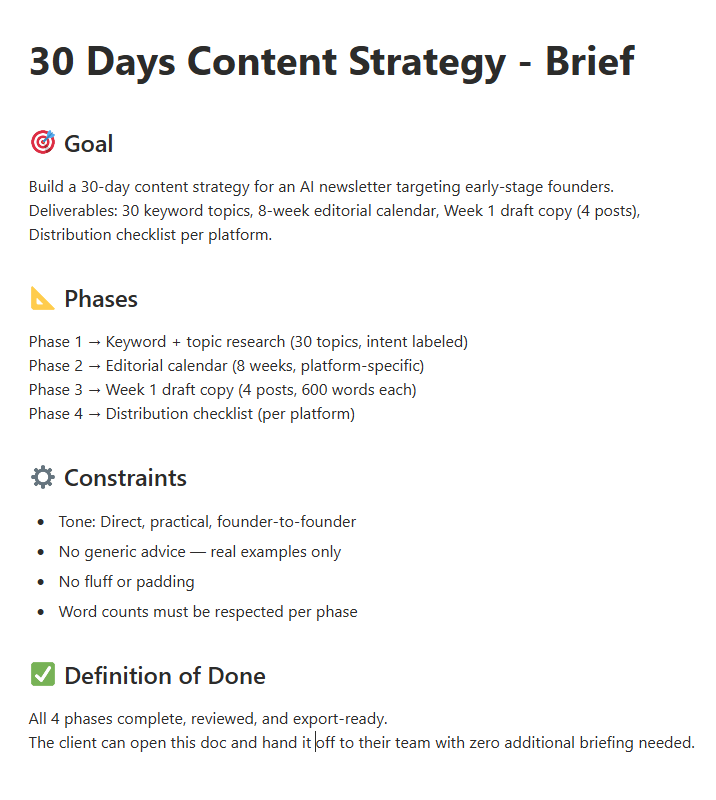
The definition of Done is the line most people skip. Without it, Claude will keep going - and going - long past the point of usefulness.
I know what you’re thinking.
“Why am I writing a brief for an AI?
Isn’t the whole point that I don’t have to do this?”
Here’s the honest answer: you’re not writing it for Claude.
You’re writing it for yourself.
Every time I skipped the brief, I spent 40 minutes mid-session trying to remember what I actually wanted.
The brief is 10 minutes of thinking that saves you 2 hours of correction.
Now - the first message.
This is where most people lose everything.
If this is useful, share it with one person who needs it. Takes 10 seconds.
