

OpenAI’s GPT-5.6 Sol, their strongest coding model, now runs inside Claude Code.
Not a hack. Not a jailbreak.
OpenAI’s own Codex lead is publicly sharing the recipe.

Most people saw this trending, saved the post, and moved on.
I actually set it up. Both ways. And one of the viral versions floating around has a broken command that silently fails.
By the end of this issue, you’ll get my Sol × Claude Code Command Kit -every working command, the fixed alias, and the cost-saver settings in one copy-paste block.
THE AI VAULT IS OPEN
Every guide, kit, template, and prompt library I’ve built - in one place. Organized. Searchable. Growing every week. Here’s how access works:
Paid Members: Get one specific guide related to the newsletter from the Vault every issue. Yours for a week.
Founding Members: Full access to everything inside the Vault. Every guide. Every kit. Every drop. Forever.
We’re 2-3 months away from 10K+ subscribers. The moment we hit that number, we’re launching a private free community - exclusively for AI In Public readers.
Last night I saw the setup trending on X and didn’t believe it.
So I opened my terminal and ran both methods back-to-back.
Fifteen minutes later, GPT-5.6 Sol was reviewing code that Claude wrote. Inside Claude Code. On one screen.
That’s when it clicked: this isn’t a party trick. It’s a workflow.
Old way vs New way
The old way:
Two terminals. Two tabs. Copy code from Claude, paste into Codex, and copy the critique back.
Ask → Copy → Paste → Lose context → Repeat.
The new way:
Claude writes → Sol critiques → You ship.
One terminal. Zero copy-paste. Two models with different blind spots are checking each other’s work.
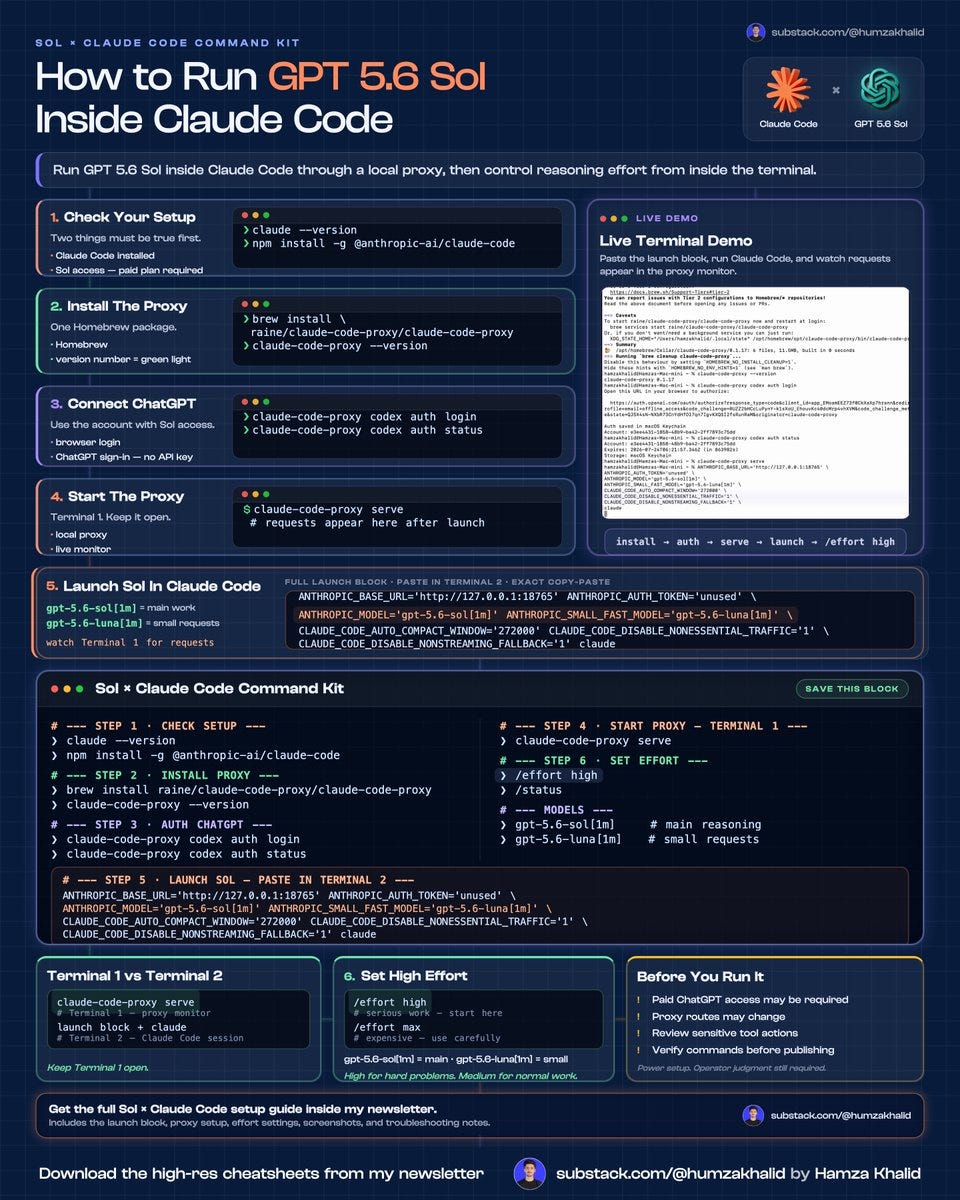
I have created a complete cheat sheet guide for this setup
Save this and USE it later:
The Setup
Everything below happens in your normal Mac Terminal. Nothing runs inside Claude Code until Step 5.
Step 1: Check your setup
Two things must be true before you start.
1. Claude Code is installed:
claude --versionIf that fails, install it:
npm install -g @anthropic-ai/claude-code2. Your ChatGPT plan has GPT-5.6 Sol access.
OpenAI currently lists Sol access in Codex for Plus and higher plans. Free accounts won’t work for this.
Step 2: Install the proxy
Paste this into your normal Mac Terminal:
brew install raine/claude-code-proxy/claude-code-proxyWait until it finishes. Then confirm the installation:
claude-code-proxy --versionYou should see a version number printed on the back. That’s your green light.
This is the current Homebrew command published by the proxy repository. No Homebrew? The repo also ships a one-line install script - it’s in the Command Kit at the end.
Step 3: Connect your ChatGPT account
Run:
claude-code-proxy codex auth loginA browser window opens. Then:
Sign in with the ChatGPT account that has GPT-5.6 Sol access
Approve the authorization
Return to Terminal
One thing that matters here: this route uses ChatGPT Plus or Pro sign-in, not an OpenAI API account, no API key. No credits. Your existing subscription.
Confirm that authentication worked:
claude-code-proxy codex auth statusA successful result displays your account and token expiry status.
Step 4: Start the proxy
claude-code-proxy serveThis is Terminal 1. Keep it open.
It runs a live monitor showing every request that passes through, which is also how you’ll know everything downstream is working.
