

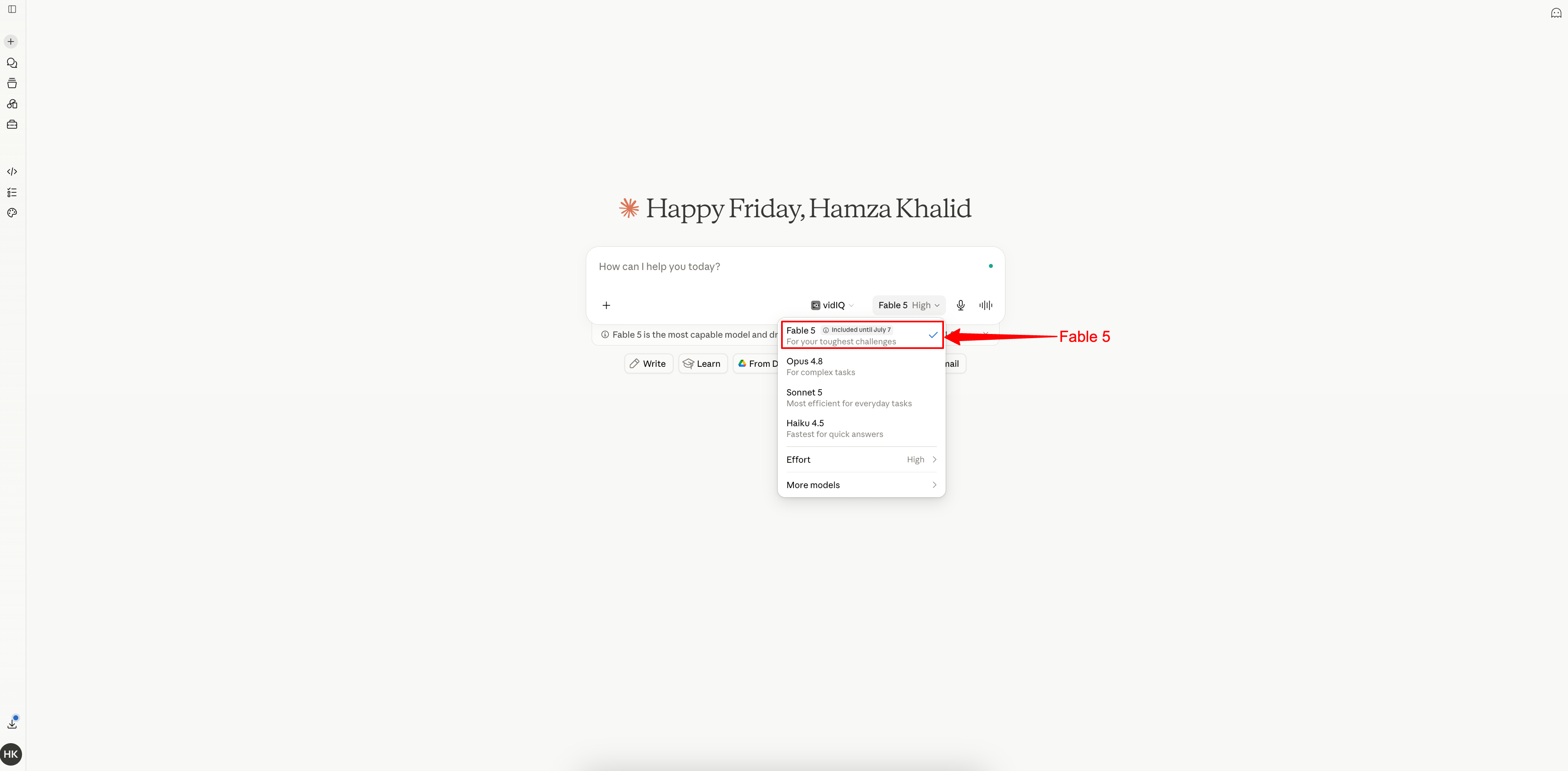
Fable 5 launched June 9.
I opened it the next day and threw it my hardest problem: restructure my entire Obsidian vault’s tag taxonomy, 5,500+ notes, without breaking a single internal link.

Four clarifying questions, then it just did it.
Two hours, one pass, zero broken links.
Three days later, it was gone.
Not rate-limited, gone.
Anthropic suspended it on June 12, 2026, to comply with US export controls.
Access came back on July 1, 2026, with updated safeguards layered on top of what shipped in June.
So this isn’t a launch-day reaction.
It’s what’s actually true now, after the model got pulled and came back different.
What you get today is free
By the end of this issue, you’ll have:
10 copy-paste prompts to test each capability yourself, tonight
Anthropic’s actual prompting playbook for Fable 5
A full master prompt: a cinematic 3D scroll-driven website
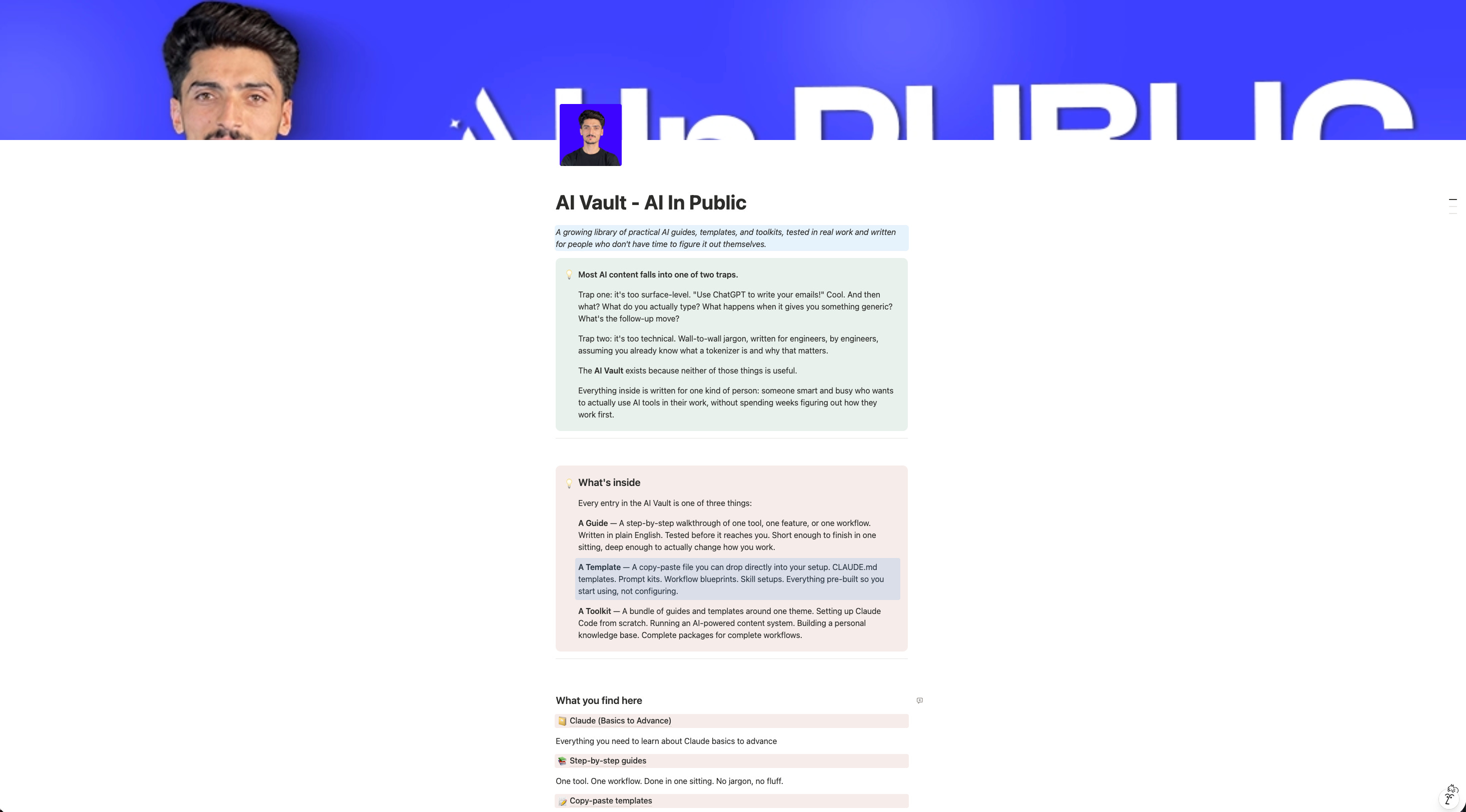
THE AI VAULT IS OPEN
Every guide, kit, template, and prompt library I’ve built - in one place. Organized. Searchable. Growing every week. Here’s how access works:
Paid Members: Get one specific guide related to the newsletter from the Vault every issue. Yours for a week.
Founding Members: Full access to everything inside the Vault. Every guide. Every kit. Every drop. Forever.
We’re 2-3 months away from 10K+ subscribers. The moment we hit that number, we’re launching a private free community - exclusively for AI In Public readers.
If you finish this issue and actually run the prompts, you will:
Stop wasting Fable 5 on tasks it’s overkill for (and know exactly when it’s worth the 2x price tag over Opus 4.8)
Know why your old Claude skills might be making Fable 5 perform worse, not better
Have a working 3D animated website built from a prompt sequence you can reuse for client work
Understand the refusal/fallback system well enough that you never mistake it for a bug again
10 things Fable 5 actually did
I cross-checked every one of these against Anthropic’s own launch documentation and independent coverage.
It beat Pokémon FireRed using only its eyes. No map tool, no game-state feed, no navigation harness. Screenshots in, moves out, start to finish. Previous Claude models needed a full scaffolding rig just to survive the first gym.
Stripe ran a 50-million-line Ruby migration through it in one day. That’s work that would normally eat a team’s time for two months.
It builds and uses its own memory. Anthropic tested this with Slay the Spire, a strategy deck-builder. Giving Fable 5 a persistent notes file improved its performance three times more than the same setup helped Opus 4.8, and it reached the game’s final act three times as often.
It designed real drug candidates. Using Mythos 5 (Fable 5’s unrestricted sibling, more on that below), Anthropic’s protein design team saw roughly a 10x speedup on parts of drug discovery. Nine of fourteen protein targets produced strong candidates now under further investigation. One hypothesis about an E. coli protein was independently confirmed by a lab that didn’t know Mythos had produced it.
It played Factorio like an engineer. Factorio punishes short-term thinking; you need working supply chains, not lucky clicks. Fable 5 planned and built an automated factory on its own.
It built a CAD tool, then used the CAD tool it built. A full browser-based CAD editor with its own AI copilot, created by Fable 5, then used by Fable 5 to design a 3D-printable object. Tool and output, one session.
It wrote music having never “heard” any. A fluid simulation with motion synced to an EDM remix, both generated in code, based purely on pattern understanding of musical structure.
In genomics, it outperformed a model published in Science, at 100x smaller size. Mythos 5 spent over a week largely autonomous, working with single-cell data across 138 animal species, and its trained model beat the published benchmark.
It survived 1,000+ hours of dedicated red-teaming with zero universal jailbreaks found before external security researchers were brought in for another round.
Its safety system doesn’t just refuse; it fails over. Instead of hitting a dead end, sensitive requests in cybersecurity, biology, or chemistry route automatically to Claude Opus 4.8. You still get an answer. It’s just not from Fable 5.
Old way vs New way
Old way: treat every new Claude release the same, run your existing prompts and skills unchanged, judge based on vibes after five minutes.
New way: re-evaluate your entire prompt and skill stack every time a model like this ships, because the instructions that made a weaker model behave well can actively hold a stronger one back.
That single idea is the most important thing in Anthropic’s own prompting guide for this model, and almost nobody is talking about it. So let’s go there next.
Loop Engineering, Skills, Vision & Memory: the operating system
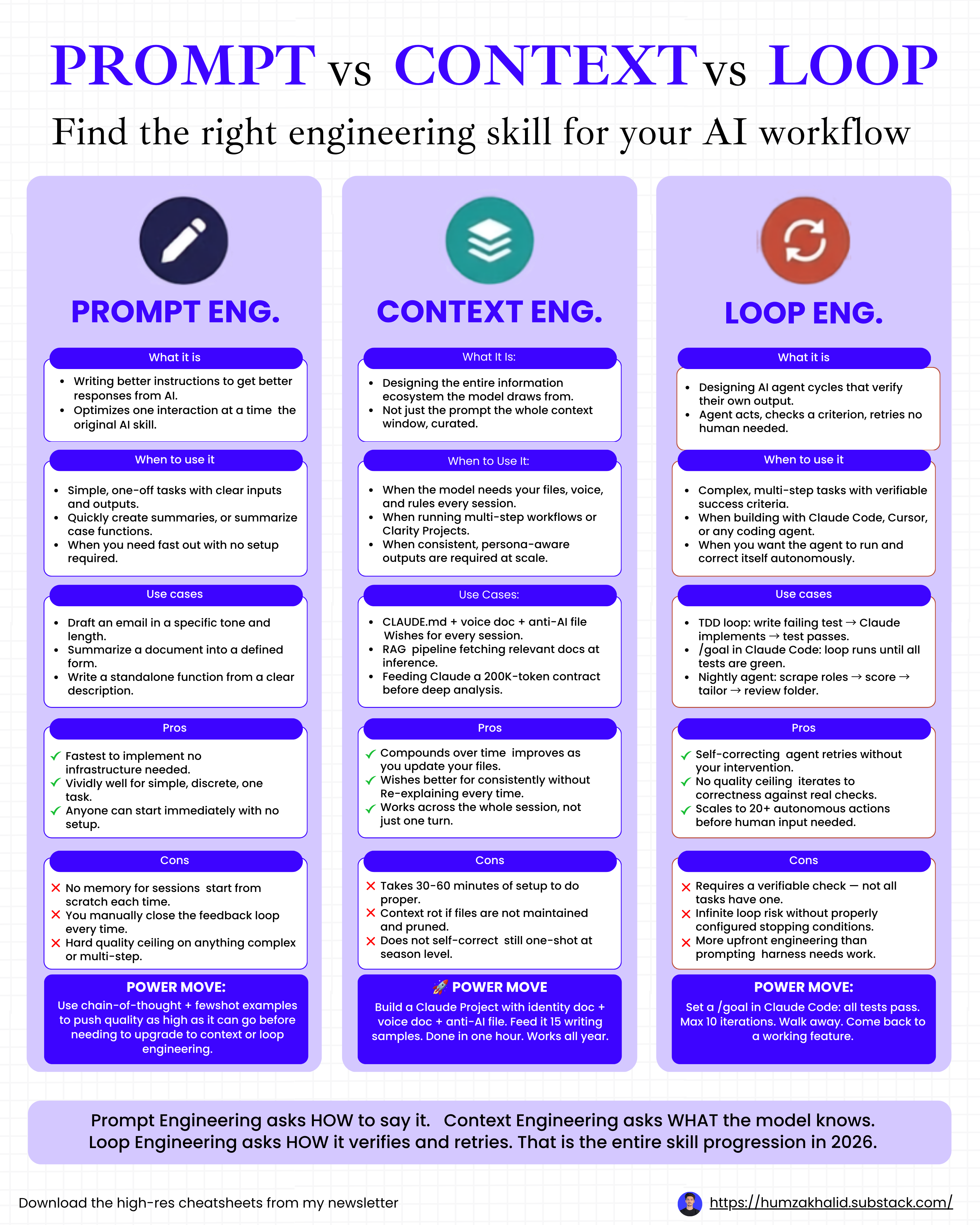
Loop engineering 101
Fable 5 is built for autonomous work, not single-turn replies, and Claude Code gives you two commands to run it that way.
/goal Launches a task that runs until it’s actually done: “/goal keep researching until you can answer these 5 questions.”
/loop Runs on an interval and doesn’t stop until you cancel it: “/loop every 30 minutes, flag any email that actually needs me.”
Think of it like this: instead of you sitting in the loop between every prompt and every fix, you design the loop once and Fable 5 handles the back-and-forth, only surfacing when it hits your success criteria.
The barbell strategy. This is the move for keeping token costs sane on long runs. Use Fable 5 for the first 10%, planning the loop. Hand the middle 80%, the actual grunt work, off to cheaper subagents like Sonnet or Haiku. Bring Fable 5 back for the last 10% to verify the finished work against the original spec. You get Fable-level judgment at the two moments that matter most, planning and verification, without paying Fable-level pricing for routine execution.
Building skills for Fable 5, three ways
A skill is a recipe you teach once, and Fable 5 reuses it forever. I build mine one of three ways:
From a past chat. The fastest way in. If you’ve already done real work in Claude- financial analysis, writing, research, whatever- you can ask it to analyze that whole conversation, pull out your patterns and preferences, and turn it into a reusable skill.
From scratch. Open the skill creator, list out everything you do regularly (a Google Sheet works fine for this), and build the skill from that list.
From data. My favorite, and the highest-leverage of the three. Feed it a real dataset, hundreds of tweets from creators in your niche, for example, and have it mimic the tone and structure. Every piece of output becomes training data. You give feedback on what landed and what flopped, and the skill compounds.
One thing worth knowing: your skills live in your local folder, not inside Claude’s memory. You own them. You can port them to a different model entirely the day you want to.
Where vision actually pays off
Fable 5’s vision is one of the most underused parts of this whole release.
Real use cases beyond the Pokémon demo:
Document & data - pull exact figures out of charts, graphs, and scientific figures buried in PDFs
Design & UI critique - drop a screenshot of any interface and get a specific, detailed breakdown of what’s wrong with it
Development - screenshot a dashboard and have it reverse-engineer the logic underneath
Content & creative - drop a screenshot of a creative you like and have it replicate the structure, not the exact asset
Agentic / computer use - read a live interface and act on it directly, no helper harness required
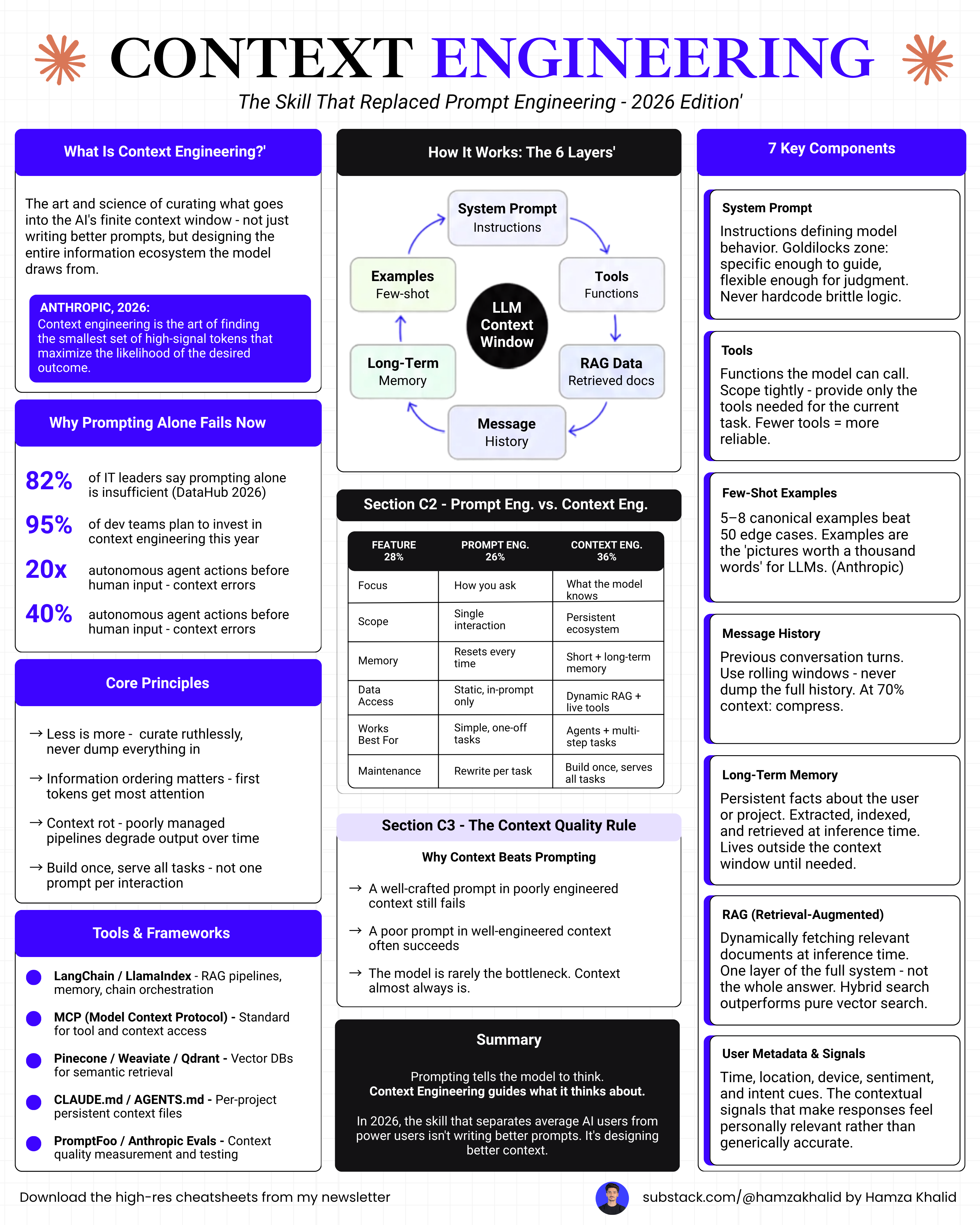
The context system (memory that actually persists)
None of the above hits its ceiling without context. Here’s the four-step setup I run:
Step 1: a local folder. Something like /claude-context on your machine. Everything in it becomes context. Fable 5 can pull from every session: a map of your business, your standard operating procedures, one-pagers on key clients or projects, strategy docs, a running log of decisions and outcomes.
Step 2: a memory file. Inside that folder, claude-memory.md. This is where Fable 5 writes down what it learns about you over time. One standing instruction makes it self-updating: “Every time I give you major context about my business or situation, update claude-memory.md with the key details.”
Step 3: an instructions file. claude-instructions.MD sets the rules: how memory gets stored, how output gets formatted, what it should always or never do. It’s the standing brief Fable 5 reads before every session.
Step 4: Connect it. Point Claude Code at the folder with /add, or reference it directly in your CLAUDE.md. From that point on, every loop, every skill, every session starts with Fable 5 already knowing your world.
Share this and get rewarded
Go to AI In Public → scroll to the Leaderboard section → copy your referral link → share it with anyone.
Every signup through your link moves you up the board and unlocks real rewards.
At the end of every month, we check the leaderboard.
The top 3 get our best guide - DMed directly, no opt-in required.
The real prompting guide (not a workaround, the actual playbook)
I read Anthropic’s official Fable 5 prompting documentation front to back and tested every pattern in it. Here’s what actually changes how well Fable 5 performs for you, translated out of documentation-speak.
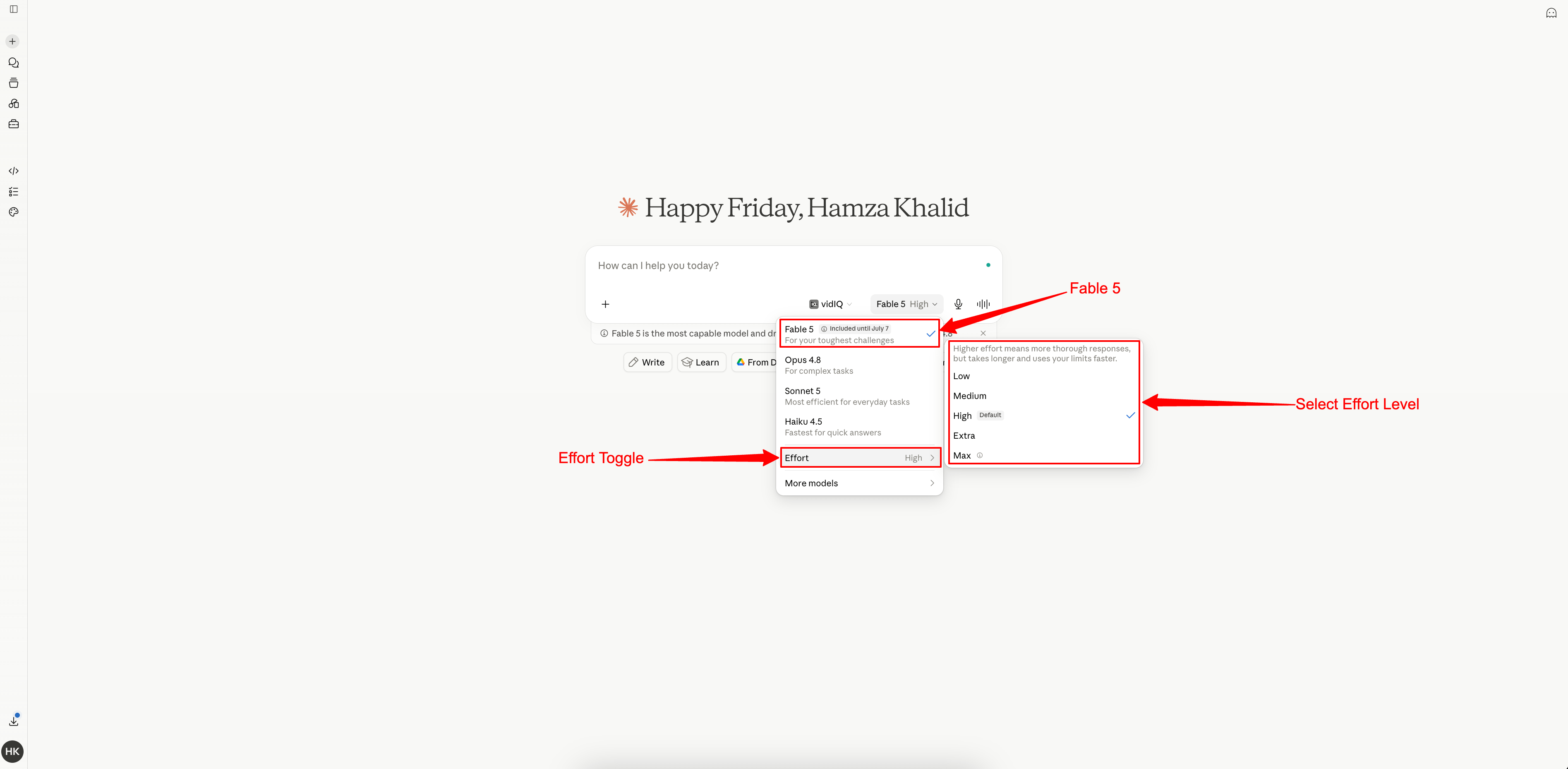
1. Pick an effort level on purpose
Fable 5 has adjustable effort, from low to high. I default to high for anything real, drop to medium for routine stuff, and only reach for xhigh on genuinely hard problems. Here’s the thing nobody tells you: low effort Fable 5 often beats xhigh effort on older models. Don’t assume you need to max it out. I wasted real money before I figured this out.
2. Expect long turns, and tell it not to overthink simple asks
Fable 5 will happily run for minutes, sometimes hours, on a hard task. On simple tasks, it can start over-planning if you don’t set a boundary. This is the line I now paste into every serious session:
When you have enough information to act, act. Don't re-derive facts we've
already established, don't re-litigate a decision I've already made, and
don't narrate options you're not going to pursue. If you're weighing a
choice, give me your recommendation, not a full survey.
3. Give it the “why,” not just the “what”
This one changed my output quality more than anything else on this list. Fable 5 uses context about intent to make better calls on its own. I stopped writing bare instructions and started framing every real request like this:
I'm building [X] for [audience]. They need [outcome]. Given that, here's
what I want you to do: [request].
4. Make it show its work with receipts, not vibes
On long runs, models can report progress that sounds confident but isn’t grounded in anything real. I now add this to every multi-step task:
Before you tell me something is done, check it against an actual result
from a tool call in this session. If something isn't verified yet, say so.
If a test failed, tell me it failed and show me the output. Don't hedge
and don't oversell.
This one nearly eliminated the “I finished it!” reports that turned out to mean “I think I finished it.”
5. Tell it explicitly what NOT to do on its own
Fable 5 is proactive by default. That’s usually great. Occasionally it’ll draft an email you didn’t ask for or create a backup branch you didn’t request. Set the boundary up front:
If I'm describing a problem or thinking out loud, your job is to tell me
what you found, not to fix it. Wait for me to ask before you make changes.
Before you run anything that changes real state, double check the evidence
actually supports that specific action.
6. Let it delegate
Fable 5 is much better than prior models at running multiple subagents in parallel and managing them without babysitting. If your task has independent pieces, say so directly:
Break this into independent subtasks and delegate what can run in
parallel. Keep working on your part while those run. Only step in if
a subagent goes off track.
7. Build a memory file
This is the single highest-leverage habit from the whole guide. Give Fable 5 a place to write notes across a session, or across sessions:
Keep a running notes file. One lesson per entry, one-line summary at the
top. Record what worked and what didn't, and why it mattered. Update an
existing note instead of duplicating it. If a note turns out to be wrong,
delete it, don't just add a correction.
I use this exact pattern for my LinkedIn-comment-meme skill now, and it’s genuinely gotten sharper at matching my face-lock rules over a week of sessions.
8. On autonomous runs, tell it not to stop and ask permission
If you’re running Fable 5 unattended (overnight, on a schedule, in a pipeline), it can sometimes pause and ask “want me to continue?” when nobody’s there to answer. Add this for any unattended run:
You're operating without me watching in real time, so don't ask "should
I..." questions, just proceed on anything reversible that follows from
the original request. Before you end your turn, check your last message.
If it's a plan, a promise, or a question instead of finished work, go do
the work now.
9. Rewrite your old skills; don’t just port them
This is the counterintuitive one. Skills built for weaker models tend to be extremely prescriptive, step-by-step instructions that assume the model needs hand-holding. On Fable 5, that same prescriptiveness can box it in and make output worse than if you’d just described the outcome you wanted. When I moved my skill library over, I went through each one and asked: Is this teaching Fable 5 something it doesn’t already know how to do, or is this micromanaging a model that’s smarter than the instructions assume?
10. Don’t ask it to narrate its own reasoning in the response
This is a real, practical gotcha and it’s worth knowing about for reasons that have nothing to do with getting around anything: if your prompt or skill tells Fable 5 to “explain your thinking step by step” as part of its visible answer, that specific pattern can trip a safety classifier built to catch reasoning extraction attempts, and you’ll get bounced to Opus 4.8 for a completely benign task. If you genuinely need to see its reasoning process, that’s what the model’s structured thinking output is for, not asking it to retype its internal thoughts into the reply.
Real-world example: building a 3D animated website live
This is where I put the whole prompting guide to work at once.
Goal: not a five-line “build me a website” prompt, a real master prompt, the kind you write once, save, and reuse on every client project.
I built mine around a cinematic scroll-driven product site, the same genre as the Apple-product-page style sites that convert insanely well for launches.
Below is the exact master prompt.
Please copy the whole thing into Terminal with Fable 5 selected; don’t summarize it first or trim it down.
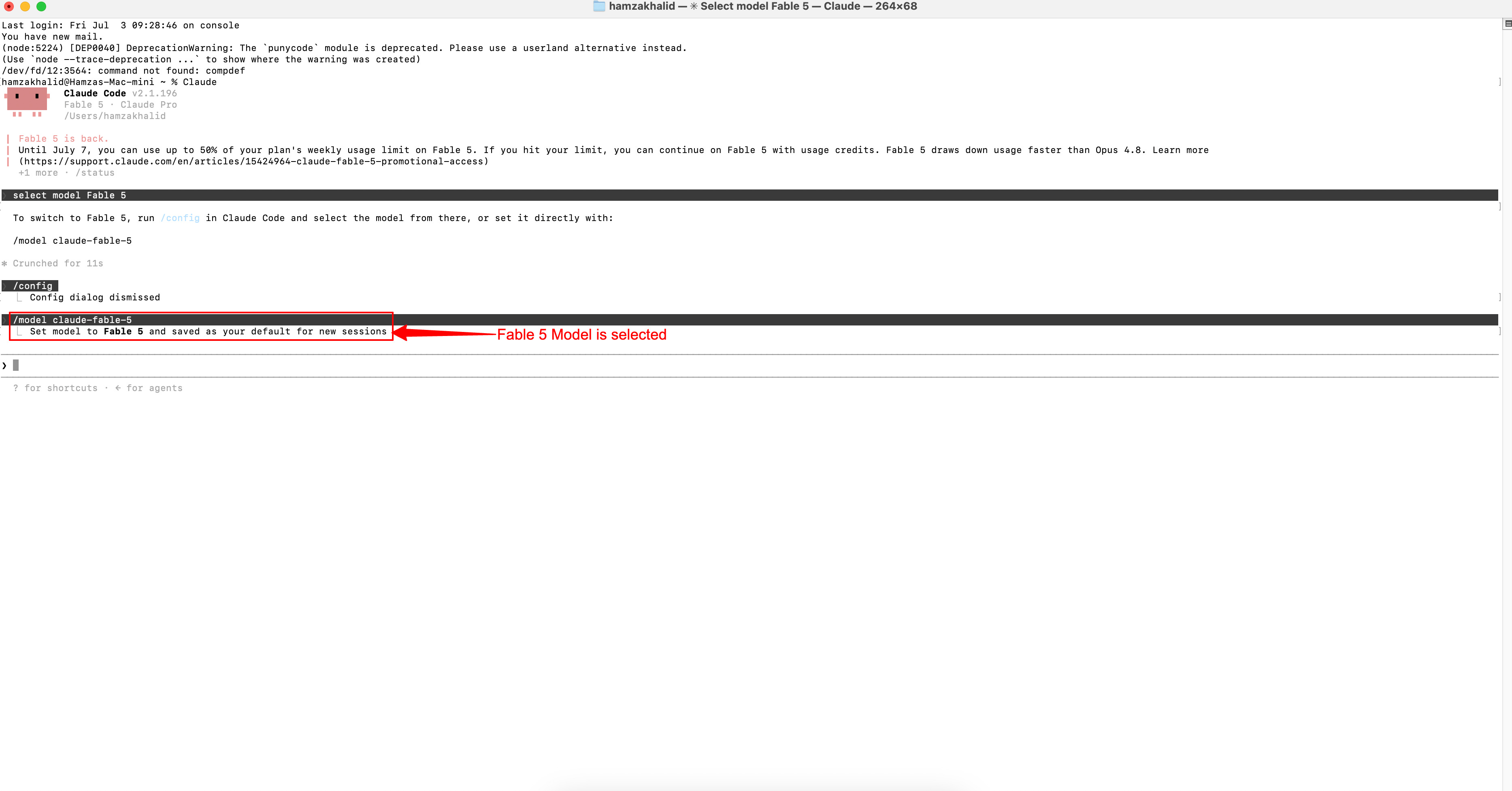
THE MASTER PROMPT (copy everything below this line)
Build a cinematic, scroll-driven 3D website for a flagship product
(default to an original sports car concept unless I specify a real
product, in which case use only generic/placeholder assets, not any
real brand's actual design files or logos). The site should feel like
an Apple product page crossed with a configurator: every scroll input
drives one continuous, physically-smooth animation, not discrete page
sections. The goal is retention (people keep scrolling to see what
happens next) and conversion (ending in a clear CTA).

TECH STACK
- Three.js (or React Three Fiber if using React) for the 3D model/scene
- GSAP + ScrollTrigger for scroll-synced timelines (pin sections, scrub
  animation tied to scroll progress, not scroll speed)
- Lenis or similar for smooth/inertia scrolling so the scrub feels
  buttery, not jumpy
- A placeholder glTF/GLB model, note in comments exactly where a
  production model would be swapped in
- Native <video> elements (object-fit: cover, muted/autoplay/loop),
  not iframes
- WebGL fallback: if unsupported or low-power, serve a pre-rendered
  video/image sequence instead of failing

STRUCTURE — SCROLL AS TIMELINE
Treat the page as one GSAP timeline broken into scroll-pinned acts.
Each act pins the viewport while scroll distance scrubs its animation,
then releases into the next. No hard cuts, every transition is a morph
(camera arcs, not cross-fades).

Act 1 — Reveal (0-15% scroll): dark stage, single spotlight, product
assembles from off-frame parts snapping together with a subtle bounce,
kinetic-type headline syncs to the last part locking in, ghost CTA
"scroll to explore."

Act 2 — Exploded view (15-35%): product explodes apart along each
part's natural axis, driven by scroll progress so scrolling back
reverses it live. Each part gets a leader-line label callout. Camera
orbits slowly during the explosion for parallax.

Act 3 — Reassembly + full rotation (35-45%): parts snap back together,
camera pulls back for a scroll-scrubbed 360 turntable (scroll down =
rotate right). This is the hero shot: rim lighting, reflections,
ground-plane reflection.

Act 4 — Detail deep-dives (45-80%): camera dollies/pans/pushes into
each of 3-4 key features in sequence, the rest of the product blurs or
fades to silhouette, a spec callout panel slides in per feature.
Numbers (specs, stats) count up on entry. Every camera move is
continuous across features, never a hard reset.

Act 5 — Environment/lifestyle (80-90%): product transitions from a
studio background into a real-world environment via a full-bleed
video layer, matched to the product's last camera angle so it reads
as one continuous scene. Parallax across foreground/midground/
background video layers.

Act 6 — Conversion (90-100%): scroll unpins, normal flow resumes.
Primary CTA, secondary CTA, trust signals. Sticky header CTA reappears
once the user scrolls past Act 1.

MOTION PRINCIPLES
- Everything scroll-scrubbed inside pinned acts, nothing autoplays
  independent of scroll, the user should feel like they're driving it
- power2.inOut or custom cubic-bezier easing on all transforms, never
  linear
- 60fps target: transform/opacity only, will-change set deliberately,
  avoid layout-thrashing properties
- Cursor-follow micro-parallax tilt on the 3D model during scroll-idle
  moments
- Persistent thin progress indicator showing position through the acts
- Preload the next act's assets one act ahead so nothing stutters

VIDEO INTEGRATION
- Background video layers (position: fixed, or a canvas texture if
  compositing into the 3D scene)
- CSS mix-blend-mode + gradient overlays to keep text legible over video
- Sync playback to scroll where it matters:
  video.currentTime = scrollProgress * video.duration
- Clearly commented placeholder paths (e.g. /videos/hero-loop.mp4)
- WebM + MP4 fallback, lazy-load anything below the fold

VISUAL LANGUAGE
- Near-black stage background, one confident accent color, off-white
  type
- Bold condensed sans for kinetic headline reveals, clean geometric
  sans for spec data
- Studio three-point lighting on the 3D model, HDRI environment map
  for realistic reflections
- Consistent foreground/midground/background parallax throughout, not
  just in the hero

PERFORMANCE & ACCESSIBILITY
- Detect prefers-reduced-motion, serve simplified fades instead of
  full scroll-scrub, skip the explode animation
- Lazy-load the 3D model, defer Three.js init until hero is in view
- Minimal branded loading state while assets load
- All CTAs and spec text stay in the DOM and screen-reader accessible
  even though visually driven by canvas/video

DELIVERABLE
Single-page app (or one HTML file if vanilla JS), with:
- Clear comments marking each Act
- A config object at the top for easing, colors, and asset paths
- Mobile fallback: replace scroll-scrub with swipe-triggered or
  auto-advance-paused-on-tap sequences, since pinned scroll-scrub is
  often janky on mobile Safari

Before you tell me this is done, verify it against something real:
confirm the 3D scene renders without console errors, confirm each
act's scroll-trigger actually fires at the right scroll position, and
confirm mobile fallback engages correctly. Show me the evidence for
each, don't just tell me it works.
Notes on using this prompt
If Fable 5 tries to condense scope on a single pass, split it: paste the tech stack and structure sections first to get the scaffold, then feed the motion/video/visual sections as a follow-up refinement turn. Swap the product description for whatever you’re actually building; this works identically for a sneaker drop, a SaaS launch, or a real estate flagship listing. The act structure doesn’t change; only the content inside each act does.
This website is developed with a single prompt, no back and forth, no video and image reference. It just took 2 minutes to develop only. Fable 5 did the everything for me.
Slow down here for a second, because this is the part people skip.
The biggest mistake I see in how creators are covering Fable 5 right now is treating it like a bigger version of the last model.
It’s not. It’s a model built to be trusted with real autonomy, and it will only reward you for that if you actually give it the room, the context, and the boundaries to use it.
If you’re still writing five-line prompts and judging the result in ten seconds, you’re testing a different, weaker version of this model than the one that exists.
The gap between people getting mediocre results and people getting the results in this issue isn’t access. It’s whether they actually rewrote how they talk to it.
ClaudeKit is the slash command and skill suite I built for exactly this kind of work - the agent loop, the reflection prompts, the memory structure, the guardrails- all pre-built for Claude Code as reusable skills, so you’re not rebuilding them from scratch every time. → theclaudekit.com
Recap checklist
[ ] Fable 5 launched June 9, got suspended June 12 over export controls
[ ] Came back July 1 with updated safeguards
[ ] Fable 5 = Mythos-class capability with safety classifiers
[ ] Mythos 5 = same model, restricted access, Project Glasswing only
[ ] Sensitive requests don’t dead-end; they fall back to Opus 4.8 automatically
[ ] Default to
higheffort, don’t assumexhighis always better[ ] Give it the “why” behind requests, not just the “what”
[ ] Build a memory file for anything that spans sessions
[ ] Rewrite old skills for outcomes, not step-by-step hand-holding
[ ] Never ask it to narrate its reasoning inside the visible response
[ ] Set explicit boundaries before long autonomous runs
[ ] Run the self-verification pattern on every build task
Upgrade to keep reading
The free version of this newsletter gets you the what.
Paid members get the how, in detail.
Every issue comes with a resource that took me hours to build and takes you 10 minutes to use.
Paid Members: One hand-picked AI Vault guide every issue, chosen for what we covered today.
Founding Members: Full AI Vault access. Every guide. Every kit. Forever. Plus, first access to the private community at 10K subscribers.
Everything above is free. What’s below is for paid subscribers.
