

Most people think a one-person company means doing everything yourself.
It doesn’t.
It means being the only human on the team.

The first version is 80-hour workweeks and a nervous breakdown disguised as a business.
The second version is what I run right now.
One person. Three products. Zero employees.
The rest? Delegated to an AI that knows my business better than most employees would.
By the end of this issue, I’m giving away my One-Person Company OS - my full AI delegation system, weekly planning template, and the exact Claude Projects structure I use to run AI in Public.
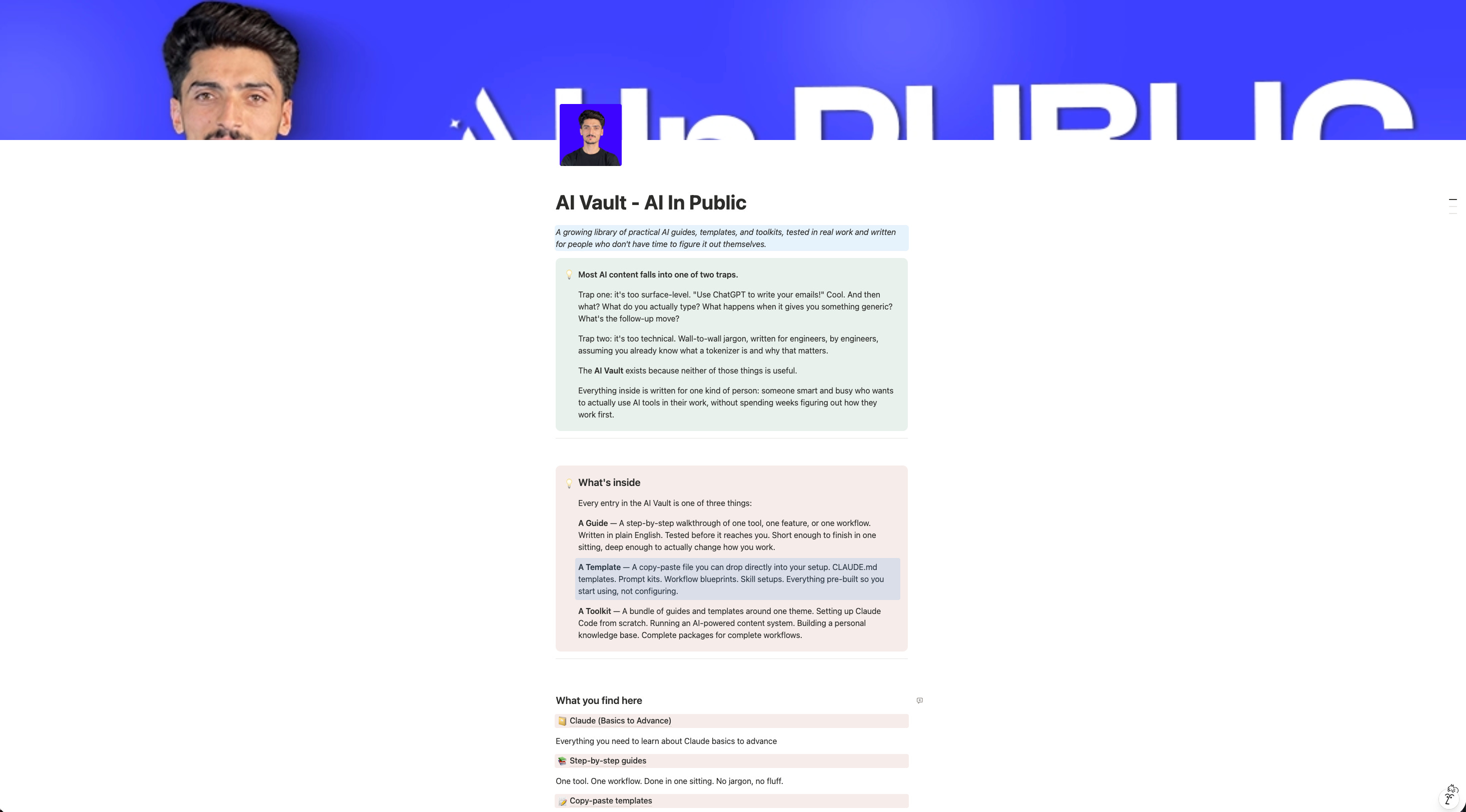
THE AI VAULT IS OPEN
Every guide, kit, template, and prompt library I’ve built - in one place. Organized. Searchable. Growing every week. Here’s how access works:
Paid Members: Get one specific guide related to the newsletter from the Vault every issue. Yours for a week.
Founding Members: Full access to everything inside the Vault. Every guide. Every kit. Every drop. Forever.
We’re 2-3 months away from 10K+ subscribers. The moment we hit that number, we’re launching a private free community - exclusively for AI In Public readers.
Sam Altman said it out loud last year.



A one-person company will reach a billion-dollar valuation.
Not a lean startup. Not a small team. One person.
The reason it’s possible now: AI handles the execution layer. Research, writing, operations, client work, content - all of it.
You stay in the only seat AI can’t fill.
The decision seat.
That’s the company we’re building here.
If this is useful, forward it to one person who’s been struggling with Claude Code. It takes 10 seconds.
By the end of this issue, you’ll have the exact structure I use to run a one-person company with AI as the operating layer.
You won’t just be faster at tasks.
You’ll stop doing tasks that never needed your brain.
You’ll stop being the bottleneck in your own business.
And you’ll have a system that runs while you sleep - not because that’s a good headline, but because I tested this and it actually does.
OLD WAY vs NEW WAY
Old way: You sit down to write. You start from scratch. You bounce between 4 tabs trying to remember what you decided last week. An hour passes. You have a paragraph. You feel behind before you’ve started.
New way: You open a Project that already knows your voice, your audience, your goals, and last week’s decisions. You give it a direction. It gives you a 90% draft in 4 minutes. You spend your hour editing - not producing.
Old way: Every new task = full context dump. “Here’s who I am, here’s my audience, here’s the tone, here’s what I did before...”
New way: The Project already has all of that. You say what you need.
The context lives in the system. Not in your head.
STEP-BY-STEP WALKTHROUGH
How I actually set this up
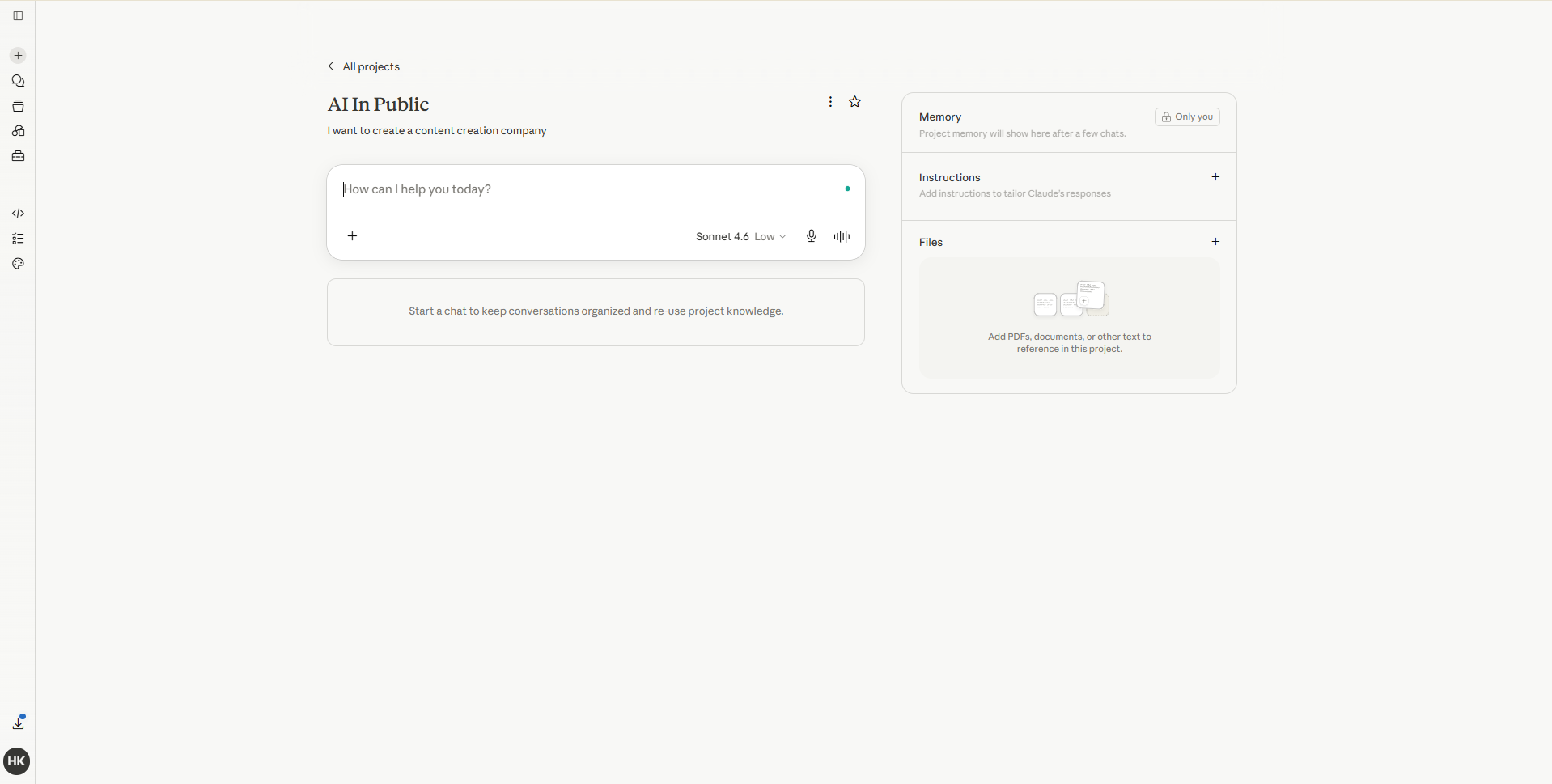
Step 1: Build your Claude Project as a business brain
Go to Claude. ai → Projects → New Project.
Name it after your business. Not “My Newsletter.” Your actual business name.
This Project is your operating system. Everything lives here.
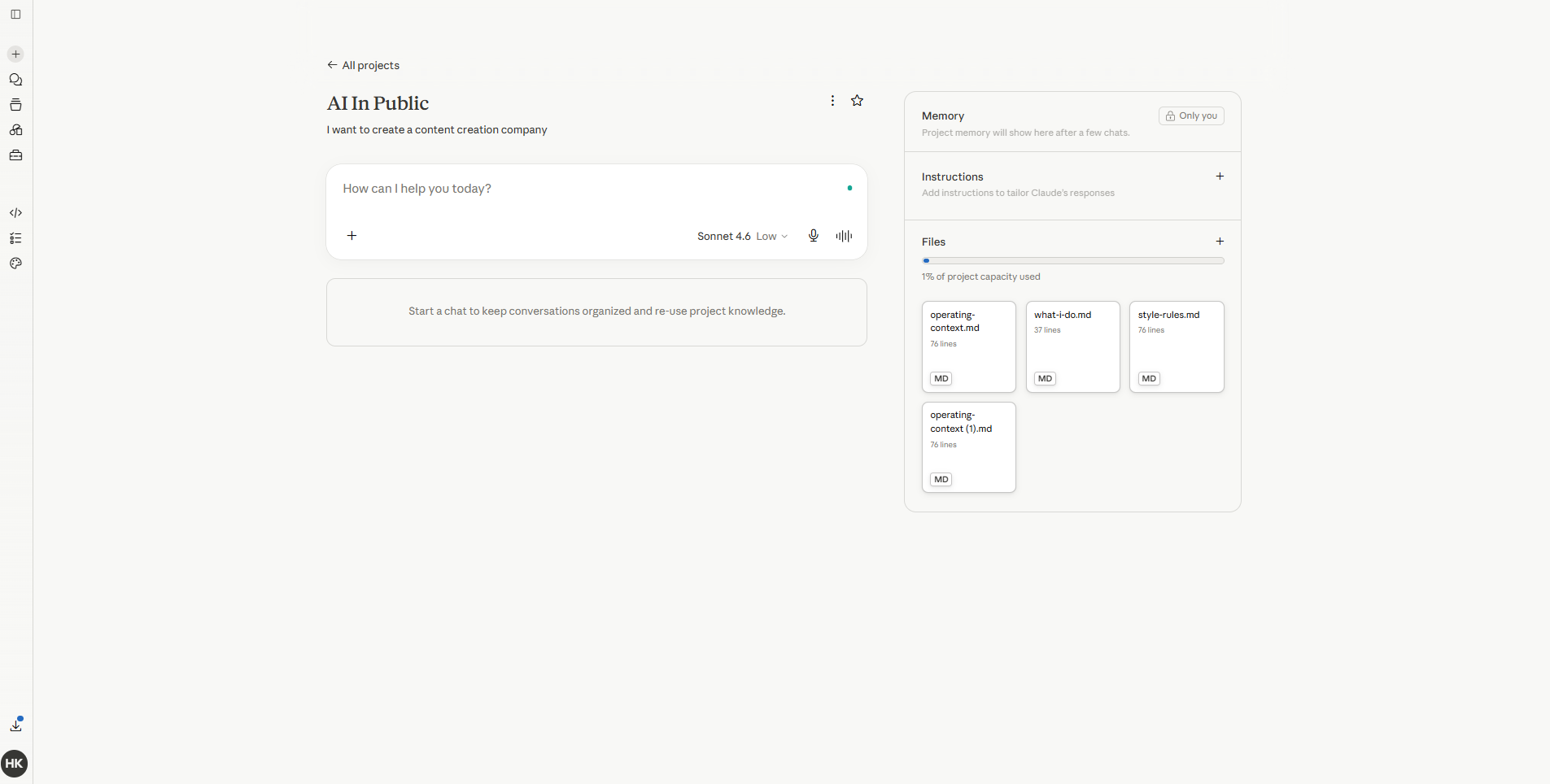
Step 2: Load the four files that run everything
Every one-person company needs exactly four files in their Project:
who-i-am.md: Your voice. Your audience. Your standards. What good work looks like. What you will never publish.
what-i-do.md: Your offers. Your goals. Your current focus. What you’re saying yes and no to this quarter. Update this every 90 days.
style-rules.md: Every word you hate. Every sentence pattern that sounds like AI. Every rule about formatting, length, and tone. Start with 20 rules. Add 2 every week.
operating-context.md: Ongoing projects, deadlines, decisions you’ve made. The running log of your business. Update it at the start of every week.
Without these files, AI gives you generic output.
With them, you get your output.
Step 3: Write your weekly brief, not your weekly prompts
Most people treat AI like a vending machine. Put in a prompt. Get out a result.
That’s not a business system. That’s a one-off.
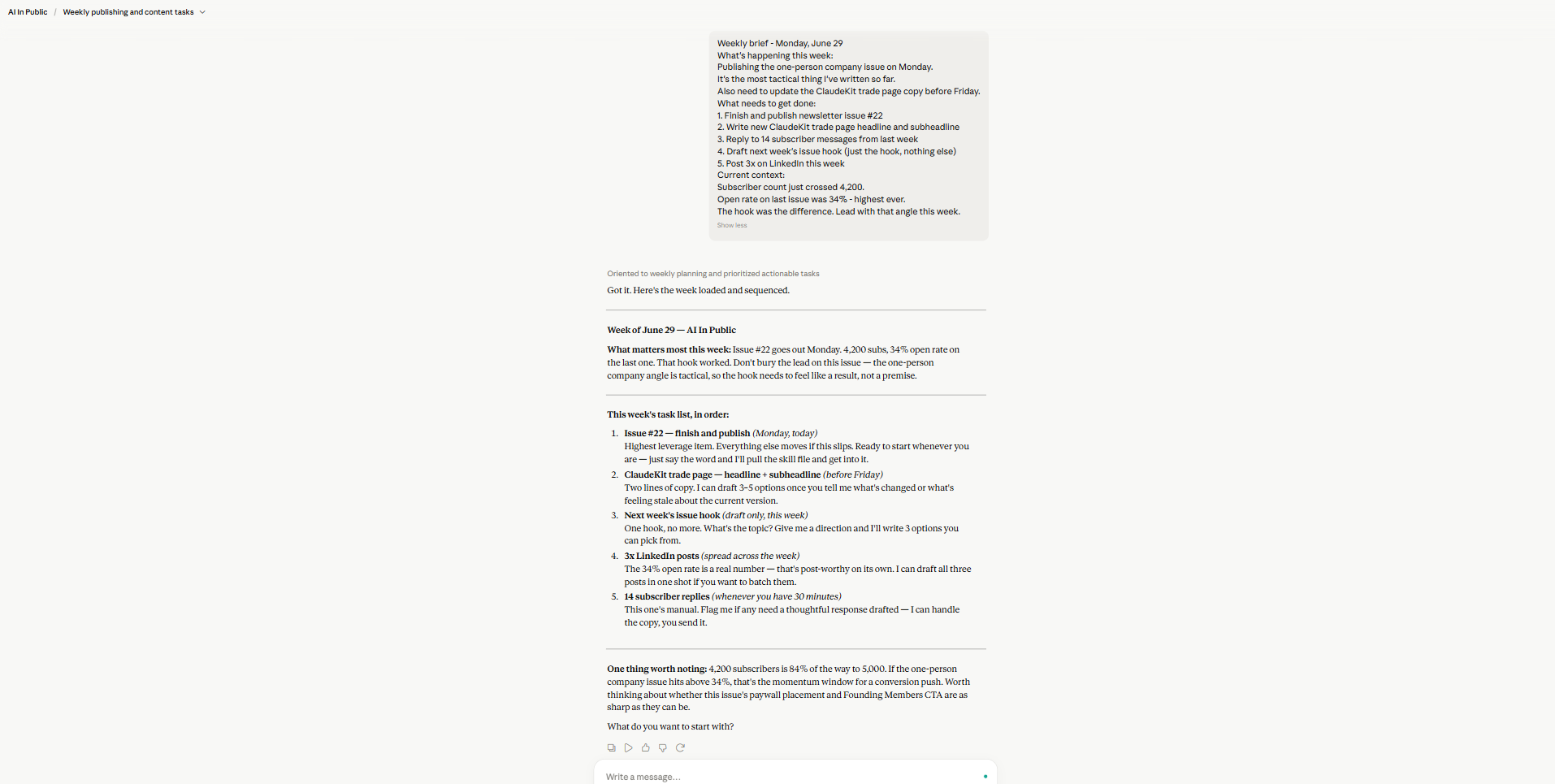
Instead, every Monday morning, write a 3-paragraph brief.
Weekly brief — [Date]

What's happening this week:
[1-3 sentences about what you're focused on]

What needs to get done:
[List of 3-5 deliverables]

Current context:
[Anything that's changed since last week — new info, changed goals, updated decisions]
Drop this into your Project at the start of every session.
Claude now has your week.
It doesn’t need to guess. It doesn’t fill gaps with assumptions. It works from what you actually need.
Step 4: Assign AI a role, not a task
The biggest mistake I made early on: I was assigning tasks.
“Write a LinkedIn post about Claude.” “Draft an email to subscribers.” “Summarize this article.”
Tasks produce output.
Roles produce systems.
When I gave Claude a role - “You are the content strategist for AI in Public. Your job is to help me show up consistently for 4,200 subscribers without me burning out.” - The quality of everything shifted.
It stopped just answering questions. It started thinking about the bigger picture.
Try this prompt to assign the role:
You are the operating partner for [your business name].

You have full access to my business files in this Project.
Your job is not to answer questions. It's to help me make better decisions, produce better work, and build systems that don't require me to be present for every task.

When I bring you a task, your first question should always be:
"Is this something I should do once, or should we build a system for it?"

Start by reading all files in this Project.
Then ask me what I'm working on this week.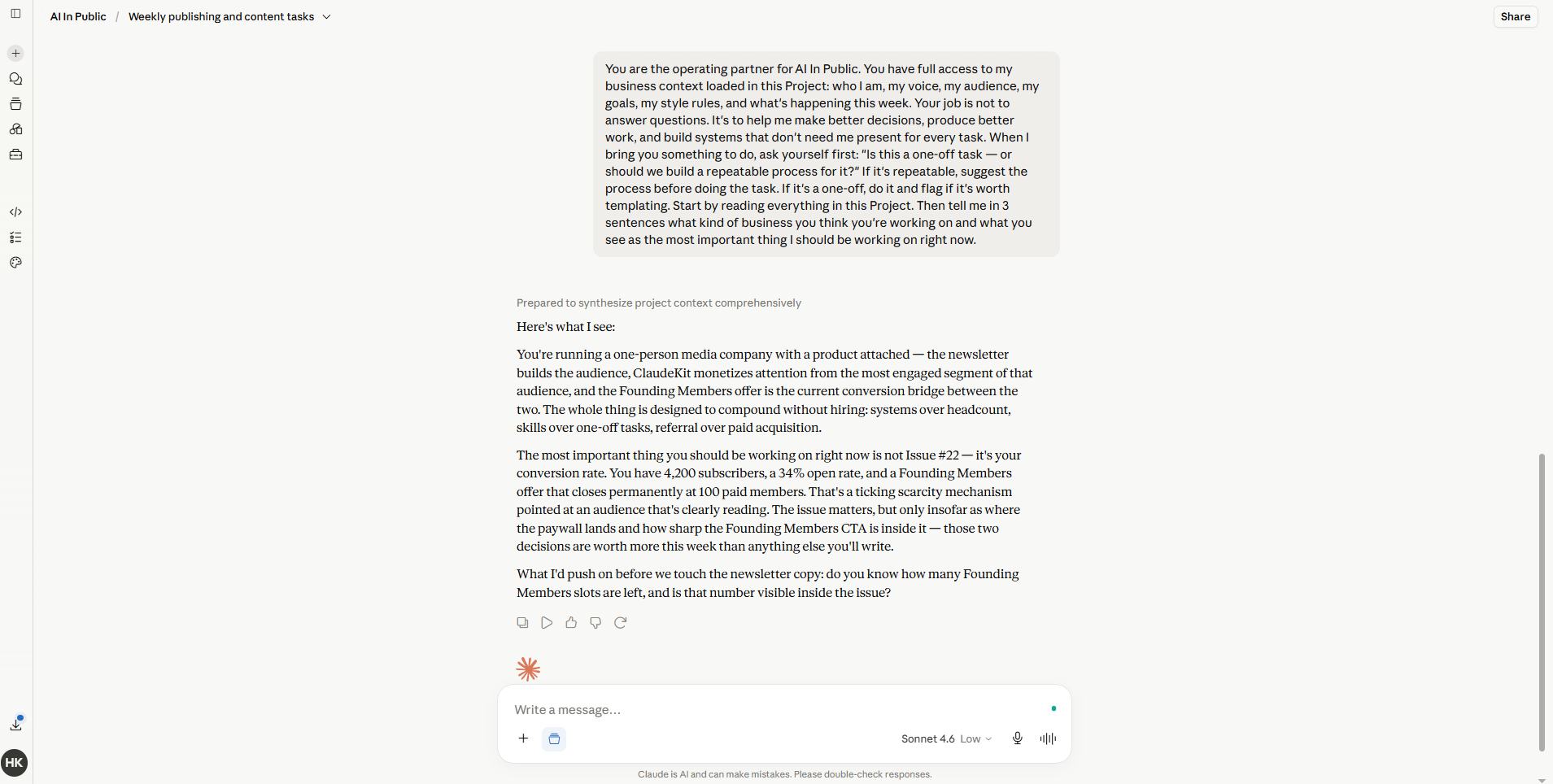
Step 5: Build one process per output type
For every repeating deliverable in your business, you need a process file.
Not a template. A process.
A template is a blank doc with headers. A process tells Claude exactly how to think through the work.
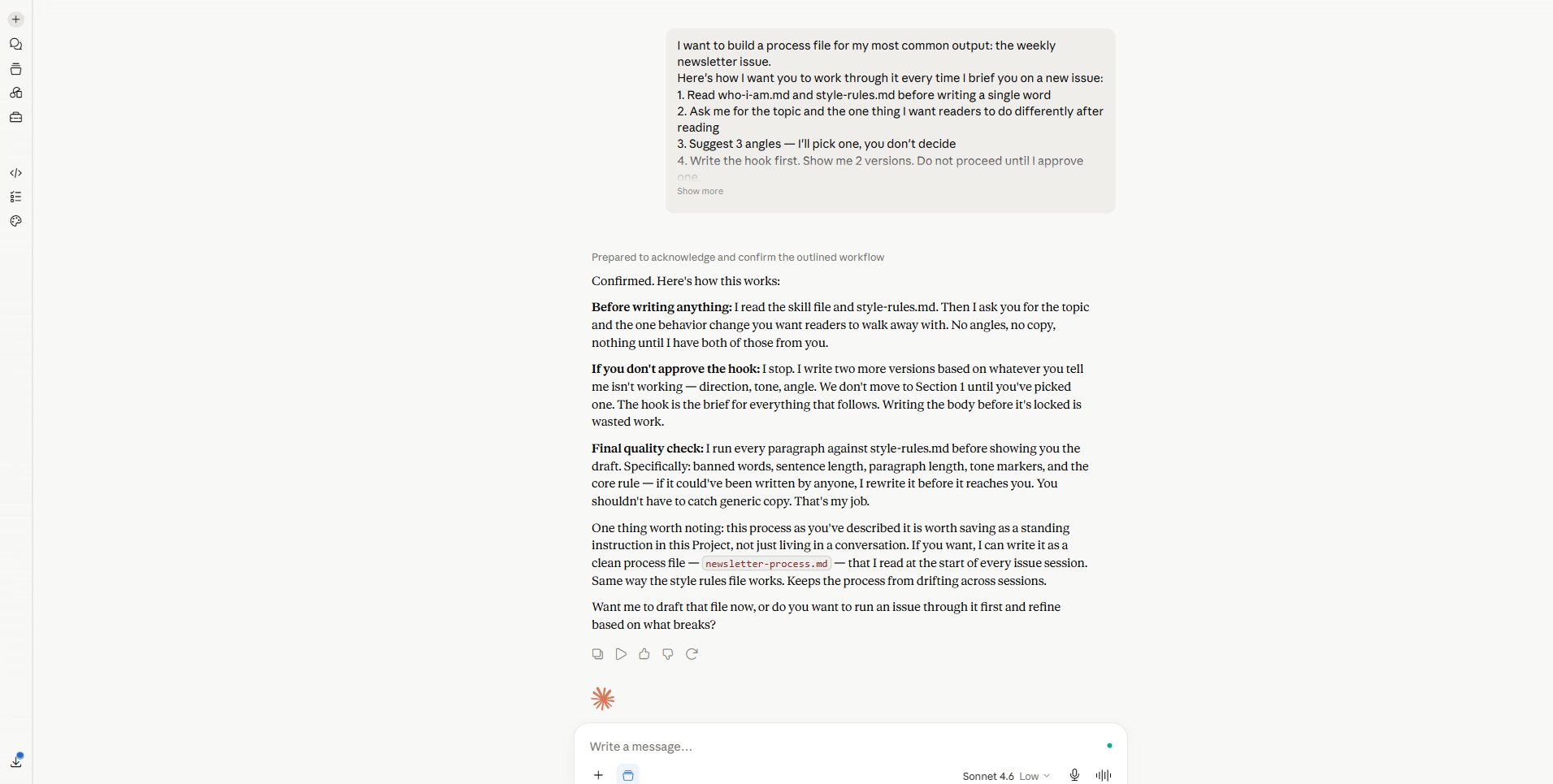
Mine for newsletter issues:
Newsletter Issue Process:

1. Read who-i-am.md and style-rules.md before writing a single word
2. Ask me for the topic and the one thing I want readers to do differently after reading
3. Suggest 3 angles — I'll pick one
4. Write the hook first. Do not proceed until I approve it.
5. Write section by section. Pause for input if the direction is unclear.
6. Run a final check against style-rules.md before calling it done
7. Flag any section that feels like it could've been written by anyone
The last line is the most important one.
“Could’ve been written by anyone” is the test.
If yes, rewrite until it cannot.
Share this and get rewarded
Go to AI In Public → scroll to the Leaderboard section → copy your referral link → share it with anyone.
Every signup through your link moves you up the board and unlocks real rewards.
At the end of every month, we check the leaderboard.
The top 3 get our best guide - DMed directly, no opt-in required.
Step 6: Review, don’t produce
This is the shift most people never make.
They use AI to help them produce.
The one-person company model uses AI to handle production and keeps you in the reviewer seat.
Reviewer work:
Is this on-brand?
Is this accurate?
Is this what I actually want to say?
What would make this 10% sharper?
That’s your job.
The typing, the structuring, the drafting, the formatting - that’s the system’s job.
BEST PRACTICES / USE CASES
The weekly production sprint: Every Sunday night, I drop my weekly brief into Claude. By Monday morning, I will have first drafts of all content for the week. I spend Monday editing. Everything else gets approved or rejected in under 30 minutes.
The subscriber reply system: Every week, replies come in. Most are questions. Some is feedback. I batch them into a single paste. Claude categorizes them, drafts responses, and flags the ones that need my personal voice. I approve, customize, and send.
Competitive research without the headache: I have a standing instruction: “Every week, find 5 interesting things happening in the AI tools space that my readers don’t know yet.” I paste 3-4 articles I spotted. Claude synthesizes them into a clear briefing. I decide what’s worth covering.
The product page that updates itself: ClaudeKit’s documentation used to be a manual process. Now I have a process file that Claude follows every time I ship a new feature. Drop in the feature notes. Outcomes: an updated, on-brand product description. I read it. I approve it. It goes live.
MENTOR MOMENT
Here’s the thing nobody tells you about building a one-person company.
The hard part isn’t the work.
The hard part is letting go of the idea that the work has to come from you.
I spent three months using AI to help me write faster.
It helped. But I was still the one producing.
The day I handed Claude my style files and said, “Your job is to protect my voice, not copy it,” - everything changed.
Good AI use isn’t about typing less.
It’s about staying in the decisions that only you can make.
Everything else is infrastructure.
Recap Checklist
Before you close this issue, here’s your setup checklist:
[ ] Claude Project created for your business
[ ]
who-i-am.mdwritten and loaded[ ]
what-i-do.mdwritten with current quarter goals[ ]
style-rules.mdstarted (even 10 rules are enough to begin)[ ]
operating-context.mdset up for weekly updates[ ] First weekly brief written
[ ] Role-assignment prompt run to give Claude its operating context
[ ] One process file written for your most common output type
You don’t need all 8 today.
Start with the first 3. The rest builds naturally.
Upgrade to keep reading
The free version of this newsletter gets you the what.
Paid members get the how, in detail.
Every issue comes with a resource that took me hours to build and takes you 10 minutes to use.
Paid Members: One hand-picked AI Vault guide every issue, chosen for what we covered today.
Founding Members: Full AI Vault access. Every guide. Every kit. Forever. Plus, first access to the private community at 10K subscribers.
Everything above is free. What’s below is for paid subscribers.
