

Elon Musk’s team just shipped something that isn’t a chatbot.
On August 11, 2026, xAI released Grok Bot, its first real answer to the “AI agent” category everyone’s been circling all year.


Not a smarter model. Not a faster chat window.
An actual AI teammate, one you assign real work to, that keeps working after you’ve closed your laptop and gone to bed.
I spent the past week testing it, reading through every teardown I could find, and setting up my own team of bots.
This guide is everything I wish someone had handed me before I started, written for people who’ve never worked with an AI agent.
By the end of this, you’ll know what Grok Bot actually is, how to set it up from zero, what it costs, whether it’s safe, and how to build a team of bots that report to you as actual employees would.
And stay till the end - I’m handing paid subscribers the exact 7-bot team blueprint I built, complete with the ready-to-paste job briefs for each one, the approval-queue rules, and routine schedules so you can clone the whole setup instead of building it from scratch.
Let’s get into it.
Table of Contents
AI Agents in Plain English
The Basics: What Grok Bot Actually Is
Words You’ll See in This Guide
How to Set Up Grok Bot
Real-World Use Cases
Build Your Own Bot Team
Mistakes Beginners Make in Their First Week
Grok Bot vs Hermes vs OpenClaw vs Buzz
What Grok Bot Actually Costs
The Safety Tradeoff Nobody Talks About Enough
Your First 24 Hours With Grok Bot
Who Should Actually Use Grok Bot Right Now
AI Agents in Plain English
Before we get into Grok Bot specifically, let’s slow down for a second.
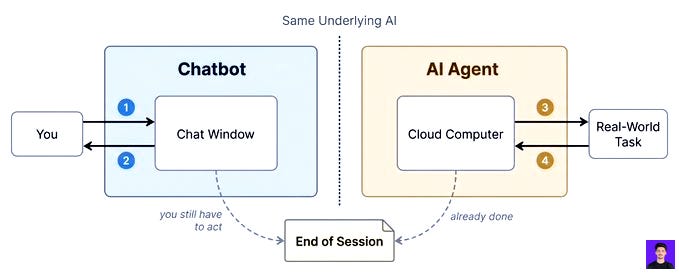
Most people have used a chatbot before. You type a question, it answers, you close the tab, and it forgets everything the moment you leave.
An AI agent works differently. Instead of just answering, it can actually carry out the task. It can open a browser, navigate a website, fill out a form, check an inbox, or update a spreadsheet, just as a person would.
Think of the difference between asking a smart friend for directions and asking them to actually drive you there. A chatbot gives you the directions. An agent gets behind the wheel and takes you the whole way.
Grok Bot takes this a step further. Instead of one agent doing one task and stopping, it hands you a team of agents that each run on their own computer in the cloud. They don’t stop when you close your laptop, because they were never running on your laptop to begin with.
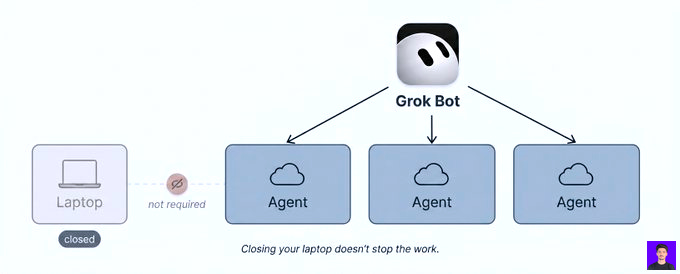
That’s the whole idea in a few sentences. Everything else in this guide is just the details of how it actually works in practice.
The Basics: What Grok Bot Actually Is
Most AI tools answer questions. Grok Bot tries to finish jobs.
A normal chat session lives inside a window, and the moment you close it, the work stops. Grok Bot doesn’t work that way.
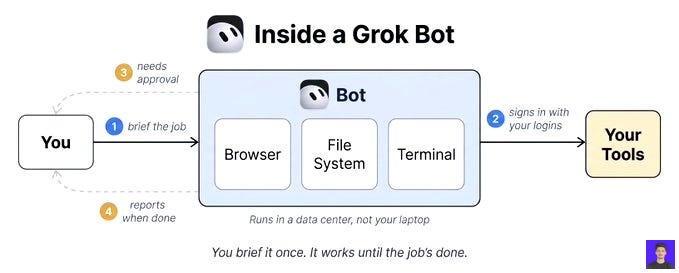
Every bot you create gets its own cloud computer. Its own browser. Its own file system. Its own terminal. That computer runs in a data center, not on your laptop, which means the bot keeps going whether or not you’re anywhere near your device.
You give a bot a job the same way you’d brief a new hire. It signs into the tools you already use, using your own logins, and works through the task the way a person would. When it hits something that needs your approval, it comes back and asks. Otherwise, it just finishes the job and reports in.
xAI built this as an internal tool first. Teams inside the company started using it for sales outreach, marketing, office admin, and bug fixes, and it apparently spread through the company faster than expected before they decided to release it publicly.
It launched jointly with Cursor, the AI coding company that SpaceX acquired earlier in 2026 for a reported $60 billion. That merger is why access to Grok Bot runs through Cursor’s subscription tiers instead of being sold on its own; more on that in the pricing section.
One more thing worth knowing up front: Grok Bot isn’t the same product as the Grok chatbot you might already use on X, and it isn’t Grok Build (the coding-focused CLI) either. Three different products, same underlying company, easy to mix up.
If this is useful, share it with one person who still re-explains their business to a chatbot every morning. Takes 10 seconds.
Words You’ll See in This Guide
A handful of terms come up constantly once you start using Grok Bot. Here’s what each one actually means, in plain language, before we get into the setup steps.
Bot: one AI teammate with one job. You can create as many as you want, and each one runs on its own.
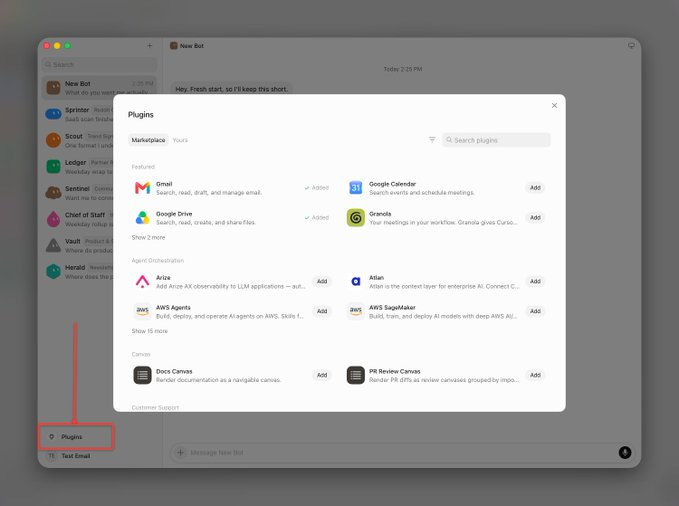
Plugin: the connection between a bot and a tool you use, like Slack, Gmail, or Notion. A bot can only work inside tools it has been plugged into.
Routine: a scheduled, repeating task. If a bot checks something every morning at 6 am, that’s a routine. Essentially a cron job with a friendlier name.
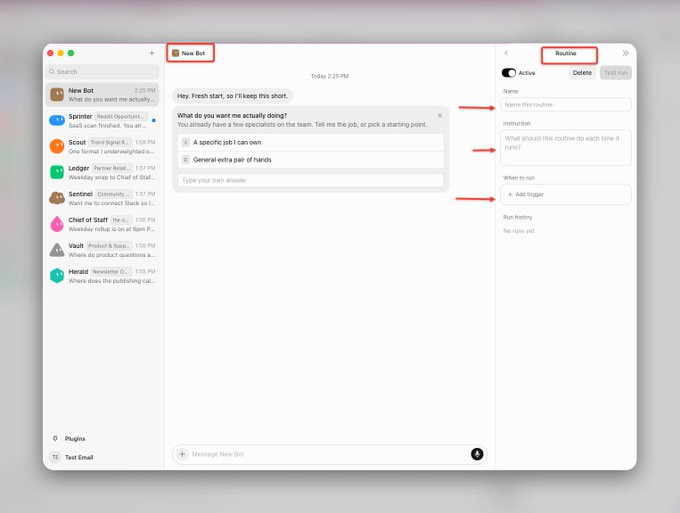
Approval queue: the point where a bot pauses and waits for you to say yes before it goes further. This is how you stay in control without watching every single step it takes.
Cloud computer: the virtual machine each bot runs on. It isn’t your laptop; it lives on a server somewhere else, which is why the work keeps going after you close your own device.
Keep these five in your head, and the rest of this guide will make a lot more sense.
How to Set Up Grok Bot
Setup is fast. Here’s exactly how it goes, step by step.
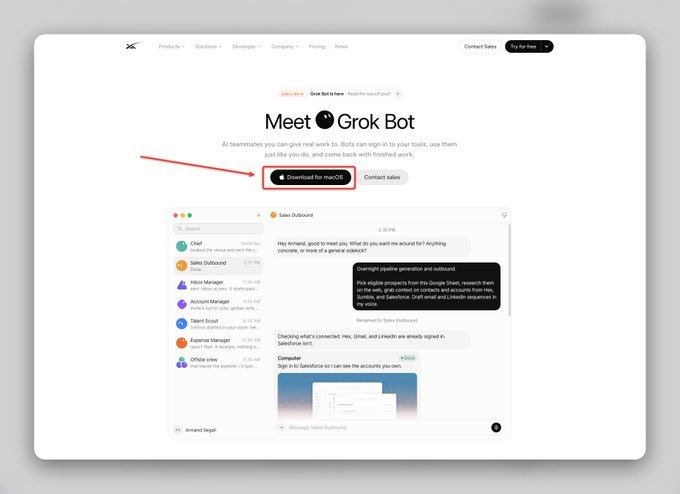
Step 1: Download the app
Head to the official download page and grab the macOS build.
This is still a beta release, so the official page is the only safe place to get it; avoid downloading it from anywhere else.
Step 2: Install it
Drag the app into your Applications folder. That’s the entire install process; nothing to configure yet.
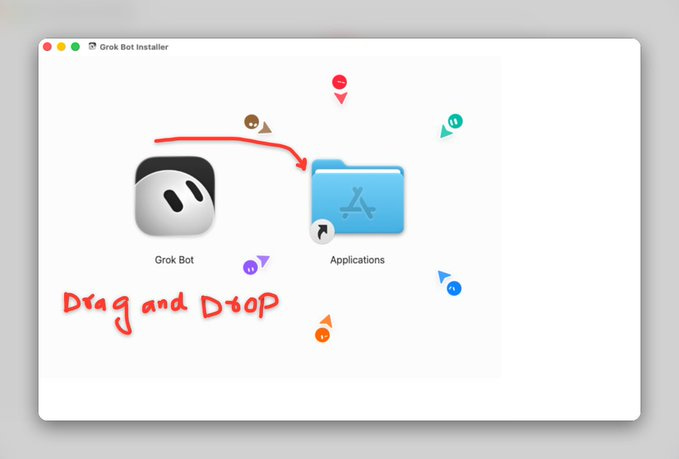
It looks sweet on the deck:)
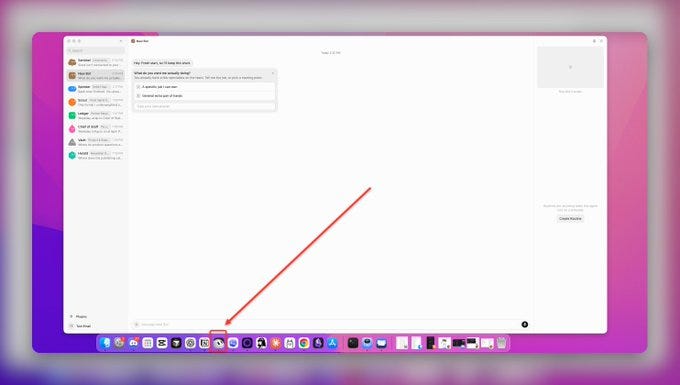
Step 3: Sign in
Open the app and sign in with your email. One thing you should know before you get here: a card is required at this step. It’s not optional, and there’s no free trial tier to poke around in first.
Note: You didn’t see any card option, as I already have the card on file.
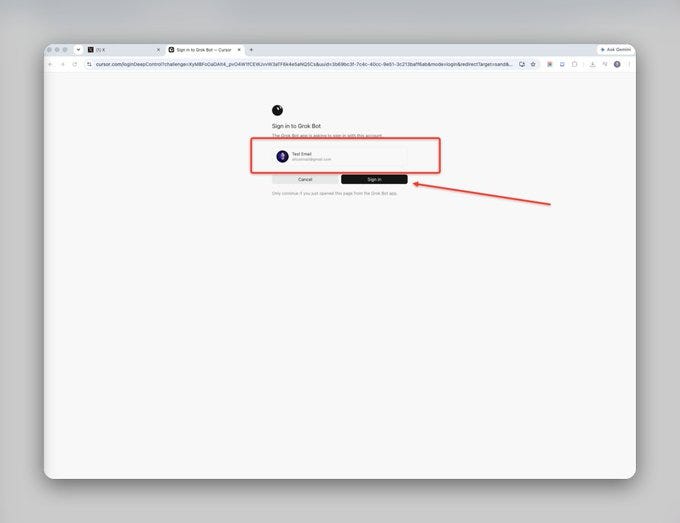
Step 4: Land on the dashboard
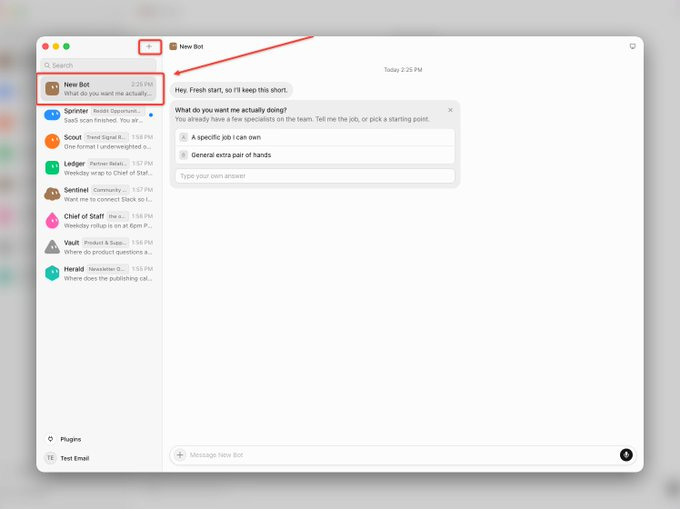
Once you’re signed in, you’ll see the main interface. This is your control room. Every bot you create will live here, and you’ll message each one the way you’d message a coworker.
Step 5: Connect your plugins
Before you build a single bot, connect the tools you actually work in. Slack, Gmail, Notion, whatever your day-to-day stack looks like. A bot can’t do anything inside a tool it isn’t connected to, so this step is really what decides what your bots will be capable of later.
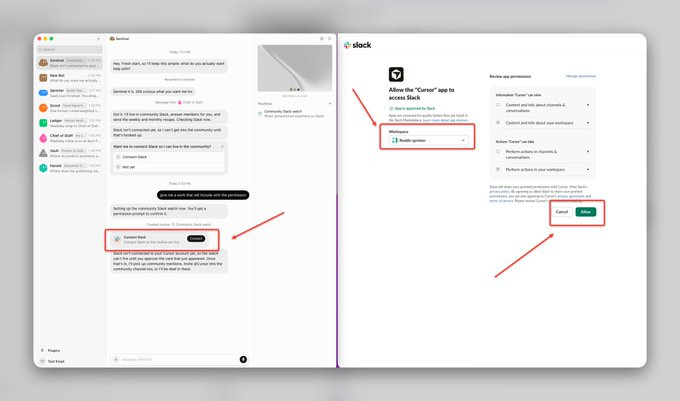
Step 6: Authenticate everything
Go through each plugin and authorize it individually. This is the step that actually matters; it’s what lets a bot act inside those tools instead of just talking about them.
Step 7: Create your first bot
Now the part that matters. Give the bot one job. Don’t try to build a generalist on your first attempt; the bots that work best are the ones with a narrow, clearly defined role.
That’s the whole setup. A few minutes, no infrastructure, no server to configure.
Real-World Use Cases
Once people got past the first ten percent of Grok Bot (typing questions into it like a chatbot), the real use cases started showing up fast.
Early adopters are running research bots that scan YouTube or LinkedIn every morning and deliver a briefing before they’ve had coffee.
Others built a bot that watches property listings twice a day and flags anything priced well under comparable sales in the area. There are portfolio-tracking bots that read live spreadsheet data and flag anything moving outside a normal range. There are Slack triage bots that read every message overnight and hand you a three-line summary instead of a wall of unread notifications.
On the business side, teams are running full local SEO stacks through Grok Bot: pulling competitor category data, tracking review velocity, auditing service listings, all work that used to take hours of manual digging and now runs in minutes.
The common thread across almost every use case worth copying is the same: one bot, one job, running on a schedule, checking in only when something actually needs a human decision.
That’s exactly the model I used to build my own team.
Build Your Own Bot Team
Here’s the team I set up inside Grok Bot. Seven bots, each with one job, all reporting up to me.
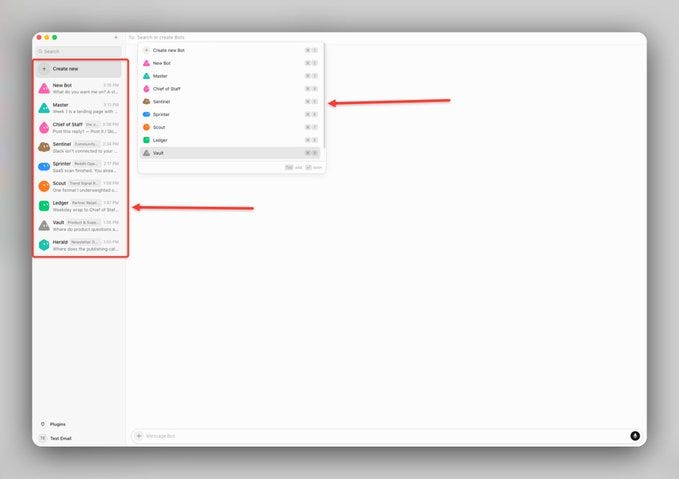
1. Sentinel: Community Manager: Lives inside the community Slack, replies to member questions on my behalf, and sends a weekly summary of what came up plus a monthly summary of recurring themes.
2. Scout: Trend Signal Researcher: Scans the best-performing AI content on LinkedIn and X every morning, flags the top signals, and drafts post ideas before 8 am.
3. Sprinter: Reddit Opportunity Bot: Watches relevant subreddits for posts gaining fast traction, drafts a response, and sends escalating reminders until I approve it or let it go.
4. Ledger: Partner Relations Bot: Tracks every active sponsor relationship, flags renewal windows coming up in the next 30 days, and flags any partner who’s gone quiet for three weeks or more.
5. Herald: Newsletter Ops Bot: Watches the publishing calendar, checks draft status three days out, and pulls open-rate and click data into a report after every send.
6. Vault: Product & Support Bot: Monitors the support inbox and community for product questions, answers from documentation, and flags anything that looks like a bug or a refund request instead of guessing.
7. Chief of Staff: The one that reports to me: This is the bot that actually makes the team work. At the end of each day, it collects a status update from all six bots above and compiles one report, not six separate notifications. If anything gets flagged as urgent during the day, it doesn’t wait for the rollup; it pings me the moment it happens.
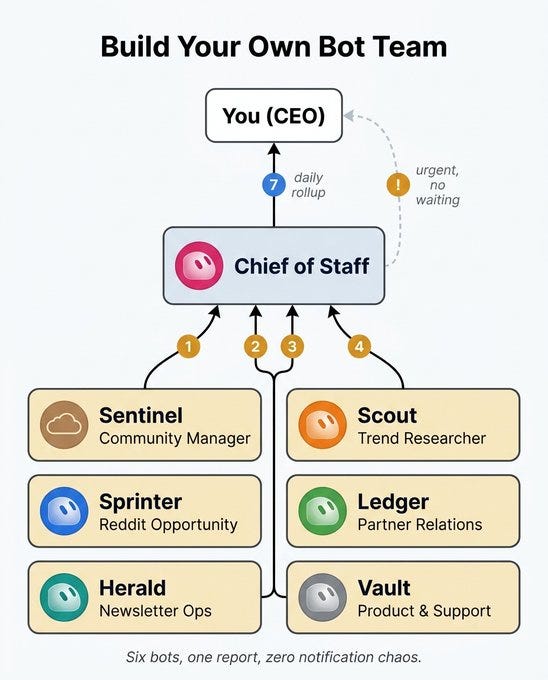
That structure is the real lesson here. Seven useful bots without a coordinator just means seven separate notification streams competing for your attention.
Mistakes Beginners Make in Their First Week
A few patterns show up again and again with people who are new to this. Worth knowing before you run into them yourself.
Connecting every plugin on day one. It’s tempting to authenticate your whole toolkit in one sitting. Don’t. Connect only what your first bot actually needs, then add more as you build more bots.
Building one bot to do everything. A bot with five different jobs is harder to trust and harder to fix when something goes wrong. The bots that work best have one job, done well, every time.
Not watching the first scheduled run. It’s easy to set up a routine and walk away, assuming it’ll just work. Watch the first run yourself, start to finish, before you trust it to run unsupervised.
Skipping the “why” behind a routine. If you can’t explain in one sentence why a bot needs the access you’re about to give it, it probably doesn’t need that much access yet.
Treating it like a chatbot. The biggest wasted potential is typing a question, reading the answer, and closing the app. Grok Bot’s real value only shows up once you start assigning it actual, repeatable work.
None of these are dealbreakers. They’re just the same five mistakes almost everyone makes in week one, so you might as well skip straight past them.
Grok Bot vs Hermes vs OpenClaw vs Buzz
If you’ve looked into AI agents before, you’ve probably run into Hermes, OpenClaw, or Buzz.
Here’s how they actually compare.
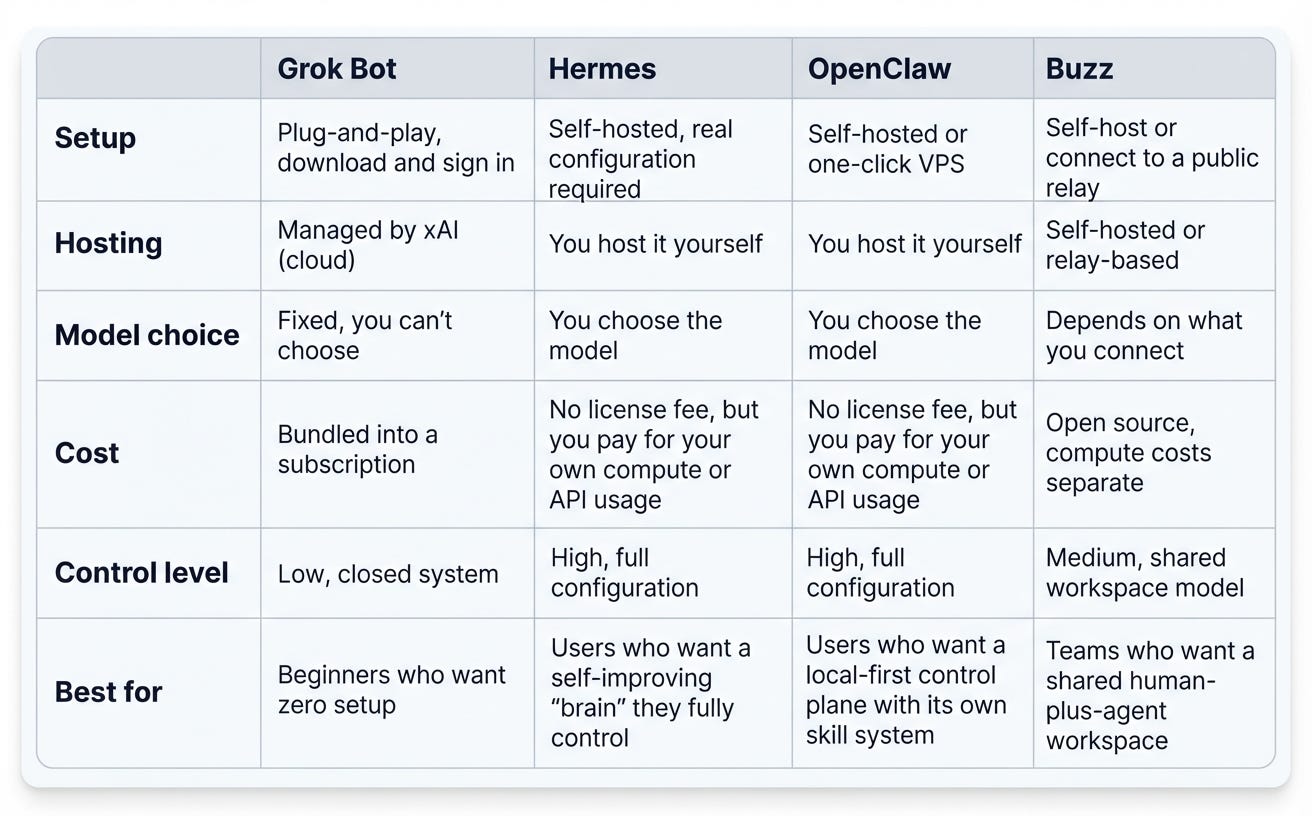
OpenClaw and Hermes are the veterans of this space. Both are genuinely powerful, and both give you real control over how they run. The tradeoff is setup. You need your own always-on machine, usually a VPS, and you’re on the hook for configuring models, writing your own instructions, and maintaining the infrastructure yourself.
Buzz sits in the middle. It isn’t an agent on its own; it’s a shared workspace you drop agents into, closer to a human-plus-agent room than a standalone tool. You either self-host it or connect to a public relay, and once it’s running, spinning up new agents inside it is fast. The catch is an early setup step around saving a private key, which can genuinely trip up anyone who isn’t already comfortable with this kind of tooling.
Grok Bot skips almost all of that. Download it, sign in, build a bot, done. No server, no maintenance, no infrastructure decisions.
The tradeoff runs the other way, though. With Grok Bot, you don’t choose your underlying model. You don’t own the harness. Your data lives on their cloud computer, not yours. You’re trading control for convenience, and it’s a real trade, not a free upgrade.
If you want real control and don’t mind configuring things yourself, OpenClaw or Hermes give you the most power. If you want a shared workspace between you and your agents, Buzz is worth a look. If you want something that works the moment you sign in and you’re fine with a closed, subscription-locked system, Grok Bot is the easiest path.
What Grok Bot Actually Costs
There’s no standalone Grok Bot subscription. You get access bundled into one of three existing plans:
SuperGrok Heavy: $300/month, direct from xAI
Cursor Ultra: $200/month
Cursor Teams Premium: $120/seat/month, assigned by a team admin
Each plan includes a weekly usage pool. Go past it, and you’re billed on top based on model and token cost.
There’s no free tier and no trial. If you’re already paying for one of these plans, Grok Bot is effectively free on top of what you’re already spending. If you’re not, you’re looking at a real monthly cost just to try it, with no way to test it in isolation first.
The Safety Tradeoff Nobody Talks About Enough
This is the part most guides bury, and it’s the part beginners should read most carefully.
Grok Bot doesn’t work through clean, sandboxed API connections the way a lot of AI tools do. It works by logging into your real accounts and driving them the way a person would, including on sites and tools that don’t have a proper integration at all.
That’s exactly what makes it powerful. It’s also exactly what makes it a trust question, not just a capability question. You’re handing an autonomous system the keys to your inbox, your Slack, your business tools, whatever you connect. If a multi-step job fails partway through, you may have to untangle whatever state it left things in.
Your First 24 Hours With Grok Bot
If you’re starting today, here’s the simplest path through everything above.
Set up the app and connect one plugin, just one. Pick the tool you use the most.
Build a single bot with a narrow job, something you’d normally do yourself in under ten minutes. A daily summary. A single scheduled check. Nothing complicated yet.
Watch it run once, start to finish, before you schedule it to repeat.
Who Should Actually Use Grok Bot Right Now
Here’s the honest answer.
If your AI budget is around $20 a month and you’re still getting comfortable with AI in general, this isn’t your next step yet.
Spend a few months getting properly fluent with a single AI assistant first: how to prompt it well, how to break a task down, how to tell when its output actually needs a second look. That foundation is what makes a bot team useful later, instead of just expensive and confusing.
If you’re already spending real money across multiple AI subscriptions, you’ve built out skill files or context systems before, and you’re comfortable handing an agent real account access, Grok Bot is a legitimate next step.
The value here is real. Whether it’s worth it for you specifically depends entirely on how much you’re already using AI to run your day-to-day.
Before you go - here’s what paid members are getting in this issue
I built and ran the seven-bot team above for a full week. Paid subscribers get the part that took the longest to figure out: the exact job brief I wrote for each of the seven bots - Sentinel, Scout, Sprinter, Ledger, Herald, Vault, and the Chief of Staff - copy-paste ready, plus the approval-queue rules and routine schedules that keep the whole team from flooding you with noise.
Everything above shows you what the team looks like. The gift below shows you exactly how to build it.
HOT OFFER
For the next 14 days, founding members get in for $200 instead of $300 - 33% off, locked in for life.
Upgrade to unlock the full blueprint. It’s the difference between reading about a bot team and running one by tonight.
