

You don’t have a memory problem.
You have 5 apps that don’t talk to each other.
Your best idea from March is sitting in Apple Notes.
The article that inspired it is in a “Read Later” folder you never open.
The draft is in Google Docs.
And you just spent an hour thinking of that idea again from scratch.
I did exactly this.
Then I fixed it in one afternoon, with one free app, without touching a terminal or writing a single line of code.
This issue is that afternoon, step by step.
Your gift at the end: The Afternoon Second Brain Kit. Ready-made templates, the folder setup, and the full Claude prompt pack for your vault. Copy, paste, done.
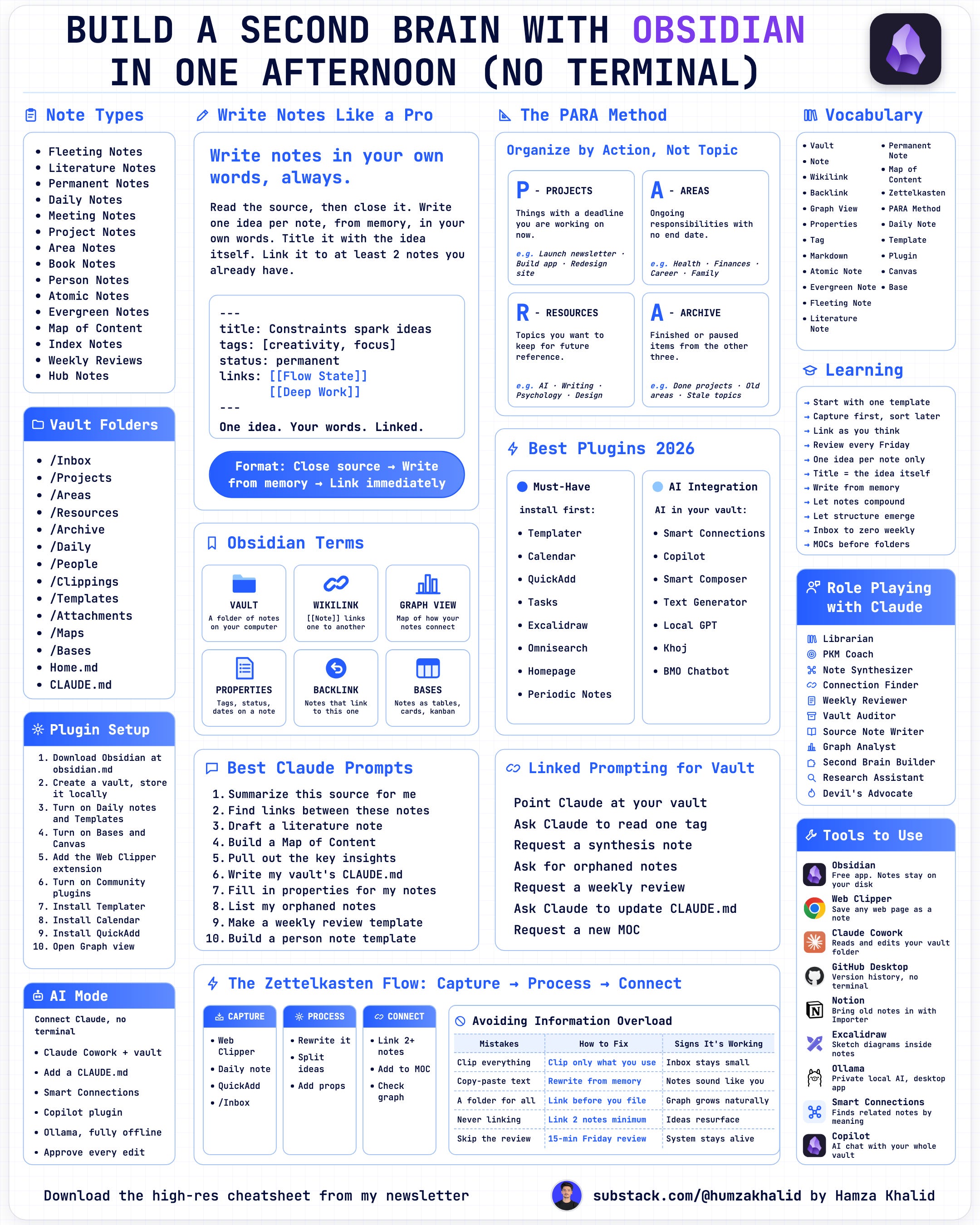
Here I made a one-pager of this whole setup. Save it and use it later.
The note that broke my system
Last year I spent 3 hours rebuilding my note-taking setup.
A week later, I found a note from 2022.
It was the exact idea I had just “come up with.”
Word for word, almost. That’s when it clicked.
My system was great at storing ideas. It was terrible at bringing them back.
I had Notion with databases for everything. Apple Notes for quick stuff. Google Docs for writing.
340 articles in a browser folder.
Four apps but zero connection. So I kept switching apps.
Mem. Roam. Capacities. Same problem every time.
Then a friend showed me his Obsidian graph.
Hundreds of notes, all linked, like a map. His ideas were talking to each other.
Mine were sitting in separate rooms, never introduced.
I set up Obsidian that evening. Two weeks later, I stopped losing ideas.
A month later, I was connecting them.
The apps were never the problem. I was building storage. I needed a thinking system.
Know someone with 5 note apps and zero ideas they can find? Send them this before they lose another one.
Who you’ll be after reading this guide
Before: You’re the person who “had a great idea last week” but can’t find it.
After: You’re the person in the meeting who says “I wrote about this three months ago” and pulls it up in 5 seconds.
That’s not a productivity tip.
That’s how people start seeing you differently.
What Obsidian actually is (in plain English)
Before going deep into Obsidian, let’s talk about what Obsidian actually is…
Obsidian is a free note app.
Your notes are saved as simple text files in a folder on your computer. That folder is called a vault.
You link one note to another by typing two square brackets: [[note name]].
Every link draws a line in the Graph View, a live map of your ideas.
That’s it.
Vault, links, graph.
Everything else is optional.
Notion is a spreadsheet for your brain.
Evernote is a filing cabinet.
Obsidian is the whiteboard where ideas actually connect.
I test one AI tool or workflow in public every issue, so you don’t waste an afternoon on the wrong one. Join free and get the next one in your inbox.
Everything you need to build it is below
The full step-by-step setup, from a blank app to a linked graph in about 2 hours. Every click, no terminal, no code.
Here’s what’s inside:
→ The exact 5-folder setup I use
→ The 5 built-in features to turn on (and which plugins to skip)
→ The meeting template, ready to paste
→ How to make your first link and watch your graph grow
→ 4 Claude prompts that turn messy thoughts into clean notes
→ The Second Brain Kit: 4 templates, 6 prompts, and Friday review checklist
