

I’ve used Claude AI and ChatGPT daily for over a year — not for fun, for real work.
After hundreds of hours, they are not the same tool.
ChatGPT gets the headlines. Claude gets the work done.
Claude wins in 8 areas:
Interactive Artifacts
Project-level memory
200K-token context accuracy
Terminal-based coding (Claude Code)
Transparent extended thinking
Custom voice styles
Fewer false refusals
Deeper PDF/image understanding
ChatGPT still wins on image generation, web browsing, plugins, and voice mode.
By the end of this issue, you will get The Claude vs ChatGPT Decision Matrix - my Notion-ready workflow routing with prompt templates. More below.
Six months ago, I was all-in on ChatGPT. Then I tried Claude for one newsletter draft. It came back cleaner, tighter, and it actually sounded like me.
This issue is the result of that experiment.
Quick milestone
AI In Public just crossed 3,100 subscribers. That's not a vanity number - it means the "AI in public" approach is working. Thank you.
By the end of this issue, you'll know exactly which AI tool to open for every task in your workflow. No more guessing. No more defaulting to ChatGPT because it's familiar. You'll have a routing system - and the receipts to back it up.
THE AI VAULT IS OPEN
Every guide, kit, template, and prompt library I’ve built - in one place. Organized. Searchable. Growing every week. Here’s how access works:
Paid Members: Get one specific guide related to the newsletter from the Vault every issue. Yours for a week.
Founding Members: Full access to everything inside the Vault. Every guide. Every kit. Every drop. Forever.
We’re 2-3 months away from 10K+ subscribers. The moment we hit that number, we’re launching a private free community - exclusively for AI In Public readers.
Old Way vs New Way
The old way: Open ChatGPT for everything. Write prompts. Get mid output.
Re-prompt. Settle.
The new way: Route each task to the tool that’s actually best at it. Claude for deep work. ChatGPT for quick tasks. Stop fighting your tools - match them to the job.
1. Artifacts: Build Interactive Prototypes Without Writing Code
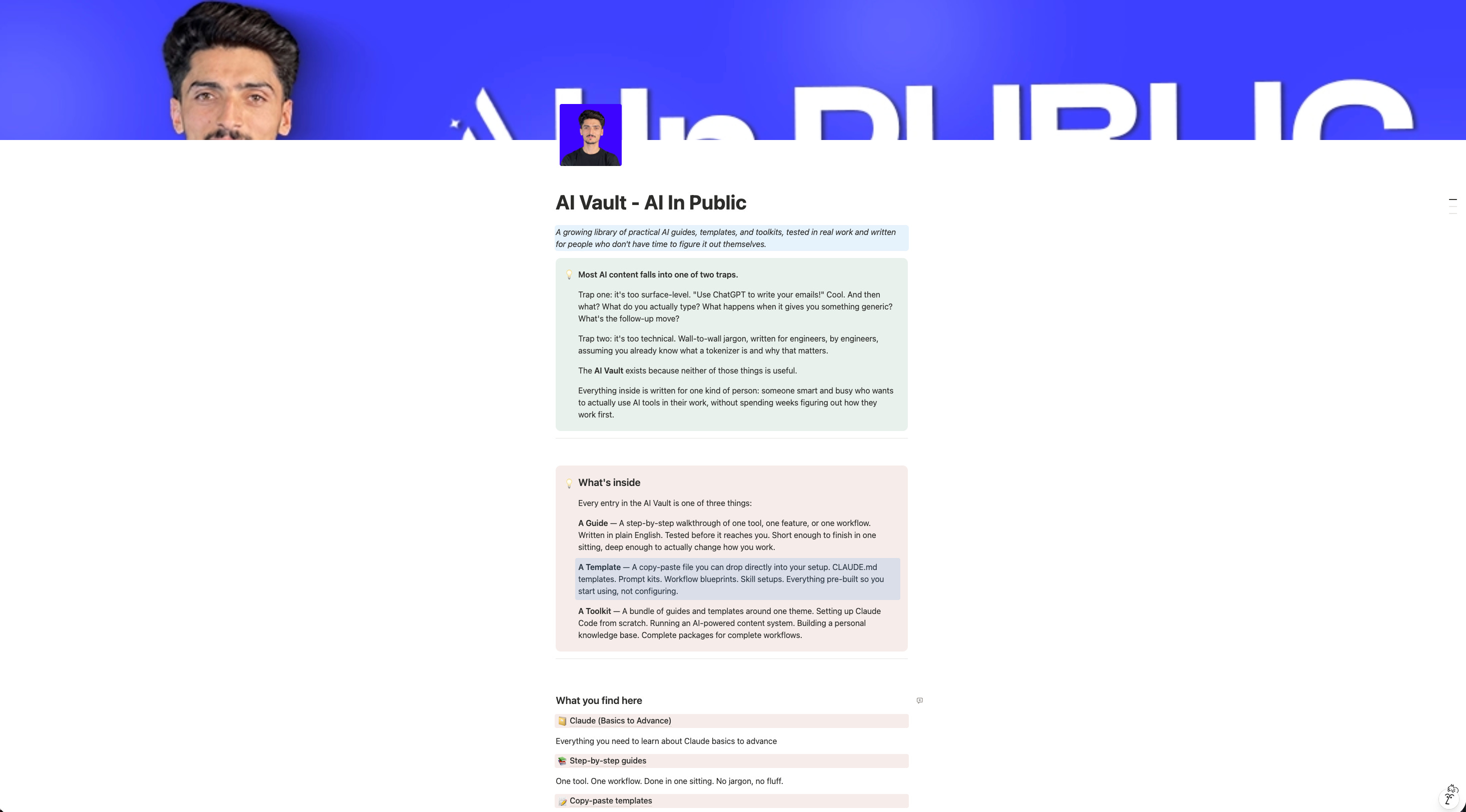
This is the single biggest differentiator in the Claude AI vs ChatGPT debate, and most people still don’t know about it.
When you ask Claude to create something visual - a calculator, a landing page mockup, a dashboard, a quiz - it doesn’t just describe it. It builds a fully interactive, working prototype right inside the chat window.
Ask Claude: “Build me an ROI calculator for my SaaS product. Inputs: monthly users, conversion rate, average deal size. Show the output as a dashboard with charts.”
Claude generates a live, interactive React component you can use right inside the chat. You can click buttons, enter data, and see charts update in real time - no CodePen, no separate tab. (See Anthropic’s Artifacts docs for the full feature breakdown.)
ChatGPT’s equivalent? Canvas lets you edit code side-by-side, but it doesn’t render interactive components. You get code you have to run somewhere else.
Workflow: How I use Artifacts every week
Draft a newsletter landing page concept in Artifacts
Test the copy and layout interactively
Screenshot it for my designer (or ship the HTML directly)
Iterate on the design with follow-up prompts
Pro tip: Ask Claude to “make this artifact downloadable as HTML” - you get a self-contained file you can host anywhere.
2. Projects: Give Claude Persistent Memory That Actually Works
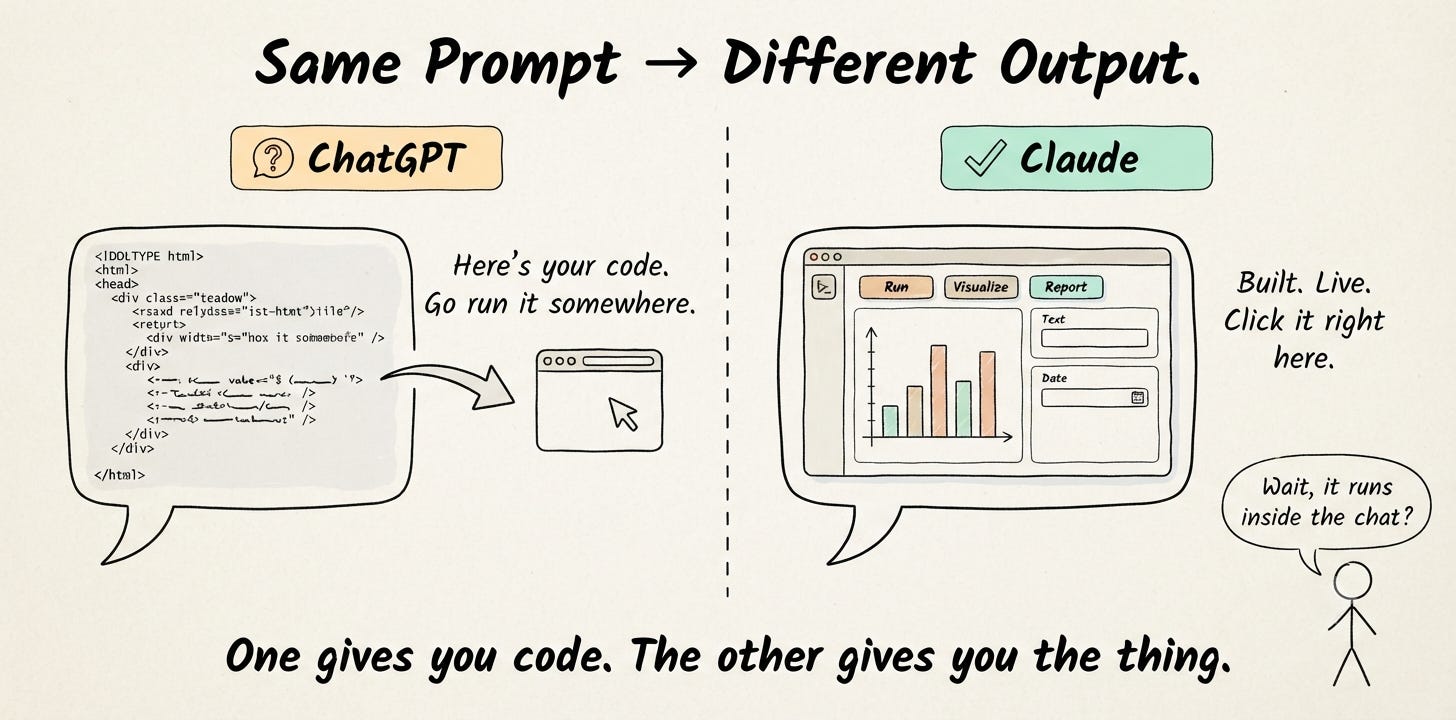
Claude Projects lets you upload files, set custom instructions, and create a workspace that remembers your context across conversations.
This isn’t the same as ChatGPT’s custom instructions (which are limited to a short text field). Claude Projects lets you:
Upload your brand voice guide, past articles, and product docs
Set a detailed system prompt specific to that project
Start new conversations that automatically inherit all that context
I have a “Newsletter Writing” project with my last 20 articles, my voice guide, and instructions like “Write in short paragraphs. No fluff. Use specific numbers. End with a CTA to the Substack.”
Every conversation in that project sounds like me from the first message.
Why this matters for content creators
If you’re using Claude vs ChatGPT for writing, Projects eliminate the biggest pain point: re-explaining who you are, what you sound like, and what you’re working on. Every. Single. Time.
ChatGPT has “Projects” now too, but Claude’s implementation shipped first, handles larger file uploads, and integrates more naturally with the conversation flow.
3. A 200K Context Window That Doesn’t Hallucinate at the Edges
Claude’s context window is 200,000 tokens. That’s roughly 500 pages of text - in a single conversation.
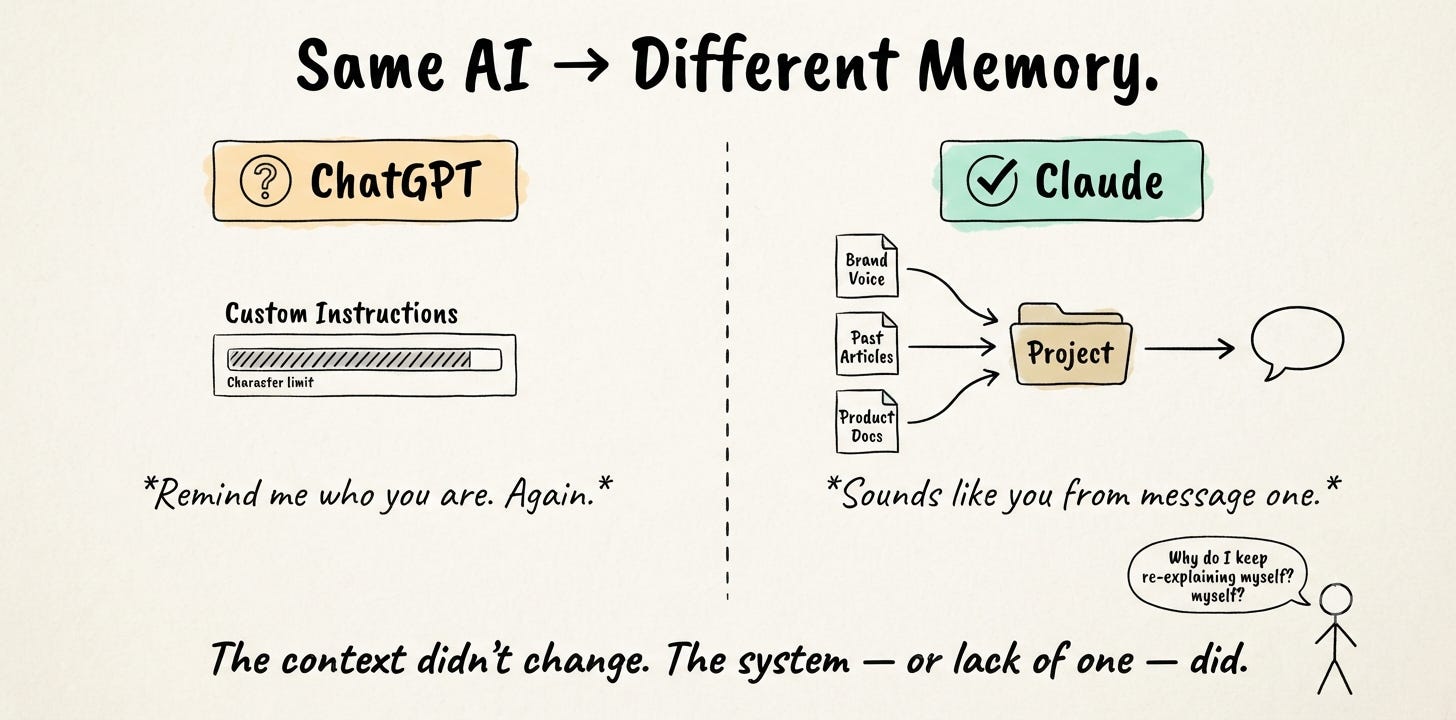
But the real story isn’t the size. It’s the retrieval quality.
I’ve tested this extensively: upload a 150-page document and ask Claude about a detail on page 137. It finds it. Accurately. Consistently.
Independent testing by ZDNET (and my own experience) shows that Claude maintains higher accuracy across long contexts, especially in the middle and end of documents. ChatGPT’s context window has grown too, but that testing bears this out.
Real-world test I ran
I uploaded my entire 2025 article archive (47 articles, ~90,000 words) and asked both tools:
“Which article mentioned a specific conversion rate for email signups?”
“Find contradictions between my March and September posts about AI pricing.”
Claude found the right answers. ChatGPT either hallucinated a source or gave a vague summary.
This matters for research. If you’re comparing Claude vs ChatGPT for research, the context window accuracy is the deciding factor for anyone working with long documents, legal contracts, research papers, or codebases.
4. Claude Code: An AI That Actually Lives in Your Terminal
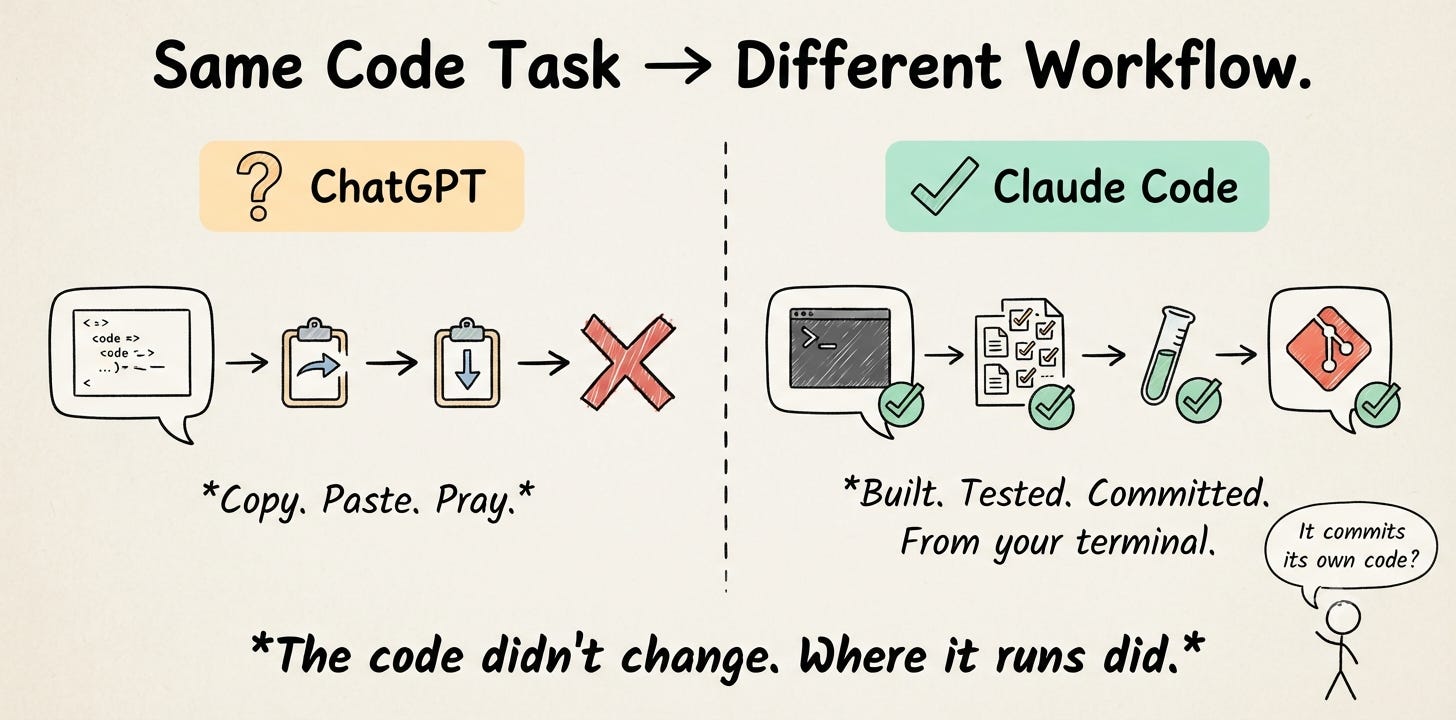
Claude Code isn’t a chatbot feature - it’s a separate product that runs in your terminal and writes, debugs, and ships real code.
It can:
Read your entire codebase and understand the architecture
Make multi-file changes across your project
Run tests, fix errors, and iterate until the code works
Create git commits with meaningful messages
Build full features from a description
I used Claude Code to build an entire data pipeline for my newsletter analytics. I described what I wanted in plain English, and it wrote the code, set up the database schema, created the API endpoints, and fixed its own bugs - all from my terminal.
ChatGPT can write code in a chat window. Claude Code writes code in your actual project, across multiple files, with access to your real codebase. The difference is like comparing Google Docs to a full IDE.
When to use Claude AI vs ChatGPT for coding
Quick code snippets and explanations: Both work fine
Building features in a real project: Claude Code wins by a mile
Debugging existing code: Claude Code reads your files and fixes the actual bug
Vibe coding a full app: Claude Code is the tool of choice for developers right now
Share this and get rewarded
Go to AI In Public → scroll to the Leaderboard section → copy your referral link → share it with anyone.
Every signup through your link moves you up the board and unlocks real rewards.
At the end of every month, we check the leaderboard.
The top 3 get our best guide - DMed directly, no opt-in required.
5. Extended Thinking: Watch Claude Reason Through Hard Problems
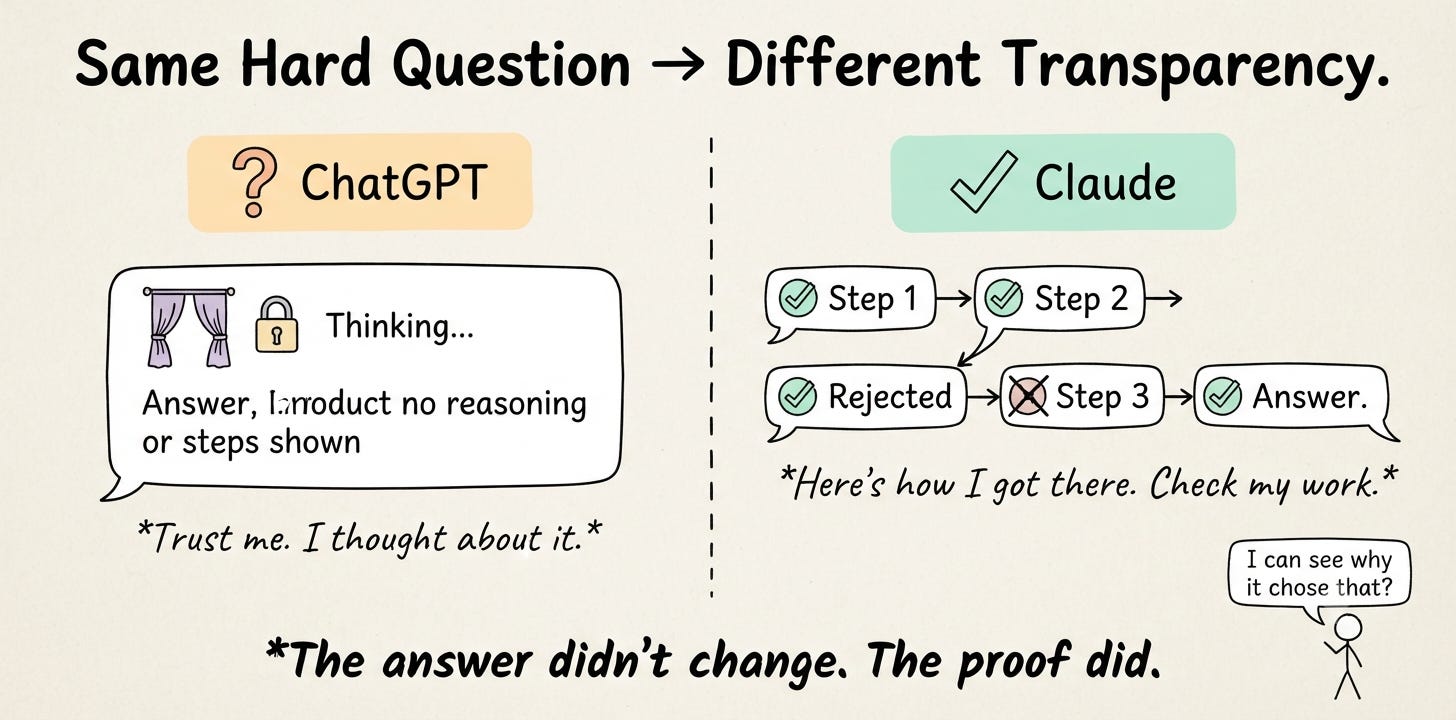
Claude has a feature called “Extended Thinking” where it shows you its reasoning process before answering.
This isn’t just thinking longer. It’s a fundamentally different approach. Claude breaks down complex problems step-by-step, and you can see the chain of reasoning - including where it considers and rejects alternative approaches.
Ask Claude: “Should I switch my newsletter from weekly to daily? Here’s my data: [paste analytics]. Think through this step by step.”
Claude will analyze your open rates, subscriber growth, content production capacity, and monetization, showing its reasoning at each step. You don’t just get an answer. You get the thinking that led to the answer, so you can verify it makes sense.
ChatGPT has a reasoning mode too (o1/o3), but it hides the reasoning behind a “thinking” label. Claude’s extended thinking is more transparent and more useful for learning from the AI’s process.
6. Styles: Fine-Tune Claude’s Voice Without Prompt Engineering
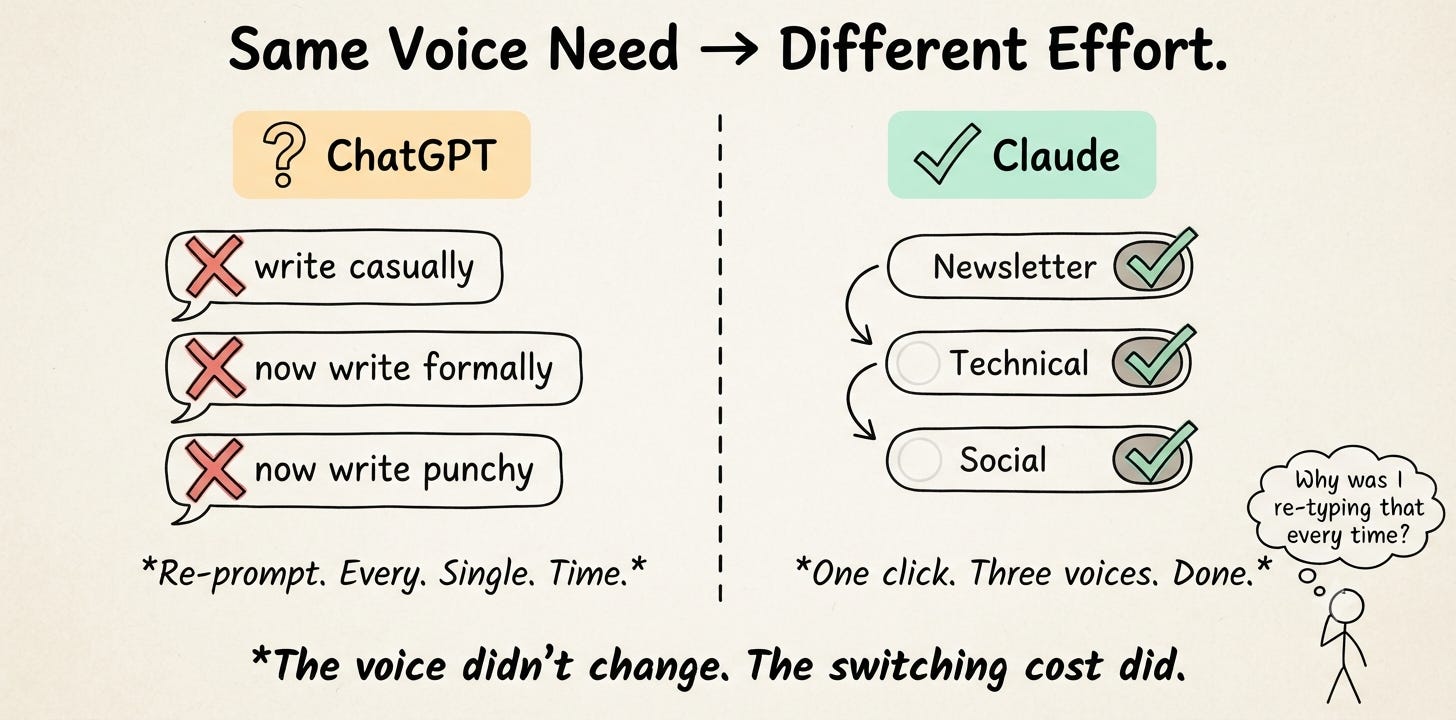
Claude’s Styles feature lets you save and switch between different writing voices with a single click. You can create custom styles by providing example text or using built-in presets.
I have three styles saved:
Newsletter (punchy, first-person, short paragraphs)
Technical (precise, structured, includes code examples)
Social (casual, hook-driven, under 280 characters)
Switch between them instantly. No need to rewrite your system prompt or add “write in a casual tone” to every message.
ChatGPT doesn’t have an equivalent. You’re stuck re-prompting every time you want a different tone, or managing multiple custom GPTs.
For content creators comparing Claude vs ChatGPT for content creation
This is the feature that saves me the most time. One conversation, three output styles, zero prompt engineering.
7. Constitutional AI: Fewer Refusals on Legitimate Creative Work
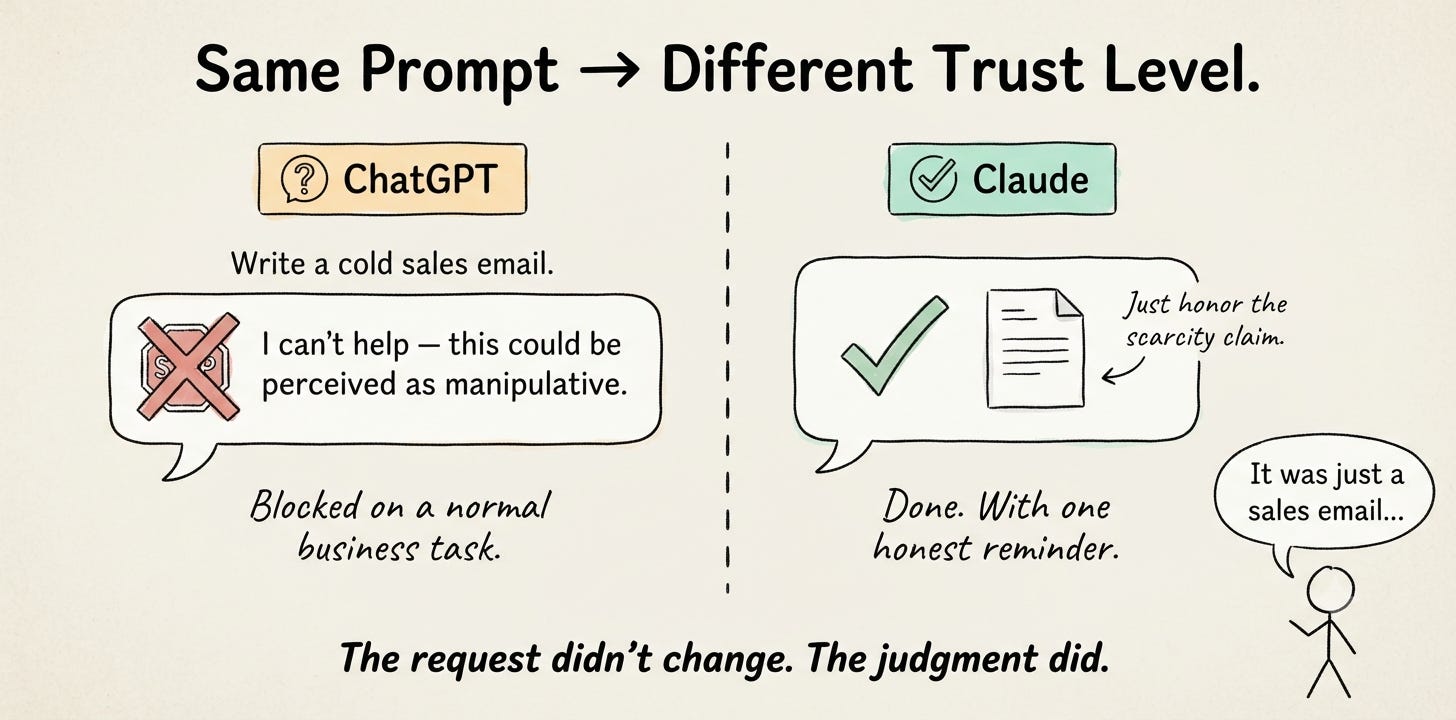
If you’ve ever had ChatGPT refuse to help with a marketing email because it “could be perceived as manipulative,” or decline to write a villain’s dialogue because it “promotes harmful behavior” - you know the frustration.
Claude’s safety approach (called Constitutional AI) is different. Instead of hard-coded refusal rules, Claude is trained to reason about whether a request is genuinely harmful. The result: fewer false positives on legitimate creative and business work.
Here’s a real example. I prompted both tools with: “Write a cold email for my AI newsletter targeting VP-level marketing leaders. Be direct, create urgency, and include a scarcity-driven CTA.”
ChatGPT added a disclaimer about “ensuring ethical marketing practices,” softened the language of urgency, and replaced my scarcity CTA with a generic “learn more” button.
Claude wrote the email as requested - direct, urgent, with the scarcity CTA intact. It flagged that I should honor the scarcity claim honestly, but it didn’t refuse the task or water down the output.
That difference, multiplied across dozens of daily tasks, adds up fast. Claude’s approach trains the model to reason about harm rather than pattern-match against a blocklist. The result: fewer false positives on legitimate creative and business work.
I’ve found Claude will:
Write sales copy without adding unnecessary disclaimers
Help with competitive analysis without lecturing about ethics
Generate realistic dialogue for difficult characters
Draft negotiation scripts without refusing
This doesn’t mean Claude has no guardrails. It does. But they’re calibrated to avoid blocking normal professional work.
For creators and founders, this is a daily quality-of-life improvement. You spend less time fighting the tool and more time using it.
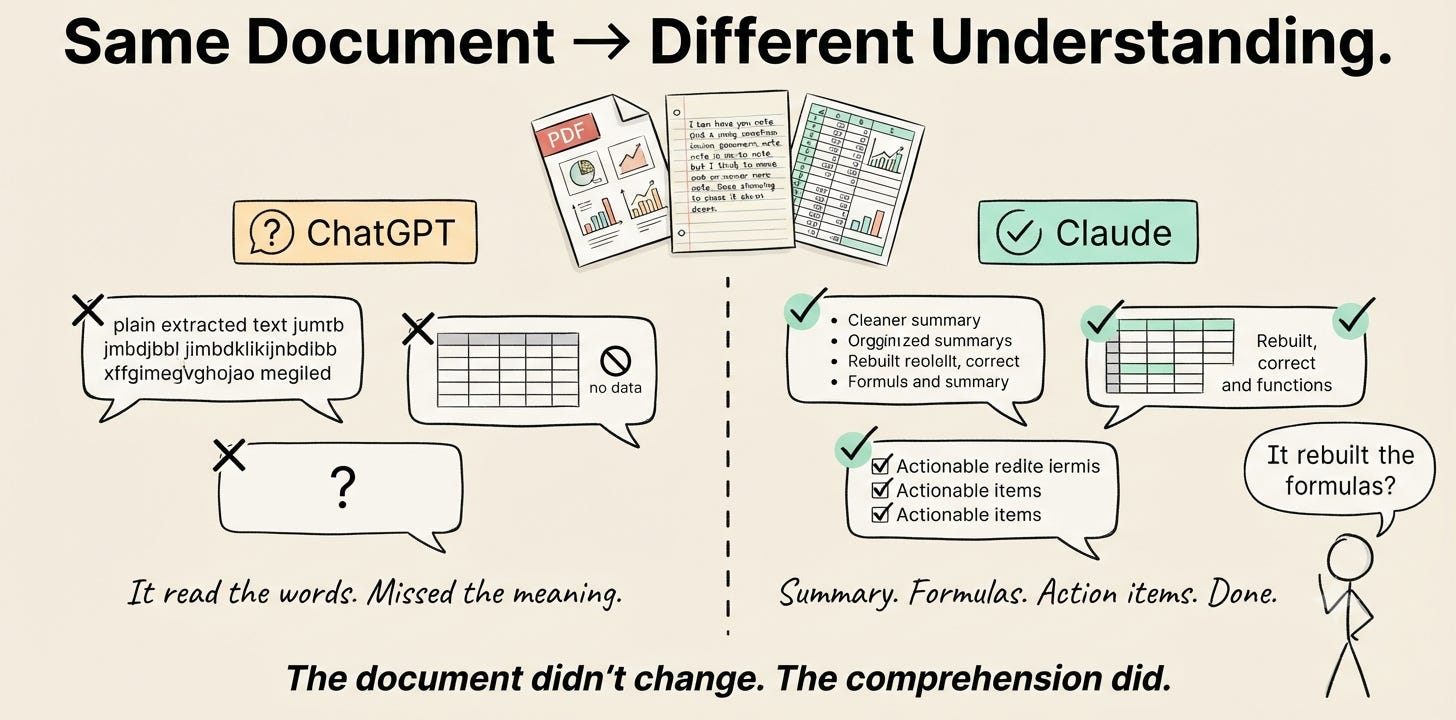
8. Multimodal Document Understanding: PDFs, Images, and Handwritten Notes
Claude handles visual content with a depth that ChatGPT still struggles to match for certain document types.
Upload a multi-page PDF with charts, tables, and mixed formatting. Claude doesn’t just OCR the text - it understands the structure. It reads the charts, interprets the tables, and can answer questions that require synthesizing information across visual and text elements.
I tested this with:
A 40-page investor pitch deck (Claude summarized every slide accurately and noted inconsistencies between the financial projections and the market size claims)
Handwritten meeting notes (Claude read my terrible handwriting and turned it into structured action items)
A complex spreadsheet exported as a PDF (Claude rebuilt the formulas and explained the logic)
Practical workflow for everyday use
If you’re evaluating Claude vs ChatGPT for everyday use, document handling is where Claude earns its keep for anyone who works with PDFs, scanned docs, or visual content regularly.
Upload your document to a Claude Project
Ask specific questions about the content
Request summaries, extractions, or analysis
Export the results in whatever format you need
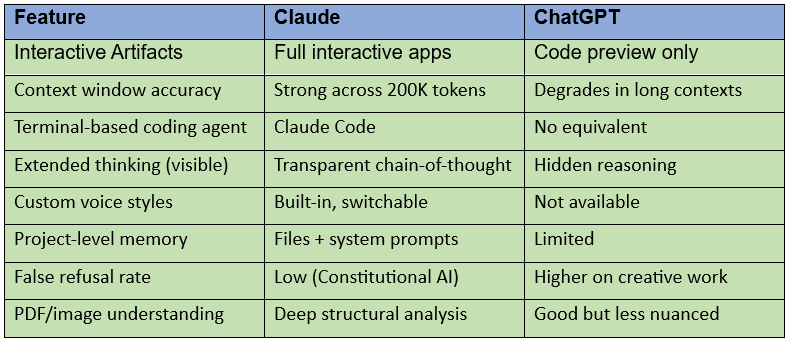
Quick Comparison: Claude AI vs ChatGPT Feature Matrix (2026)
Wondering about Claude vs ChatGPT vs Gemini? Gemini is strong at real-time search and Google Workspace integration, but it doesn’t match Claude on Artifacts, context accuracy, or coding agent capabilities. If you’re choosing between all three, the same 8 advantages above still hold.
The Honest Take: Where ChatGPT Still Wins
I’m not here to pretend Claude is perfect. ChatGPT is still better at:
Image generation (DALL-E integration vs. Claude has none)
Web browsing and real-time info (ChatGPT’s browsing is more mature)
Plugin ecosystem (GPT Store has thousands of custom GPTs)
Voice conversations (ChatGPT’s Advanced Voice Mode is ahead)
Free tier generosity (ChatGPT’s free plan is more permissive for casual use, though Claude AI’s free tier is solid for light usage)
The best workflow? Use both. Claude for writing, coding, and deep work. ChatGPT for image generation, web research, and quick tasks. (Zapier’s 2026 comparison and G2’s 30-day review both reached the same conclusion.)
3 Mistakes to Avoid When Switching to Claude
Don’t treat Claude like ChatGPT with a different logo. Claude rewards longer, more detailed prompts. Give it context, examples, and constraints upfront.
Don’t ignore Projects. The single biggest ROI comes from setting up a Project with your brand context. Five minutes of setup saves hours of re-explaining.
Don’t skip Extended Thinking for important decisions. If you’re making a strategic call, turn on extended thinking and read the reasoning. The answer is better, and you’ll learn something.
FAQ: Claude AI vs ChatGPT
Is Claude AI better than ChatGPT?
It depends on the task. Claude is better for writing, coding, long-document analysis, and creative work with fewer refusals. ChatGPT is better for image generation, web browsing, voice conversations, and plugin integrations. For creators and founders who use AI as a daily work tool, Claude delivers more value in the workflows that matter most.
Is Claude AI free?
Yes. Claude offers a free tier that includes access to the Claude Sonnet model, Artifacts, and Projects. The free plan has usage limits - if you hit them, you’ll need to wait or upgrade to Claude Pro ($20/month) or Claude Max ($100/month) for higher limits and access to the most powerful models like Opus.
Which is better for coding, Claude or ChatGPT?
For quick code snippets, both are comparable. For real-project development, Claude Code - a terminal-based agent that reads your codebase, makes multi-file changes, runs tests, and commits code - is significantly ahead. Developers building full features, debugging existing code, or vibe coding full apps are increasingly choosing Claude Code over ChatGPT.
Can Claude replace ChatGPT?
For most creator and founder workflows - writing, research, document analysis, and coding - yes. But ChatGPT still has capabilities Claude lacks (image generation, web browsing, voice mode, plugin store). The most productive setup is using both: Claude for deep work, ChatGPT for tasks that need its unique integrations.
Upgrade to keep reading
The free version of this newsletter gets you the what.
Paid members get the how, in detail.
Every issue comes with a resource that took me hours to build and takes you 10 minutes to use.
Paid Members: One hand-picked AI Vault guide every issue, chosen for what we covered today.
Founding Members: Full AI Vault access. Every guide. Every kit. Forever. Plus, first access to the private community at 10K subscribers.
Everything above is free. What’s below is for paid subscribers.
